
When a shopper asks Algoshop AI Sales Chatbot whether a lamp is rechargeable, the answer starts with reliable product information. A polished photograph alone cannot explain power requirements, included accessories or what makes one model different from another. Those details belong in the listing, where shoppers can find them before they have to ask.
Listagrow AI Product Listing is a Shopify listing tool for creating new products from photos and raw information, or improving existing products in bulk. Its distinctive proposition is a connected content workflow: listing fields, keyword research, brand direction and image work, rather than a description writer alone. The Shopify App Store page is the primary product reference for this guide.
This guide explains where those capabilities are useful, how to choose between creation and enrichment, and how to move from source material to reviewed Shopify content. The Listagrow website provides additional product information and help alongside its Shopify listing.
Partnership disclosure: This article is part of a content collaboration between Algoshop and Listagrow. Product descriptions draw on Listagrow's official materials; the drafting and review advice below is editorial guidance, not the result of a hands-on app test.
What Listagrow adds beyond a description generator
Writing a paragraph is only part of preparing a Shopify product. The shopper-facing title, description, search snippet and supporting catalog information need to describe the same offer. Otherwise, a clearer description can still leave a weak search title or an inaccurate image description behind.
Listagrow's App Store page lists bulk generation, enrichment and publishing inside Shopify, alongside live keyword research, brand and content controls, and image generation and enhancement. These are the core capabilities to evaluate together, rather than treating the app as a single text box. Source: Listagrow App Store listing.
New arrivals: turn available material into a reviewable listing
For a new collection, the main challenge is assembling the offer: what the product is, who it suits and what the buyer receives. Gather the product photos and the facts that are not visible in them before drafting. That gives the reviewer something concrete to compare against, instead of editing persuasive language without knowing whether it is true.
Existing products: improve the weak parts without starting over
The official Shopify product page describes catalog auditing and selected-field enrichment, so merchants can address missing or weak content while retaining fields they want to keep. It also describes reviewing drafts, regenerating individual fields and publishing from the app.
A useful starting point is a collection with accurate descriptions but incomplete search metadata. Treat the descriptions as established copy, improve the missing fields, and check that the revised search wording still matches the product page. A wholesale rewrite is not automatically a better result.
Brand consistency and international listings
The same official page describes brand guidance for tone, audience and content rules; image-based variant suggestions that can be reviewed; and translation of approved listings into enabled store languages, with review before publishing. These are developer-described capabilities, not a claim that this article tested every workflow.
For the merchant, the important distinction is consistency without sameness. A children's backpack and a travel bag can share a brand voice while answering different buying questions. Likewise, translated copy should preserve capacity, package contents and product limitations—not merely sound fluent.
Choose the right workflow for your catalog
Swipe horizontally to read the full table.
| Your starting point | The job to prioritize | What a good finished listing resolves |
|---|---|---|
| New products with photos and supplier details | Create complete listings | Buyers understand the product, its use and what is included |
| Existing products with thin descriptions | Enrich the missing explanation | The page answers the questions shoppers need to make a choice |
| Strong product copy but weak search fields | Improve selected supporting fields | Search wording and visible product information agree |
| A collection written in inconsistent voices | Establish shared editorial direction | Products sound like one brand without losing their differences |
| Approved listings for another market | Review translated versions | Local wording is natural and product facts remain unchanged |
These are suggested merchandising priorities, not names of preset modes in the app. Start with the problem your catalog actually has. A merchant onboarding new stock needs a different review process from a team polishing an established bestseller.
Prepare one reusable product brief
Listagrow's product data enrichment guide recommends starting from reliable product sources, bringing together the available context and reviewing factual attributes before applying changes. That matters because a more complete record is not simply a longer description: different categories need different buying information.
For your own catalog, prepare a brief that answers the questions a reviewer will need to resolve. The table below is a merchant preparation checklist, not a set of required Listagrow input fields.
Swipe horizontally to read the full table.
| Information to prepare | What it should establish | Where your team can verify it |
|---|---|---|
| Product identity | Which item and variant the material belongs to | Existing catalog, supplier reference and SKU records |
| Product images | Visible shape, color, pattern and packaging | Approved original photos |
| Technical facts | Measurements, composition and compatibility when relevant | Manufacturer or supplier documentation |
| Included items | What arrives with the purchase and what is sold separately | Packing list and approved product record |
| Use and care | Appropriate use and maintenance instructions | Supplier instructions and merchant-approved copy |
| Brand direction | Audience, tone and terminology | Your current editorial guidelines |
| Missing information | Which questions require a supplier or merchant answer | A reviewer-owned list of unresolved details |
Attach product-specific source information where the workflow supports it. Keep ambiguous material out of the approved facts until someone resolves it. A photo can show a visible finish; it cannot establish an electrical rating, safety certification or hidden component.
Your brand direction should help readers rather than inflate the offer. Tell the reviewer who the product is for, which verified differences matter and how the store normally explains them. Avoid instructions that demand impressive benefits regardless of the evidence. When a fact is missing, the right next step is to obtain it—not to make the prose sound more certain.
Choose new-product creation or existing-listing enrichment
The official listing describes uploading photos for new products or selecting existing products for bulk enrichment, plus brand voice, content-style and product-rule controls. Use the approved brief and directions as the starting material where supported.

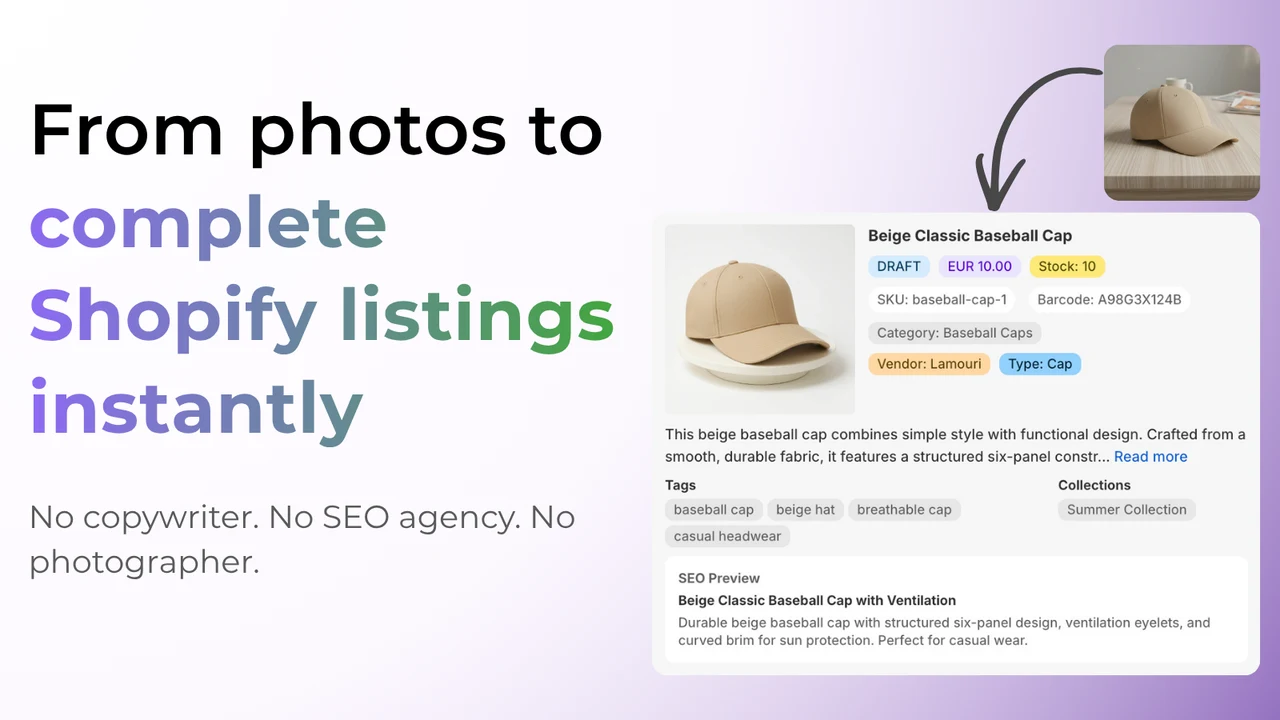
Product photos and details provide the starting point for creating new listings.
The official Shopify getting-started guide describes opening the embedded app from Shopify Admin, choosing List New Products, and supplying images, folders or a CSV/Excel file. Organize the images into the intended products and attach a context file when additional details are needed. Check the product count and displayed credit cost before generating.
Generation prepares content for review; it does not update Shopify at that point. This separation makes the workflow useful for new arrivals: your team can inspect the proposed listings before they become store content. Start with a manageable product group, resolve any repeated misunderstanding, then use those findings to prepare the next batch.
For an existing catalog, decide which fields need enrichment and which must be preserved. Listagrow's official site describes control over the fields being updated. Select a small group first and inspect the result: a carefully edited description should not be rewritten just because its metadata needs improvement. Keep a copy of the original values as part of the merchant's normal editing process.
Group a batch by input quality and product family. Similar products with consistent source sheets are easier for a reviewer to compare than an unrelated mixture of technical accessories, skincare and apparel. Keep variant-specific evidence separate when the specifications differ. This is a merchant review practice, not a claim that the app automatically validates those differences.
Turn the brief into complete product copy
The goal is a listing that helps someone choose, not a collection of persuasive sentences. Listagrow's guide to common AI description problems identifies generic language, missing specifications, inconsistent tone and invented details as recurring issues. Its practical recommendation is to supply specific inputs and review claims that could affect the purchase decision.
Product title
Use the title to identify the item and its distinguishing characteristics. A buyer should be able to tell whether they are looking at a single product, a set, a replacement part or an accessory. Include a relevant search term when it accurately describes the product; do not add a popular attribute that the supplier information does not support.
Read the title beside the selected variant and the main image. If those suggest different offers, fix the disagreement before spending time polishing the wording. An attractive title cannot compensate for uncertainty about what is actually being sold.
Product description
Begin with what the product is and the buyer's relevant use, then explain the verified details that help someone compare it. Put important limitations near the benefit they qualify. Compatibility, package contents and care instructions should not be hidden behind several paragraphs of generic lifestyle copy.
For your review, separate three questions: Is the statement supported? Does it explain why the detail matters? Is it easy to find? This prevents an editor from accepting a polished sentence while overlooking a missing specification. It also makes the copy more useful to shoppers who scan before reading closely.
Preserve distinctions between related products. A shared collection description can explain the overall range, but each listing still needs its own confirmed attributes. The reviewer—not the fluency of the generated text—decides whether a statement is ready for the storefront.
Supporting fields
Review the supporting fields as part of the same offer
Search copy
Check that the SEO title identifies the same item as the visible product title. The meta description should summarize the offer clearly without adding a benefit or specification absent from the page.
Catalog attributes
Review product type, category and tags against your catalog conventions. Shared vocabulary should help shoppers find comparable products, while variant-specific details remain attached to the right item.
Image alt text
Describe the actual image so its meaning is available without seeing it. Do not turn this field into a list of keywords or copy specifications that the image does not show.
Buyer answer
Check whether the page answers the purchase questions your team regularly receives. Use confirmed product information and explain any important condition directly rather than relying on marketing shorthand.
Alt text describes the image, not a list of SEO phrases. Product type and tags should match the store's catalog conventions. Price, inventory, warranty and delivery promises should come from their own approved records; the description generator should not invent them.
Give the whole batch one reliable direction
A new-product batch needs source photos and raw facts; an enrichment batch starts with existing Shopify listings. In both, brand voice, content style, and product rules give the output a consistent direction. Listagrow's listing describes those controls alongside multi-field content and metadata generation.
For a product family, establish the audience, level of technical detail, preferred terminology and facts that each listing must explain. Listagrow's Shopify help guide directs merchants to Brand & Settings before larger workflows. Use those defaults to give a batch a shared direction, then review the products individually where their facts differ.
A photograph supports visible shape and color, not voltage, certification, or battery life. Keep those facts in the supplier brief. The keyword “cordless reading lamp” cannot make a wired lamp cordless. That is the review rule for this batch, not a reason to abandon the drafting workflow.
Review titles, metadata and variants

Review and edit product copy in one place before publishing your listings.
Review every safety, compatibility, electrical and included-item claim. Inspect variant differences directly: a color change does not necessarily change specifications, while a different model may have different components or accessories. Shared wording should not erase those distinctions.
Review the batch in two passes. First, inspect shared wording and tone. Then inspect each item's exceptions, including dimensions, materials and accessories where relevant. A shared error needs a family-wide correction; a model-specific difference needs its own source information. Keep the original and approved values as a merchant restoration record.
Live keyword research is a listed capability, but a keyword suggestion is not evidence of ranking or future traffic. Compare proposed terms with buyer intent and the actual product. Review search titles and descriptions for clarity rather than repeating a phrase mechanically.
Choose search wording that matches the actual product rather than a neighboring category with more attractive traffic. Explain the practical consequence of a specification in ordinary language. A reader should not need to interpret a technical term alone to discover whether the item meets their needs.
For AI-powered discovery, make the same information easy to understand without relying on a photograph. State the product type, power arrangement, dimensions and package contents together; answer common questions directly; and keep those details consistent across the page. This is a content-quality approach, not a promise that an AI service will recommend the product.
The title, visible copy and metadata should all describe the same item. A page that says “USB powered” while its metadata says “cordless” remains inconsistent even if each field looks polished separately.
Treat image enhancement as a separate job
Listagrow lists image generation and enhancement. Review image changes with the same rigor as words. A lifestyle background can change the impression of scale, and an edited image can suggest accessories or features that are not part of the offer.
Preserve product geometry, color, controls and included accessories. Keep an original reference and inspect the edited output against it. If a change makes an important detail less accurate, keep the original or choose a different view. A convincing image is not necessarily a faithful product image.
A supporting specification image can help, but readable text should also be present on the page. Do not make the photograph the only place where a shopper can learn about package contents or an important limitation.
Publish and maintain the approved content
The Shopify getting-started guide clarifies a useful sequence. On first opening, the dashboard scans the catalog automatically: Syncing… means the scan is still running, not that the catalog has already been repaired. Sync Now refreshes those health results later.
Catalog review and publishing are separate steps
Find the content gap
Use the completed Catalog Health scan to see the score and number of audited products. Select a manageable product group rather than treating every record as equally incomplete.
Generate and review
The guide says generation creates reviewable content without updating Shopify. Open Review Products to check and edit the result.
Apply approved changes
Use Apply for a product or Apply Selected for reviewed products. The documented confirmation precedes the Shopify update; generation alone is not publication.
Listagrow's Shopify instructions describe opening Review Products, checking and editing a product, then using Apply for approved changes. Apply Selected supports several reviewed products and asks for confirmation before changing Shopify content. That is the point to check your selection carefully, not after a large batch has been applied.
Before applying, verify the selected variant, mobile layout, product title, metadata, images and package contents. Confirm that the store's inventory, price and shipping information still reflect their source records.
Record changed URLs, publication time and the fields revised. Review product questions and returns for new misunderstandings. If customers repeatedly ask about a limitation, improve its visible explanation rather than simply generating a longer description.
Maintain the brief when the supplier changes components or packaging. For new arrivals, create complete records from approved facts. For existing products, select the missing content rather than rewriting an already useful description. That choice makes Listagrow's two routes practical: create what is absent, enrich what is incomplete, and keep the buyer's answer consistent across the catalog.