

HypeQR connects a printed QR code with a store experience customers can continue on their phones.
A QR code on a package insert has only a second to make sense. The shopper scans it, arrives somewhere, and decides whether the destination is worth continuing. The useful question for a merchant is not “Can I print a QR code?” It is “What should the shopper be able to do after scanning this one?”
QR Code Generator by HypeQR lets Shopify merchants build dynamic QR campaigns for products, promotions, reviews and interactive experiences such as scratch cards, puzzles and quizzes. Its developer page and App Store listing show the app as a way to connect physical surfaces with store actions, then examine scans and other campaign outcomes. A QR campaign still needs a relevant destination and a credible offer; printing more codes is not a conversion strategy by itself.
This guide follows a single campaign from the reason for the scan to its measurement: choosing the destination, matching it to a printed placement, setting the campaign rules and deciding what to improve next.
Pick the action before designing the code
The Shopify listing names several QR experiences: store product and promotional destinations, review collection, and gamified scratch-card, puzzle and quiz formats. They are not interchangeable. A code on a product box can help a buyer find accessories or care instructions. A code on a flyer may invite someone to a time-limited offer. A code on a post-purchase insert can ask for a review after the customer has had time to use the product.
Write a one-sentence campaign brief before opening the editor: “The person scanning this code is [who], standing at [where], and should be able to [one action].” That sentence keeps the QR destination from becoming a general homepage when the printed promise was specific.
Choose the next step, not just a QR design
Product or collection discovery
Use a product or collection destination when the print placement points to a particular item or range. Keep the landing page current if prices or inventory change.
Discount or add-to-cart action
Use an offer or cart-oriented destination only when the customer can see the terms before committing. Confirm the configured discount and the final checkout result in the actual store.
Review or interactive challenge
Use review collection when the timing makes sense after purchase. A scratch card, puzzle or quiz should explain the reward and its conditions without making the customer guess what happens after the scan.
HypeQR's published feature list includes prebuilt campaign templates and no-code creation. Templates reduce setup work; they do not decide the correct promise for a product or prove that a particular offer improves sales. The merchant owns that decision.
Match the destination to the physical placement
The same QR destination can feel helpful in one place and confusing in another. Consider a package insert for a coffee grinder. A scan leading to compatible accessories, instructions or a clearly explained replenishment offer has context. A generic quiz with no obvious connection to the purchase asks the buyer to do more work.
Swipe horizontally to read the full table.
| Placement | Likely reason to scan | Destination to consider | Before printing |
|---|---|---|---|
| Product packaging | Learn about the item already purchased | Relevant product, collection or support content | Does the URL still work after a product is updated? |
| Event flyer | Explore the promoted collection or offer | Named collection or promotion | Are the dates and discount terms visible? |
| In-store sign | Continue browsing on a phone | Mobile-friendly product or campaign | Can a shopper recognize the same item online? |
| Post-purchase insert | Share feedback or find a follow-up item | Review request or relevant product path | Is the request timed after a real use opportunity? |
For these suggested placements, test the exact code on a phone from the distance and lighting in which it will appear. The scan should resolve directly to the campaign promised on the printed material, without an unexplained detour.
Keep the printed code useful when the destination changes
The developer's packaging and placement guide explains a practical advantage of dynamic codes: the destination can change without reprinting the card. A refill link can move to a new collection, or a care guide can gain a video, while the physical insert stays in circulation.
Keep the promise stable when making that change. A card reading “Scan for care instructions” should still lead to useful instructions, even if the page now also recommends accessories. Redirecting it to an unrelated sale wastes the context that made the customer scan in the first place.
Build a campaign the customer can finish
A practical first pilot is one product family and one printed surface. Suppose a store includes an insert with a seasonal tea set. The copy might say, “Scan for brewing notes and a matching refill.” The merchant can point the QR to an appropriate product or collection experience, then check that the page explains the tea, current refill options and the offer if one is present. This is a suggested editorial scenario, not a customer result reported by HypeQR.
One QR campaign, end to end
Brief the promise
Choose a single audience, placement and next step. Write the printed call to action before choosing a template.
Configure the experience
Use an appropriate HypeQR template, destination and QR styling. If using a challenge, make its rules and reward legible before the customer plays.
Test the whole route
Scan the code with more than one phone, check the landing page and complete the relevant Shopify action. For an offer, check the cart and checkout conditions.
Observe and revise
Review scan activity and the outcome metrics available on your plan. Change one part of the campaign at a time so the next run tells you something useful.
A HypeQR campaign can also use scratch cards, puzzles or quizzes. Those formats may be appropriate when the game itself makes the offer enjoyable, but they add a step before the shopper reaches a product.
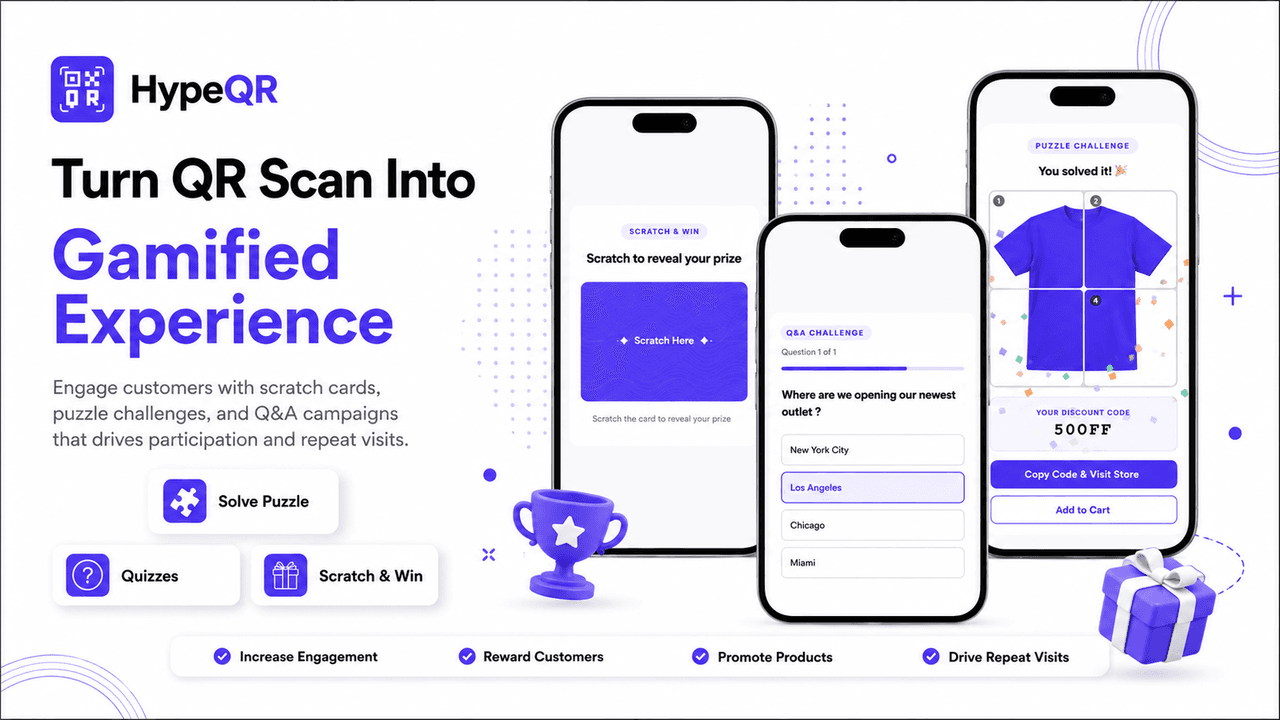
Scratch cards, quizzes and puzzles give the scan a different destination. HypeQR's official product visual shows the reward and the next store action together.
Compare the three formats by the effort they ask of the customer. A scratch card is a short reveal. A quiz asks the customer to read and choose an answer. A puzzle asks for a longer interaction before the reward appears. For a busy retail shelf, a direct product link may fit better; for an insert inviting a playful follow-up, an interactive format may be worth the extra step. These are campaign-design choices, not evidence that one format universally performs better.
Use scan limits and expiry dates deliberately
Follow a refill campaign from the box to the cart
Consider a suggested campaign for a store selling loose-leaf tea. The first purchase includes a printed brewing card; the store wants the customer to find a compatible refill later. This is a campaign-design example, not a HypeQR case study. Begin with a direct product or collection destination rather than a game: the customer has a specific follow-up need, and a useful answer should come before entertainment.
The same campaign, seen from both sides
What the customer encounters
The insert says “Find a refill for this tea.” After scanning, the customer sees the named tea family, available refill sizes and the product details needed to choose. If a promotion is included, its conditions appear with the offer. The customer can continue to a relevant Shopify product instead of searching the full catalog again.
What the merchant prepares
Choose the current refill destination, give the code a recognizable campaign name and check the printed wording against the landing page. Verify product availability and any configured discount in the actual cart. When the range changes, update the dynamic destination while retaining the original promise of the insert.
The landing page should answer the next obvious question. If the original set contains several tea blends, show which refill belongs to each one; if sizes differ, make the quantity clear. Do not add a generic “shop now” page between the scan and that explanation. The campaign becomes easier to complete when the customer recognizes their purchase and sees a sensible continuation.
For a real offer, separate three dates: when the printed cards start shipping, when customers are likely to open them and when the offer ends. A campaign that expires before most packages arrive is a planning problem even if the QR code scans perfectly. Check the actual expired destination or message before distributing the cards. The HypeQR listing identifies the plan scope for time and scan conditions; the store still needs to make the end of the offer understandable.
After launch, use separate questions for discovery and completion. Did customers scan the insert? Did they reach the intended refill? Were qualifying purchases associated with that route in the available reporting? A low scan count can point to the card's visibility or promise; product-page visits without purchases can point to availability, pricing or an unclear match. Avoid changing all three at once. First fix the part of the journey that the evidence actually identifies.
Read the official visuals as a workflow, not a sales claim
The challenge visual above shows a different type of journey: interaction, reward reveal and a next store action. Ask whether each step helps your campaign. A quiz might suit a discovery invitation; it is unnecessary when the customer simply needs a replacement part. In the analytics visual, scans and order value appear separately. That distinction is the reason to review the destination as well as the code: the first number describes attention, while the later outcome depends on what the customer can do after arriving.
The App Store listing says merchants can control when or how often a QR experience runs through expiry dates and scan limits. These settings matter most when the printed code will outlive the promotion. A flyer can remain in someone's bag after the offer expires; a package may be opened weeks after the campaign started.
Set the campaign's end state before launch. If a discount expires, the scan should not leave the customer with a dead page and no explanation. Check the app's configured behavior and your destination after the limit is reached. Do not promise that every plan has the same conditional rules: the listing places time and scan-limit conditions in the Standard tier and above.
Read scans, orders and revenue as different signals
HypeQR's listing describes tracking scans, orders, revenue and reviews. These values answer different questions. A scan says a device opened the code. It does not by itself say the visitor understood the offer, bought the product or would not have purchased otherwise. An order or revenue value associated with a campaign is more commercially specific, but its interpretation still depends on the app's attribution rules and the store's wider marketing activity.
Swipe horizontally to read the full table.
| Signal | What to ask | What not to conclude |
|---|---|---|
| Scans | Did the placement attract attention? Did traffic change after moving the sign? | Every scan came from a unique buyer or caused a sale. |
| Orders | Did a relevant Shopify purchase follow through the tracked route? | The QR was the only reason for the purchase. |
| Revenue | Which campaigns are associated with tracked order value? | This is an independently verified incremental return. |
| Reviews | Did the review path produce feedback? | More review requests automatically mean more useful reviews. |
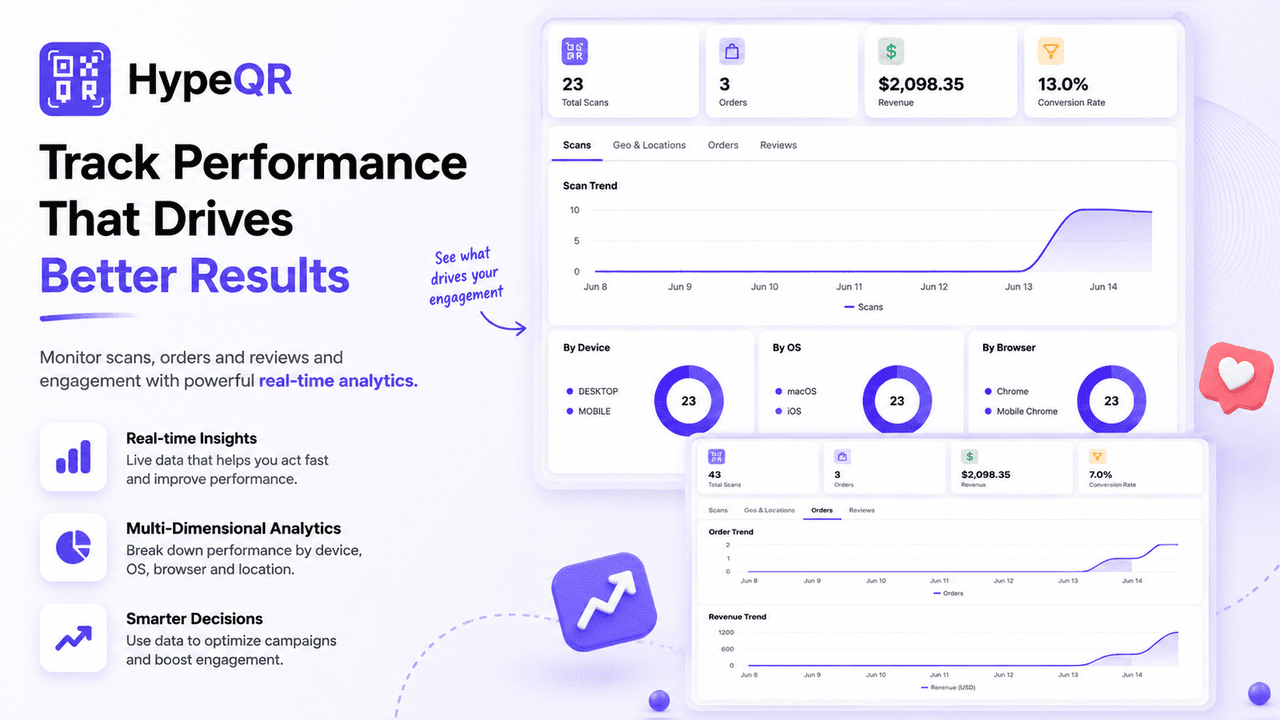
Read scan activity separately from orders and revenue. The numbers shown are from HypeQR's product demonstration, not results from an Algoshop campaign.
Compare two placements without changing the offer
The developer's QR placement-testing guide recommends a separate code for each physical surface. That makes the placement identifiable rather than combining every scan into one total.
For a suggested first comparison, keep the same destination and offer on an outer-box label and an insert, but use clearly named codes. Record how many packages carried each placement and compare the same delivery period. An outer box may be seen before the customer opens the purchase; an insert may be read while unpacking. If one attracts more scans, the next question is whether those visits complete the intended action—not whether the placement has automatically caused additional revenue.
If you change the sign, offer and destination simultaneously, the dashboard cannot tell you which change mattered. For an early pilot, the best output may be a clearer customer journey, not a dramatic number.
Choose the HypeQR plan for the measurement you need
As listed on the Shopify App Store on October 9, 2026, HypeQR has a Free tier with dynamic QR codes, unlimited scans, custom styling and basic analytics. Standard is listed at $4.99/month with UTM tags, time/scan-limit rules, and order and revenue tracking. Premium is listed at $9.99/month with review-by-QR features, challenges and rewards, and advanced analytics. The two paid tiers show a seven-day free trial. Check the current listing before subscribing, since plan terms can change.
The plan choice follows the question you need to answer. A simple product code may need only reliable scans and a usable destination. A promotion that must expire or connect to order value needs the rules and metrics named in the paid tiers. Avoid buying the larger plan merely because a more detailed dashboard looks impressive; decide what action you will take from the extra information.
Frequently asked questions
Is HypeQR only for discounts?
No. The listing also names product, collection, add-to-cart, review and interactive destinations. Start with the customer reason for scanning, then select the supported campaign format.
Will a QR code automatically increase Shopify sales?
No result is guaranteed by creating a code. The offer, placement, page quality and campaign timing all matter. The app helps build and observe the route; the merchant must test whether that route is useful for their store.
Can I measure revenue on the free plan?
The current listing places order and revenue tracking in Standard, while Free includes basic analytics. Confirm the current plan table if revenue attribution is central to your campaign.
What should I check before printing a large batch?
Scan the final code, verify the destination and mobile layout, test any discount through checkout, inspect the expiry behavior, and confirm that the wording on the printed piece matches the current offer. A small print run is easier to correct than thousands of inserts.
The strongest HypeQR campaign begins with one useful next step. Create a code that makes sense where the customer encounters it, test the route, and use the available analytics to improve the next version. The developer's HypeQR page provides additional product context alongside the Shopify listing.

