
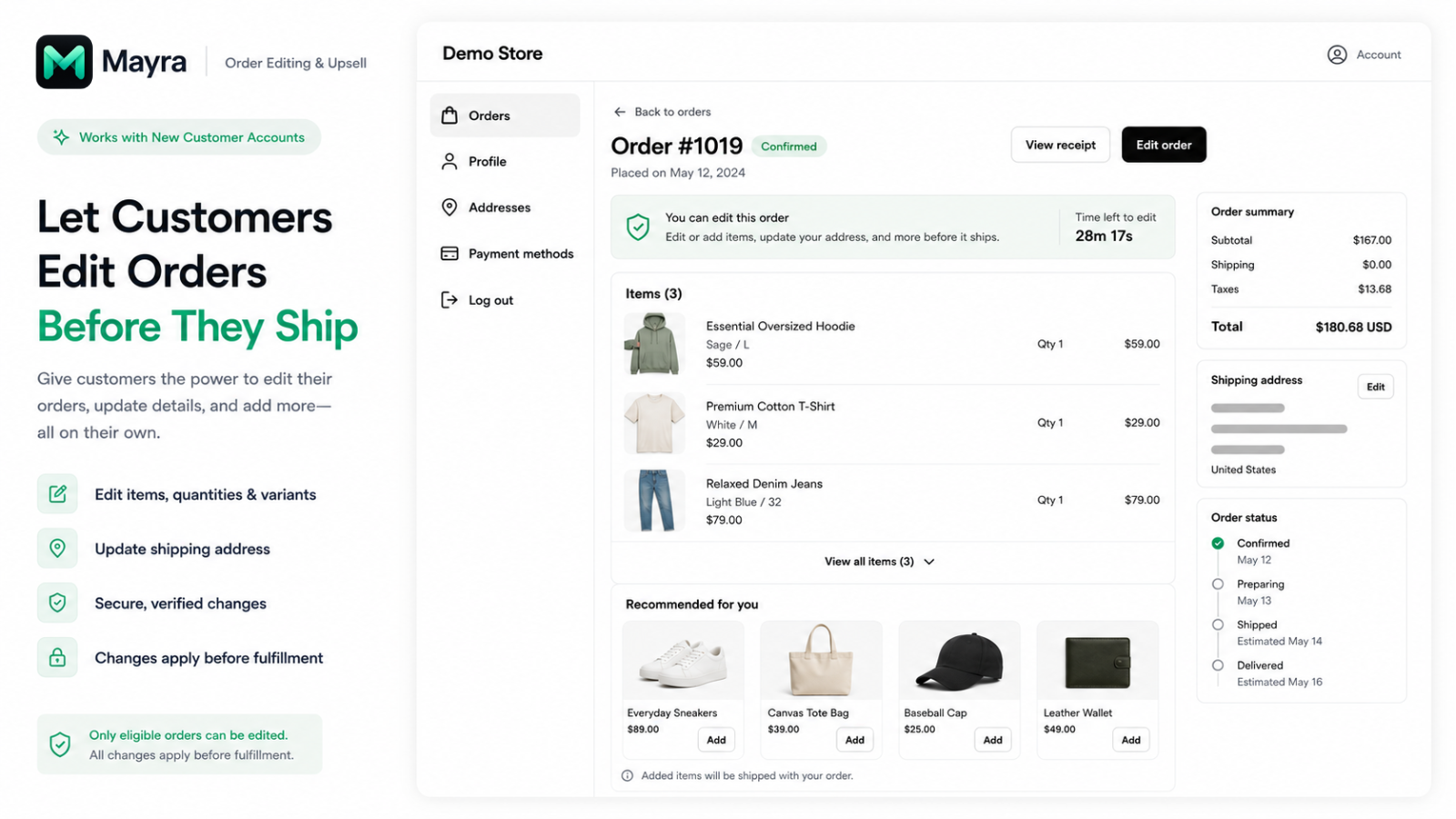
The moment after checkout is sometimes the moment a customer notices a mistake: the wrong size, a missing item or an old delivery address. If the order has not entered fulfillment, correcting it can be a straightforward service task. The challenge is giving customers that opportunity without leaving the warehouse working from an outdated order.
Mayra – Order Edit & Cancel is a Shopify app for customer-led changes after checkout. It combines item and address edits with cancellation options and post-purchase recommendations, within merchant-controlled rules. Its official setup guide requires Shopify's new customer accounts and describes editing eligible, unfulfilled orders—not changing a parcel that has already shipped.
This guide is part of a reciprocal content collaboration. It is based on the official listing and help materials, not hands-on testing or a claim about support savings.
What can change after checkout
Mayra's Shopify listing describes changing quantities, variants and shipping addresses, adding or removing items, and cancelling orders. These actions address different customer needs, so merchants should not treat enabling order editing as one all-or-nothing service policy.
An address correction changes where the parcel should go. A variant change changes what should be packed. Adding an item changes both the contents and potentially the amount owed. Removing an item or cancelling the order can require a refund. The customer may think of all of these as “fixing my order,” but the operational consequences are different.
Start with the requests your team actually receives. If address corrections are common but item changes require careful handling, consider those separately when choosing what to allow. Self-service should reflect your operating policy, not replace it with the broadest available set of actions.
Make the editing entry point understandable
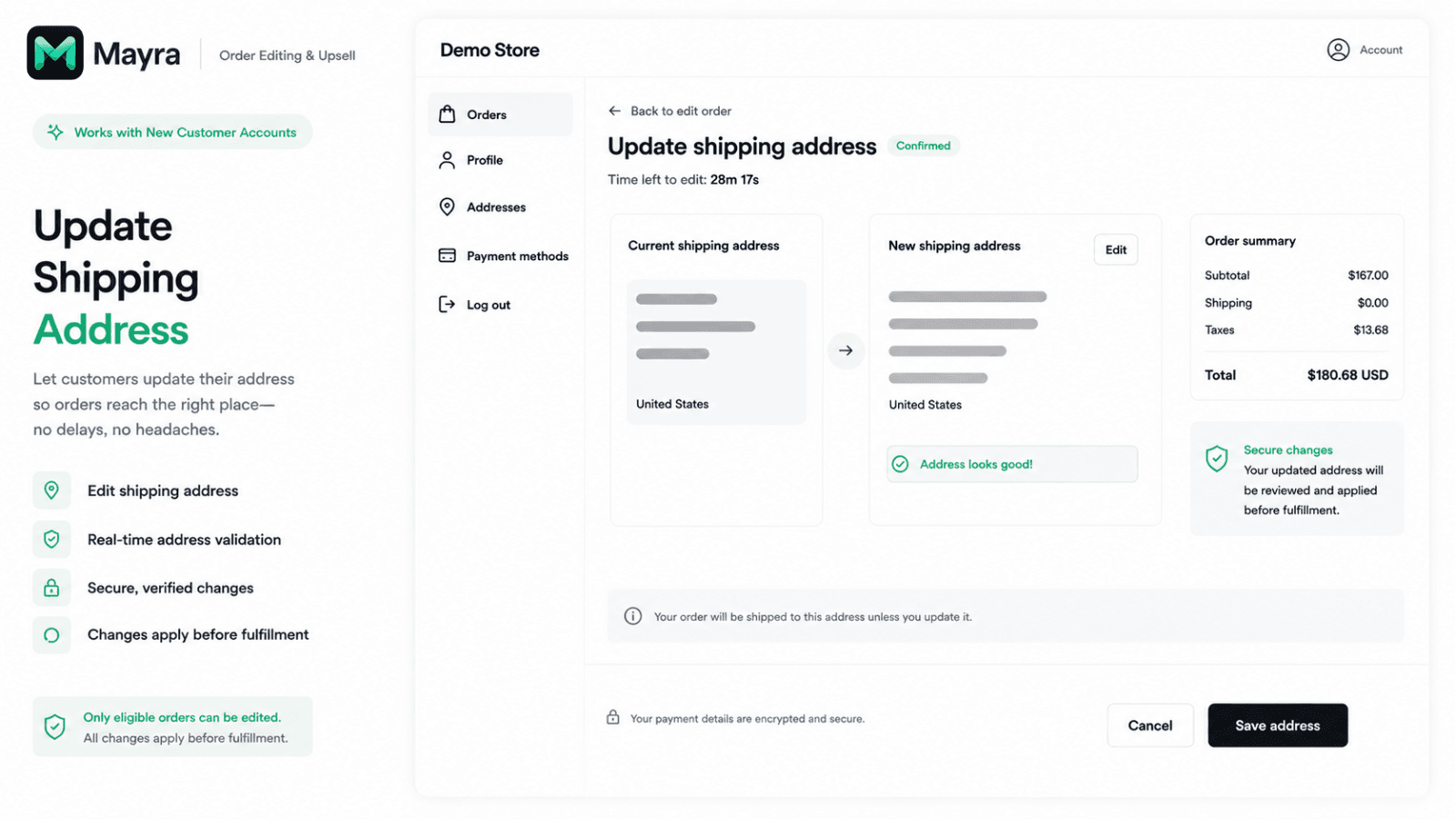
Customers review the delivery address on their order while it is still eligible for editing.
The Mayra help guide places the experience inside new customer accounts, with a Mayra block on the Order status page. It also describes an optional confirmation-email link. The customer's first task is therefore finding the eligible order, not starting an unrelated support conversation.
Make the invitation to edit specific. Explain that changes are available for eligible orders before fulfillment and within the store's editing window. An unrestricted promise such as “change your order anytime” would contradict the actual conditions and create unnecessary frustration later.
Customer communication should also distinguish the account address book from the shipping address on an existing order. A buyer trying to correct a delivery needs to understand which order they are changing. Review the finished experience from that perspective: the entry point, the chosen order, the change and the confirmation should make sense together.
If the editing option is unavailable, give customers a normal support route. Absence of a self-service control does not tell them whether a manual request is possible, and it should not leave them guessing whether the order has shipped.
Set rules that fit fulfillment
The help guide describes an editing window, allowed actions and order restrictions. It also states that fulfilled, cancelled or archived orders are not editable and that fulfillment is held during an edit, then released afterward. Those documented safeguards matter, but merchants still need to check the handoff to their own warehouse or fulfillment provider.
| Control | The operating decision behind it |
|---|---|
| Editing window | How long can a customer reasonably make changes before the team needs a stable packing instruction? |
| Allowed actions | Which changes are suitable for self-service, and which should remain a support request? |
| Order eligibility | Which order values, products, customers or destinations need a more cautious process? |
| Refund handling | Which reductions can proceed automatically, and which need review? |
Work backward from fulfillment. If orders move quickly into a packing queue, a long editing window may be difficult to support even though it is available as a setting. If work is performed by an external provider, confirm how that provider receives the changed order and respects a hold. The public guide does not establish compatibility with every third-party handoff.
Keep staff instructions aligned with the customer promise. A support agent should know when to direct a customer to self-service and when the request needs manual handling. A warehouse colleague should know where the latest approved order information is found. The useful outcome is one coherent process, not merely fewer messages in an inbox.
Separate extra charges, refunds and store credit
According to the official guide, additional amounts are handled through a Shopify invoice, while refunds can be automatic or queued for approval. It also describes a cancellation-deflection offer: a customer may accept bonus store credit to keep the order, rather than cancel it. Accepting that offer also locks the order against further edits, so customers need to understand that condition before choosing it. These are three different decisions—not three labels for the same payment flow.
Three money-related questions
Has the edited order increased in value?
Explain the additional balance and how the customer completes payment. A larger order total should not be described as collected revenue before the balance has actually been paid.
Has the customer requested a reduction?
Make it clear whether the change can proceed immediately or is waiting for approval. Review the refund policy alongside the self-service settings.
Does the customer want to cancel?
An optional retention offer should be explained as a choice to keep the order, not presented as a compulsory substitute for a cancellation refund.
The settlement and approvals guide explains a distinction that matters at the service desk: in “Auto-refund every time” mode, the refund threshold is ignored. In “Queue larger refunds for approval” mode, amounts above the threshold wait for review; a blank threshold requires approval for every refund. Choose the handling mode before relying on the threshold.
Swipe horizontally to read the full table.
| Status of the requested reduction | What happens to the order | What to tell the customer |
|---|---|---|
| Awaiting approval | The requested edit has not been applied and no refund is owed yet | The request is under review, not completed |
| Approved | Apply the edit and process the refund | Confirm the accepted change and refund outcome |
| Declined | Leave the order unchanged | Explain the decision and any available support route |
For an increase, the guide describes a separate Shopify invoice and a configurable balance-due window. The store chooses whether an unpaid edit reverts or is retained when that window expires. Make that choice part of the fulfillment policy, and decide whether removed items should be restocked; neither decision should be left to the customer's guesswork.
For cancellation offers, keep the language transparent about what the customer is accepting. Store credit is future purchasing value, not a refund to the original payment method. A merchant should be able to explain that difference without relying on a promotional label.
Add relevant products without distracting from the edit
Mayra's guide describes recommendations during editing, on the order-status page and after a completed edit. For merchants, this creates a different context from a pre-checkout upsell: the shopper already has an order and is returning to manage it.
Choose products that make sense alongside the existing purchase. The purpose should remain understandable to the customer: completing the order or adding something they overlooked. A recommendation that interrupts an address correction can feel less helpful than one shown after the customer has finished the essential change.
Separate order additions from revenue claims. An offered product is not an accepted addition, and an accepted addition that creates a balance due is not automatically a paid sale. When reviewing results, use the app's documented definitions and avoid turning estimated support impact into a measured reduction in support tickets.
The point is to make the return visit useful, not to promise that every editing session increases order value. Keep the core task easy to finish whether or not the customer accepts a recommendation.
Decide whether Mayra fits your workflow
As of October 8, 2026, the Mayra listing shows free pricing. That is the current offer, not a guarantee of unchanged future terms. The guide and some promotional materials use “Order Edit & Upsell,” while the current English listing uses “Order Edit & Cancel”; this article identifies the app through its direct listing rather than assuming those names describe separate products.
Mayra is worth evaluating when customers regularly ask for changes while orders are still unfulfilled and your team can support a clear editing boundary. Before enabling it broadly, review the new-account entry point, eligible order states, extra-payment experience and warehouse handoff together.
If customers mostly need to manage cancellations, our Shopify order-cancellation guide discusses that narrower task. Mayra's broader editing journey should be assessed on its own conditions, not on another app's rules.
Frequently asked questions
Where do customers edit an order?
Mayra's help guide describes the customer's order in Shopify's new customer accounts and an Order status page block. Confirm that your store uses the required account setup.
Can customers edit an order that has shipped?
The guide says fulfilled orders are not editable. This is a before-fulfillment workflow, not a way to recall or redirect a dispatched parcel.
Can the merchant control which changes are allowed?
Yes. The official materials describe controls for the editing window, permitted actions and order eligibility. Choose them according to your actual fulfillment policy.
Does a cancellation offer refund the customer's payment as store credit?
Do not conflate the two. The documented deflection offer gives a customer a choice to keep the order with bonus store credit and locks the order against further edits once accepted. Refund settlement is a separate process.
Read the current app listing and setup guide together before configuring the customer's editing journey.

