

The Australian storefront needs the UK store's backpack photographs and specifications. It also needs Australian prices, warehouse stock and delivery promises. Rebuilding the catalog duplicates work; copying without deciding ownership can duplicate the wrong facts. The same distinction matters when Algoshop AI Sales Chatbot answers a shopper in each market.
To copy data between Shopify stores, reuse the approved catalog foundation, preview the proposed changes and verify the destination purchase experience. Ecomsolo Multi-Store supports copying directly from another connected store, alongside dry-run imports and bulk updates. That is a different job from manually rebuilding every product or assuming the whole business can be cloned.
This guide is for merchants launching a second or third storefront. It explains what can be reused, how the documented import controls work, and which local decisions still need an owner.
Why a second store becomes a repeated setup job
A second store often needs much of the first store's product work: descriptions, specifications, approved imagery and catalog relationships. Re-entering it creates two problems. Launch work is repeated, and two independently maintained versions can drift.
A central update might correct a material description while the destination still carries the old wording. A copied collection might point to products not yet ready locally. A polished page can therefore be inconsistent even when its title looks familiar.
The useful goal is reuse without losing local control. A shared backpack specification can travel; its Australian warehouse quantity should not automatically become the UK quantity. Before copying, establish which information belongs to central merchandising and which belongs to the destination team.
This is also why “copy,” “sync” and “migration” should not be interchangeable. A copy performs a transfer. A recurring update needs rules for later changes. A business migration may include payment, shipping and other systems beyond copied records.
How Ecomsolo supports store-to-store copy
The current App Store listing describes store-to-store copying alongside file imports, bulk updates and cross-store reporting. The import documentation specifically details direct store sources for products, customers and inventory. For other objects promoted in the broader listing and partner brief, confirm their availability in your current wizard before planning a direct transfer.
The distinctive choice is the source: another store can supply the data directly. A merchant does not need to treat every transfer as a separate export-file preparation and upload job.
Treat the first copy as a sequence: connect the source and destination, choose supported objects, inspect the dry run, then reconcile the destination. The next copy is a separate maintenance decision, because local edits now exist. Store-to-store copy is listed on paid plans; check the current plan scope against the records and refresh needs of the operation.
Ecomsolo also offers cross-store reports in a common currency and timezone. That is useful after launch, when the merchant wants a shared operating view. Reporting totals, however, do not establish that a catalog copy was correct.
The workflow becomes valuable beyond the first launch. A merchandising team can prepare a product foundation once, while each market team reviews its own prices, assortment and delivery information. Scheduled exports and editable cross-store reports address the later operating work: sharing a recurring file with finance or comparing stores in a common reporting currency. These are separate capabilities, not evidence that the storefronts share one live stock pool.
The official website describes reruns updating records rather than duplicating them. The partner's product brief additionally describes automatic column mapping and scheduled one-way copying. Those are meaningful advantages over rebuilding a transfer file each time. The question to validate is not whether updates exist, but which destination records and fields your chosen run will update—especially when a local team has changed the description or price.
For a quick look at the product workflow, watch Ecomsolo's 50-second store-to-store copy demonstration, supplied by its team. Use the demonstration to understand the sequence, then review your own dry run before writing to a destination store.
Start with one product family, not the entire catalog
Choose an existing product family with several variants and approved images. If the destination already has a manually created version, inspect its handle before the first run. The product import guide identifies the handle as the product matching key: an existing handle updates its record with Upsert, while an unmatched handle creates a product. A familiar title or shared SKU does not by itself prove that two product records will match.
Swipe horizontally to read the full table.
| Shared product detail | Source | Destination requirement |
|---|---|---|
| Physical items | Source variants and option values | The intended buyable variants |
| Product identity | Source product handle | Match an existing record or deliberately create a new one |
| Specification | Verified product description | Accurate facts for the destination catalog |
| Images | Approved studio set | Authorized images for this market |
| Collection relationship | Source merchandising | Confirm supported transfer and destination assortment |
A two-variant family is a better first test than hundreds of simple products. It exposes identity, images and relationships while the team can still inspect every result.
For spreadsheet-based product imports, keep rows for the same handle together. The first row contains product information and option names; variant rows contain their option values, SKU and price. Additional image rows can share the handle. This documented layout helps preserve the distinction between one product with variants and several unrelated products.

Choose a connected store as the source when copying information between stores.
Use the dry run to inspect the proposed scope and any reported errors. Then reconcile the actual destination product in both admin and storefront: intended variants, correct facts, usable images and appropriate collection links. A dry run is a preview, not an automatic rollback; image availability and some Shopify validation errors can surface only during the actual run.
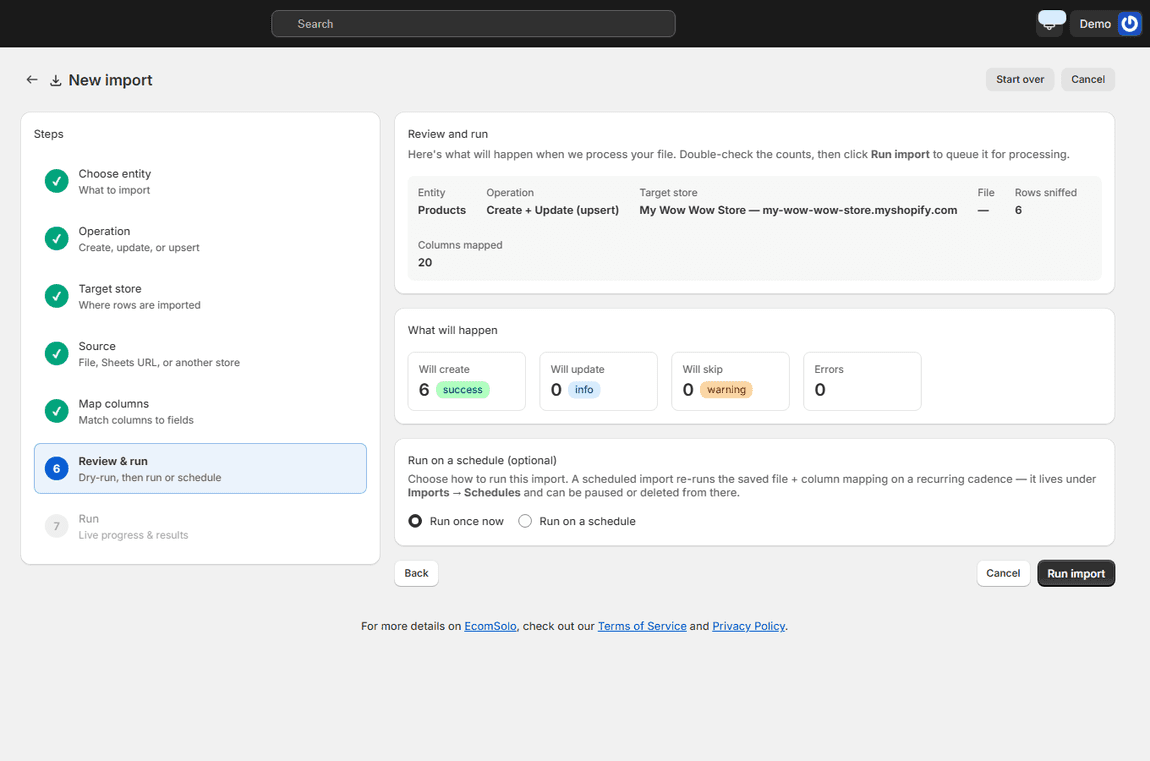
Review which records will be created, updated or skipped before running the copy. This example also shows the destination store, helping the team catch a wrong target before making changes.
Decide what can be reused and what stays local
Shared information and local business decisions should be separated before an import, not discovered after checkout uses the wrong price.
| Reusable foundation | Review or configure locally |
|---|---|
| Verified product specifications | Prices and selling currency |
| Approved photography | Warehouse stock and availability |
| Compatible product and collection foundations | Market-specific assortment |
| Editorial conventions | Delivery, return and support promises |
| Catalog data dictionary | Shipping, tax and payment arrangements |
| Launch checklist | Apps, theme presentation and local language |
Prices, currency and local stock should follow the destination business's decisions, not become accidental copies of source-store values. Product imports can include inventory changes, so review the selected quantity fields as well as the descriptive content.
A single description can contain both shared specifications and a local dispatch promise. Copying the whole field cannot infer which sentences the merchant wanted to preserve. Confirm whether the supported field controls satisfy the intended policy; otherwise choose a narrower import or perform the local revision as a separate reviewed task.
The same distinction applies to customer assistance. Product facts can be reused in a support brief, but Algoshop needs its own store setup and accurate local policies. A multi-store data account does not imply one chatbot instance automatically handles every storefront.
Check what a second run will change
When central merchandising changes a specification or image, first identify which destination fields should change and which local edits should remain. The documented product importer lets you map the fields to update and leaves unmapped fields on existing products untouched. That control must be configured deliberately; it is not an automatic policy that distinguishes shared content from local wording inside one description.
Products reject Merge. The product guide warns that incomplete variant and option inputs can remove omitted variants, and directs merchants to Upsert with complete rows or Update instead. Preserving local prices is therefore not a reason to invent a partial-product workflow: validate the chosen operation with the full variant set and current field mapping.
The import guide describes schedules that re-read a live store source with the saved mapping and filter. A reused uploaded file, by contrast, remains the saved file; it does not automatically pick up a new catalog export. Keep that distinction clear when deciding which source should drive ongoing maintenance.
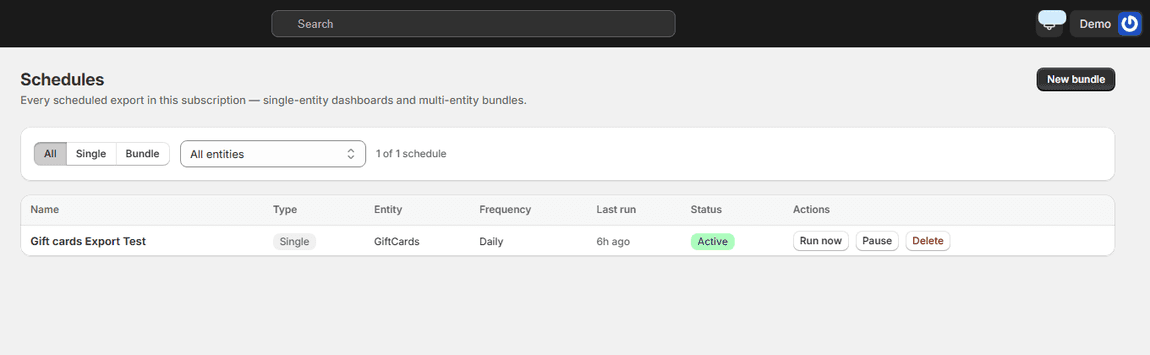
Ecomsolo also manages scheduled exports. This example shows a daily gift-card export with its last run and controls to run, pause or remove it; it is separate from a store-to-store import.
If the app cannot express the chosen field policy, reduce the scope rather than promising protected fields it does not provide.
Use the first month to build a repeatable process
The first month should leave the merchant with an operating method, not just an imported catalog.
- Before launch: approve the shared/local ownership map and record the destination baseline.
- First copy: dry-run and reconcile one representative family.
- First week: inspect storefront links, variants, price, stock and local delivery answers.
- First source update: compare the intended changes with actual destination values.
- Expansion: add compatible families while retaining exception ownership.
- Month-end review: decide whether recurring copying is suitable and document who checks failures.
Look at copied pages and menus through the destination storefront. A returns page can exist while still mentioning the source country's address. Correct record counts do not catch that mistake.
For a material error, stop further writes and identify affected records before rerunning. Download the import report and inspect failed rows alongside successful changes; a partly completed run can already have written valid rows. Preserve a destination baseline before launching the operation, because the documentation states that imports have no automatic undo.
When Ecomsolo is a useful fit
Ecomsolo is relevant when several Shopify stores share reusable data and the team wants direct transfers, import previews and wider cross-store management. The strongest first use is a defined catalog job with a known source, a clear destination and a reviewer.
It is less suitable to frame the task as “make an identical business automatically” when local pricing, stock and policies must differ. Those decisions need explicit setup regardless of the copy tool.
Start with the Ecomsolo Multi-Store copy overview, confirm current capabilities in the App Store, and finish one representative copy before expanding. The successful outcome is a reusable catalog foundation plus a clear list of what each new store must still own.

