

Algoshop AI Sales Chatbot helps merchants answer customer questions. When a supplier ships an order, “Where is my parcel?” depends on more than the customer's payment: the retailer needs to know which item reached the supplier, whether it was accepted, and which shipment belongs to it.
FulfillRelay connects a retailer's Shopify store with existing suppliers so paid order lines, supplier acceptance and shipment tracking can be coordinated without sharing the retailer's admin. Its Shopify App Store listing identifies exact SKU mapping, a focused supplier workboard, fulfillment exceptions and supplier payment batches as core capabilities.
The important distinction is independence. The retailer keeps its customer order; the supplier works in its own Shopify store. This guide explains how those records stay connected, using one item first and then an order with two suppliers.
When a paid order becomes a supplier handoff problem
Consider a retailer selling goods shipped by another Shopify business. A familiar product name may cover several sizes, colors or packs, while the supplier uses different SKUs and processes orders in its own store.
Forwarding “one black bottle” is not enough. The supplier needs the exact item and quantity. The retailer needs confirmation that the supplier can proceed. Later, the tracking must return to the customer order rather than remain buried in a supplier message.
The problem becomes more visible as suppliers multiply: one customer basket can require several purchases, separate payments and different dispatch dates. A shared spreadsheet may describe what should happen, but the team still needs to connect that plan to actual order and shipment records.
FulfillRelay is positioned for suppliers the merchant already works with, not for finding products or vetting a new supplier marketplace. Commercial terms—what is sold, where it ships, and who handles a return—remain agreements between the businesses.
What FulfillRelay connects—and what stays independent
The listing presents five connected parts of the supplier workflow. Their usefulness comes from the relationship between them, not from a generic promise to automate everything.
| Capability | The merchant problem it addresses |
|---|---|
| Exact retailer-to-supplier SKU mapping | Similar product names can conceal different sizes, colors or packs |
| Routing paid order lines | A mixed basket needs the correct supplier for each eligible item |
| Restricted supplier workboard | Suppliers need their own work without staff access to the retailer's admin |
| Acceptance, exceptions and returned tracking | The retailer needs to know what can proceed and what still needs attention |
| Supplier payment batches with checkout control | Customer receipts and supplier purchases must remain distinguishable |
These are capabilities stated in the current listing. The merchant's benefit is a clearer handoff: the same line can be followed from the retailer's demand to the supplier's work and back to fulfillment information.
The two businesses still have separate roles. The retailer owns the customer relationship and original order. The supplier owns its catalog and shipment work. The app connects their work; it does not make the supplier an employee of the retailer or turn two stores into one shared admin.
This arrangement is particularly relevant when a retailer expands an assortment with goods shipped by established partners. The customer still expects one store to explain the purchase, even when different businesses prepare the parcels. Keeping acceptance and tracking connected to the original order helps the retailer answer that question without piecing together separate messages every time.
It also matters to the supplier. Working in its own Shopify store preserves the supplier's catalog and fulfillment workspace, while approved mappings identify the exact item it agreed to supply. The official product page presents these as the core of the service: correct items out, recognizable fulfillment information back. That is a more precise reason to consider FulfillRelay than a general promise of “automated dropshipping.”
The fit depends on the relationship you already have. Both businesses use Shopify, agree on commercial terms and approve the relevant product mappings. If the task is finding new suppliers, FulfillRelay is not positioned as a sourcing marketplace. If the task is keeping an existing supplier handoff understandable as order volume grows, its connected workflow is the relevant capability to evaluate.
For a retailer fulfilling everything in its own warehouse, the OrderOps pick-and-pack guide addresses a different problem.
Start with one product both businesses recognize
Start with a product whose identity is unambiguous. The official setup transcript explains the connection in concrete terms: the retailer sends an invitation, the supplier accepts it and selects its receiving Shopify store. Product approval then connects the retail variant to the supplier's exact variant and settlement price. Use the actual catalog records, not a match based only on product names.
| Retailer requirement | Supplier confirmation |
|---|---|
| Product variant sold to the customer | Matching physical item, size, color and pack |
| Retailer's variant reference | Supplier's approved SKU |
| Quantity unit used at checkout | Corresponding supplier quantity unit |
| Approved sourcing relationship | Confirmed item and commercial terms |
FulfillRelay's Supplier Connect plan explicitly lists exact supplier SKU and price approval, alongside order acceptance and tracking. Confirming the product is therefore more than matching names: both sides need to recognize what will be supplied and on what basis. Check currency and purchase terms as part of that commercial review; do not assume the retailer's selling price becomes the supplier's purchase price.
A carton-versus-unit mismatch is worth catching here. If the supplier sells packs of six, a retailer quantity of one cannot be treated as one pack without a deliberate supported arrangement. The mapping should describe the physical product and quantity unit, not just create a convenient label.
The vendor's help page describes separate installation in each store and connection/mapping conditions before routing. Use its current instructions for the actual setup rather than guessing button names.
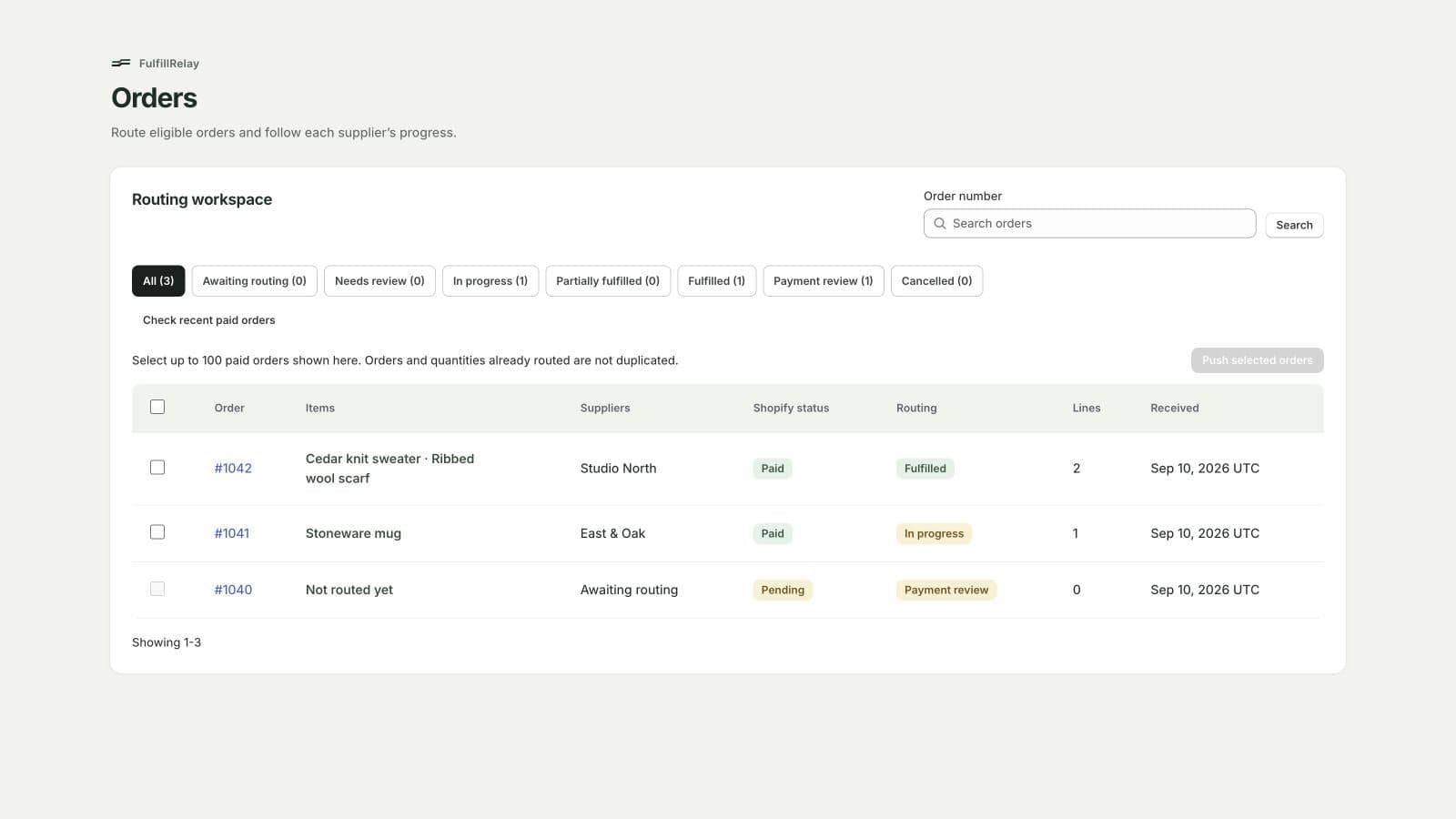
The overview separates completed progress from supplier tasks that still need attention.
Follow one line from customer payment to returned tracking
Once the customer buys the bottle, keep four questions separate:
- Did the customer pay the retailer?
- Did the correct line reach the intended supplier?
- Was the supplier purchase accepted and paid under the agreed workflow?
- Did the supplier fulfill it and return tracking?
A “yes” at one step does not answer the next. This distinction helps the retailer give a useful customer update instead of treating payment confirmation as dispatch evidence.
The retailer's side: keep the customer line recognizable
The customer pays for a retailer variant that has an approved supplier mapping. That relationship prevents a familiar product name from turning into the wrong size, pack or color at the next business.
The retailer's original order remains the customer-facing reference. It should be possible to explain which supplier purchase belongs to that line without asking the customer to understand the supplier's internal references.
The supplier's side: accept, purchase and fulfill
The connected supplier receives the intended work through the supported workflow. Acceptance establishes that it has acknowledged the item. The purchase has its own payment step, and fulfillment has its own shipment result. They are separate business events even when they appear close together on screen.
Supplier handoff — two businesses, separate responsibilities
Retailer · Customer order
Keep the paid customer line and its mapped supplier reference recognizable. The original retailer order remains the customer-facing reference.
Supplier · Acceptance
Acknowledge the intended item through the supported supplier workflow. Acceptance is not dispatch.
Retailer · Supplier purchase
Complete the related purchase payment through the supplier's checkout. Customer payment and supplier payment are separate events.
Supplier → Retailer · Fulfillment and tracking
Dispatch the item, then associate returned tracking with the originating retailer order. Confirm the actual shipment result.
This sequence explains the merchant task; it is not a transcription of interface labels or a guarantee that each transition is automatic.
Supplier acceptance deserves its own place. A supplier can acknowledge an order while payment or dispatch is still outstanding. Likewise, a payment batch prepares purchasing work; it is not evidence that a carrier has collected a parcel.

The supplier workboard shows orders awaiting acceptance or fulfillment.
FulfillRelay's help describes payment through the supplier's Shopify checkout. That allows the retailer to retain checkout control rather than assuming the routing subscription also buys the goods. Reconcile the actual supplier order and payment result before repeating an interrupted purchase.
The first meaningful trial ends when one correct retailer line produces the intended supplier purchase and its tracking is visible on the originating retailer order. Merely connecting two stores is not the whole trial.
What changes when one order uses two suppliers
With multiple connected suppliers, the useful unit of work is the eligible order line, not simply the customer's whole basket. A single checkout can contain items fulfilled by different businesses. Each supplier purchase and parcel needs to remain associated with the correct original line.
| Record to follow | What the retailer needs to distinguish |
|---|---|
| Original order line | Which product and quantity the customer purchased |
| Approved supplier mapping | Which connected business is responsible for that line |
| Supplier purchase | Its own acceptance and payment status |
| Shipment and returned tracking | The dispatched quantity and parcel associated with the original order |
One customer order, two independent shipment paths
A completed shipment from one supplier cannot settle another supplier's status. When part of an order has shipped, customer communication should distinguish the dispatched items from those still outstanding, using the actual fulfillment records.
Keep purchasing and shipment reconciliation separate too. The official Help page explains that the retailer pays through the supplier's Shopify checkout and the app records payment evidence; the app does not hold the retailer's funds or card details. A subscription payment is not payment for the goods. Review the covered orders and total before proceeding to the supplier checkout.
When the second supplier ships, check the returned tracking against its own items. Verify the configured partial-fulfillment behavior and line quantities during the trial; the presence of one tracking number does not justify marking every item shipped.

Order details bring supplier assignments and shipment tracking together.
This is where connected supplier records matter most. A customer should receive a clear account of the purchase, without needing to interpret unfamiliar supplier order numbers.
Make the next action visible when work stops
FulfillRelay lists fulfillment exceptions as a core feature. An exception becomes useful when it points to a specific decision rather than a general “order problem.”
If the exact mapping is missing: identify the retailer variant and ask the supplier to confirm the intended item. Do not choose the nearest-looking SKU merely to clear a queue. The help page says unmapped items need attention rather than being sent before the required conditions are met.
If tracking is missing: check the supplier order first. Unshipped goods need a dispatch update. Shipped goods with tracking present at the supplier but absent at the retailer need a synchronization investigation. Those are different issues.
Keep a short record: original retailer line, supplier order, last confirmed step, missing evidence and responsible person. This gives the next operator enough context without copying unnecessary customer or payment details.
For cancellation, retries and returns, use the documented workflow and supplier agreement. Do not assume a retailer cancellation automatically cancels or refunds a supplier purchase. The article does not claim those unverified behaviors.
Is this the right supplier setup for your store?
FulfillRelay is worth evaluating when the retailer already has Shopify-based supplier relationships, exact product references and a need to coordinate purchases and shipments while keeping businesses independent.
It is not a substitute for sourcing suppliers, negotiating terms or operating the physical warehouse. A merchant who needs those services should resolve them before expecting order routing to complete the business model.
Start with one supplier and one mapped product. Check acceptance, supplier payment, shipped quantity and tracking on the original order. Then add a second supplier and deliberately test one blocked item. Choose a plan against connected suppliers and routed-line volume using the current App Store terms, rather than against the number of customer orders alone.
The result to aim for is straightforward: the team can tell which supplier is doing what, what still needs action, and which tracking belongs to the customer's purchase.

