

A multilingual store needs more than translated paragraphs. Product names must stay recognizable, brand terms need consistent wording, and the next catalog update must not leave another language behind.
Translingo – AI Translation combines translation providers, a glossary and a job-based workflow for Shopify content. You can start with its built-in translation service or connect your own DeepL or Google Translate API key. The practical advantage is organizing translation as ongoing catalog work rather than a one-time copy-and-paste project.
This article is part of a reciprocal content collaboration. It explores provider choice, consistent terminology and the workflow for keeping translated content current.
Choose the translation engine—and understand who bills for it
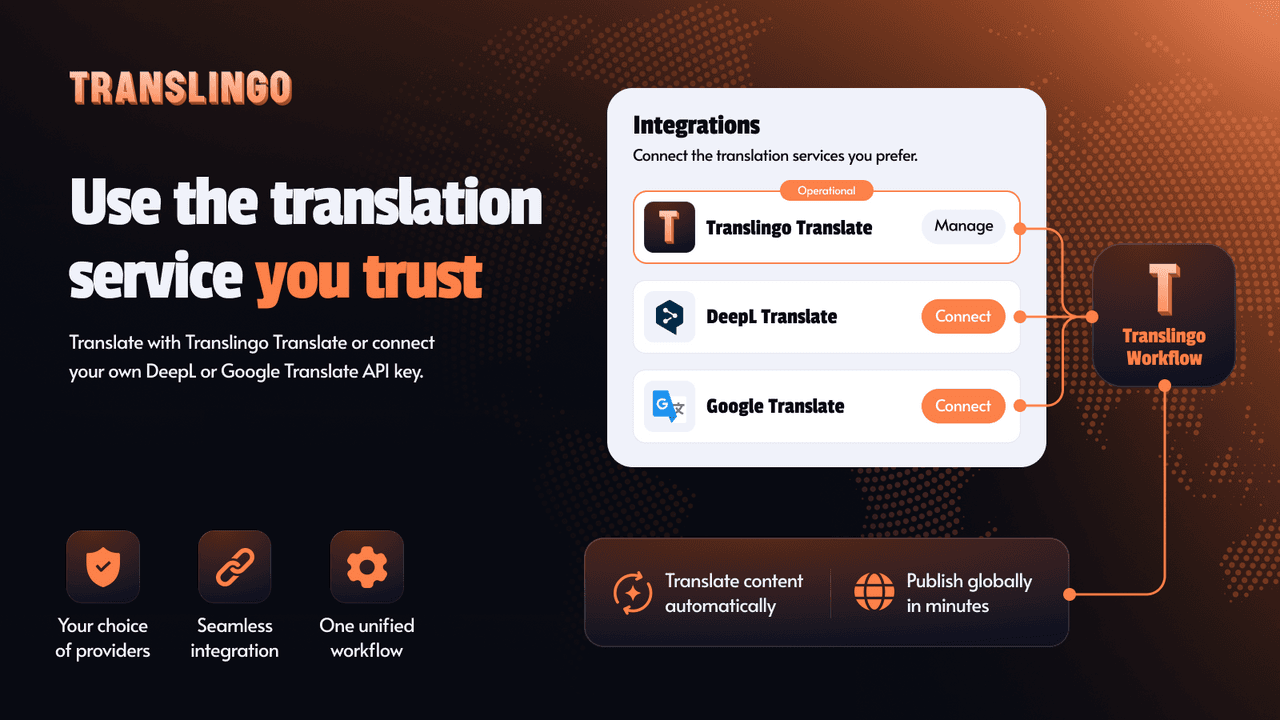
Choose the provider, then distinguish the app subscription from translation charges.
The official website presents three options: Translingo Translate, DeepL and Google Translate. The built-in option does not require connecting an external provider first. The other two use the merchant's API key.
That choice affects more than preference for a particular style of translation. It affects setup, account ownership and cost. A subscription to an app does not necessarily include unlimited translation usage from an external provider.
Swipe horizontally to read the full table.
| Route | Setup | Cost to keep visible |
|---|---|---|
| Translingo Translate | Use the built-in service | Included character allowance and subsequent usage charges |
| DeepL | Connect your own API key | Translingo plan plus the provider's applicable usage cost |
| Google Translate | Connect your own API key | Translingo plan plus the provider's applicable usage cost |
Choose based on the content and the team's existing accounts. A familiar provider can simplify ownership; a built-in service can reduce initial setup. Neither choice removes the need for a fluent person to review important customer-facing language.
Put the glossary before the bulk translation
A recurring brand term can become inconsistent even when every sentence is individually understandable. Product collections, named materials and campaign phrases need a preferred treatment across the store.
Translingo's glossary description explains defining terms and preferred wording for translations. This is useful when a phrase should not be freely reinterpreted every time it appears.
What belongs in a translation glossary?
Names that must stay recognizable
Product families and brand names may need a stable form. Decide whether they should stay unchanged or have an approved local-language version.
Terms with a preferred meaning
A business may use a material or product term more narrowly than an everyday dictionary does. Give reviewers enough context to select the intended wording.
Recurring customer-facing phrases
Use consistent wording for repeated concepts so customers do not have to interpret several labels for the same thing.
These are editorial recommendations for preparing a glossary, not sample translations generated by the app. Have a fluent reviewer approve the target terms. A glossary improves consistency only when the chosen wording is appropriate in the first place.
Translation jobs make the work visible
A job can be uploaded without the language being published
Prepared
The selected content and target languages define the translation job. Confirm that the intended product group and glossary are included.
Translated
Translation work has progressed, but customer-facing wording still needs review. Keep factual specifications and brand terms consistent with the source.
Uploaded
The content has reached the upload stage. Review the separate language coverage and publication state before telling the team the market is live.
The official homepage illustrates this difference with both Published and Draft languages beside the job stages. Its German glossary examples include “Free Shipping” → “Kostenloser Versand” and “Best Seller” → “Bestseller.” These are examples from Translingo's interface, not translations we generated or a rule that every store should use the same wording. Establish your own approved terminology before the bulk job.
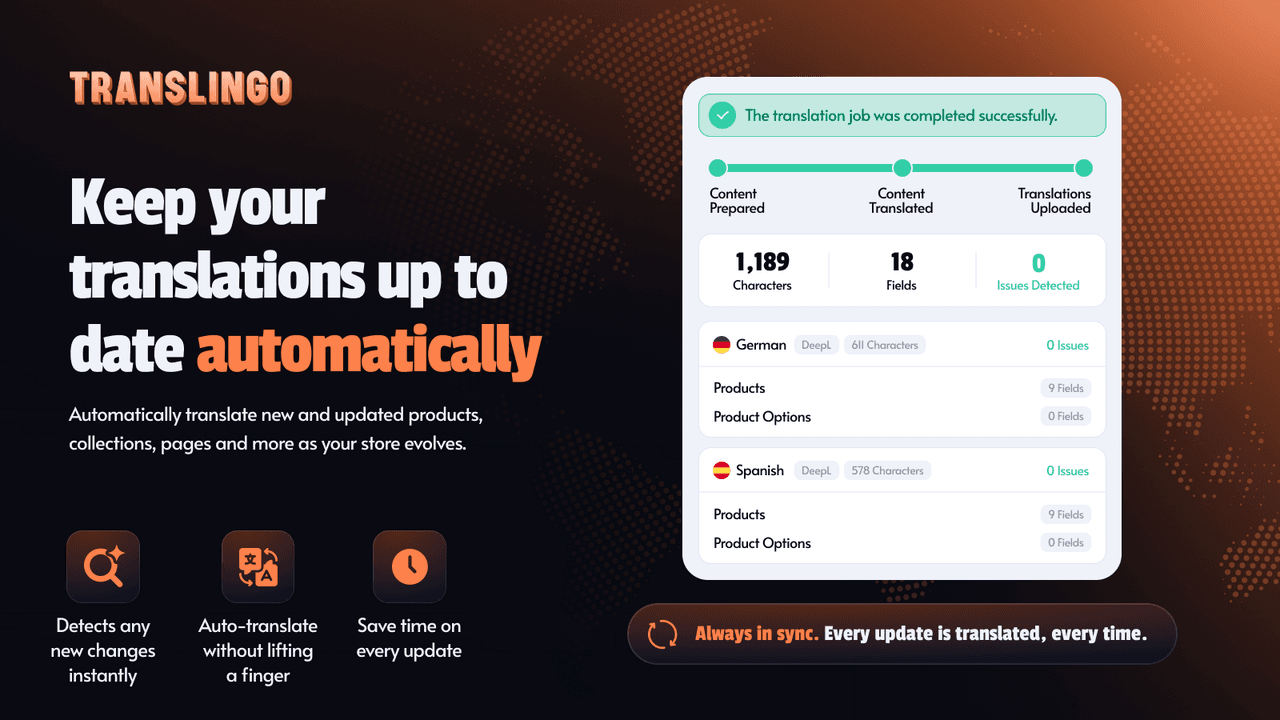
The job view separates preparation, translation and upload.
The Translingo workflow starts with installation and provider selection, followed by a translation job. Merchants choose languages and what to translate, then follow the job's progress.
That structure is valuable when several people contribute to a launch. “We have started translating” and “this language is ready to publish” are different statements. A job gives the team a defined unit of work to discuss instead of treating the whole store as one undifferentiated task.
The website shows progress from preparation through translation to upload, alongside language coverage. Read those states in context: a progress indicator describes work in the system, not a guarantee that every translated sentence has been reviewed for accuracy.
Choose a scope that the team can actually review. A product group with shared terminology is easier to assess coherently than a mixed collection of products, policy text and campaign pages. That is an operating recommendation, not a claim that Translingo requires a particular project size.
Cover the details that shoppers read before buying
The Shopify listing describes translating store content and SEO metadata. Metadata matters because it appears in discovery contexts, while product and page text help customers decide what to do once they arrive.
Do not let a translated description drift away from the underlying product facts. Sizes, quantities, care instructions and shipping conditions still need to match the store's actual offer. A natural-sounding sentence that changes a material or promise is not an improvement.
Also review the boundaries of supported content. Content controlled by another app or a custom storefront component may require its own handling. The listing's broad coverage language should not be treated as proof that every third-party interface is translated under every configuration.
Keeping new and updated content translated
Translingo describes automatic translation for new and updated content. This answers a common maintenance problem: the source catalog changes while other languages remain on an older version.
Automatic updating is useful, but the publishing process still needs an owner. Decide which changes require human review—especially a revised specification, shipping policy or sensitive claim. Do not assume a small source edit is insignificant in every language.
The current listing places Auto-translate in Business. Do not choose a lower plan on the assumption that every paid tier includes the same automation. If the team manually edits translated text, confirm the app's current update and overwrite behavior before relying on a particular preservation rule.
Plans, character allowances and the 14-day trial
The following summarizes the listing checked for this draft. Character allowances and provider charges deserve attention alongside the subscription price.
Swipe horizontally to read the full table.
| Plan | Monthly price | Relevant distinction |
|---|---|---|
| Free | $0 | Up to 20 languages, manual translation and 50,000 built-in characters once |
| Lite | $9.90 | Glossary and own API-key option; 500,000 Translingo Translate characters, then $12 per million |
| Business | $29.90 | Auto-translate; 5 million Translingo Translate characters, then $8 per million |
The listing offers a 14-day trial on Lite and Business. It also distinguishes included Translingo Translate characters from usage beyond the allowance. Review those limits for your catalog; a large batch and frequent updates can create different workloads.
“Unlimited characters with your own API key” is not the same as “unlimited free translation.” The provider's account and pricing still apply. Avoid comparing only app subscription prices when estimating the cost of a translation project.
Storefront translation and multilingual support are different jobs
Translated pages help shoppers understand the catalog in their language. A multilingual support tool addresses questions that arise while they shop. These jobs can complement each other, but they are not interchangeable—and mentioning both does not imply a technical integration.
For a first rollout, establish approved terms, translate a manageable scope and review the resulting product information. Then decide how updates will be maintained. That produces a clearer operating process than translating everything and assuming the job is permanently finished.
Explore Translingo's website for its workflow or review the Shopify App Store listing for current plan details.
Frequently asked questions
Do I need a DeepL API key?
Only if you choose the own-key DeepL route. Translingo also offers a built-in service and a Google Translate API-key option.
What does the glossary do?
It applies preferred wording for important terms. It does not replace reviewing the meaning of a translated product description.
Which plan includes automatic translation of updates?
The listing checked for this draft places Auto-translate in Business. Check the current plan description before subscribing.
Does translating SEO metadata guarantee rankings?
No. Translated metadata is one part of making a page understandable in another language; it is not a search ranking guarantee.

