
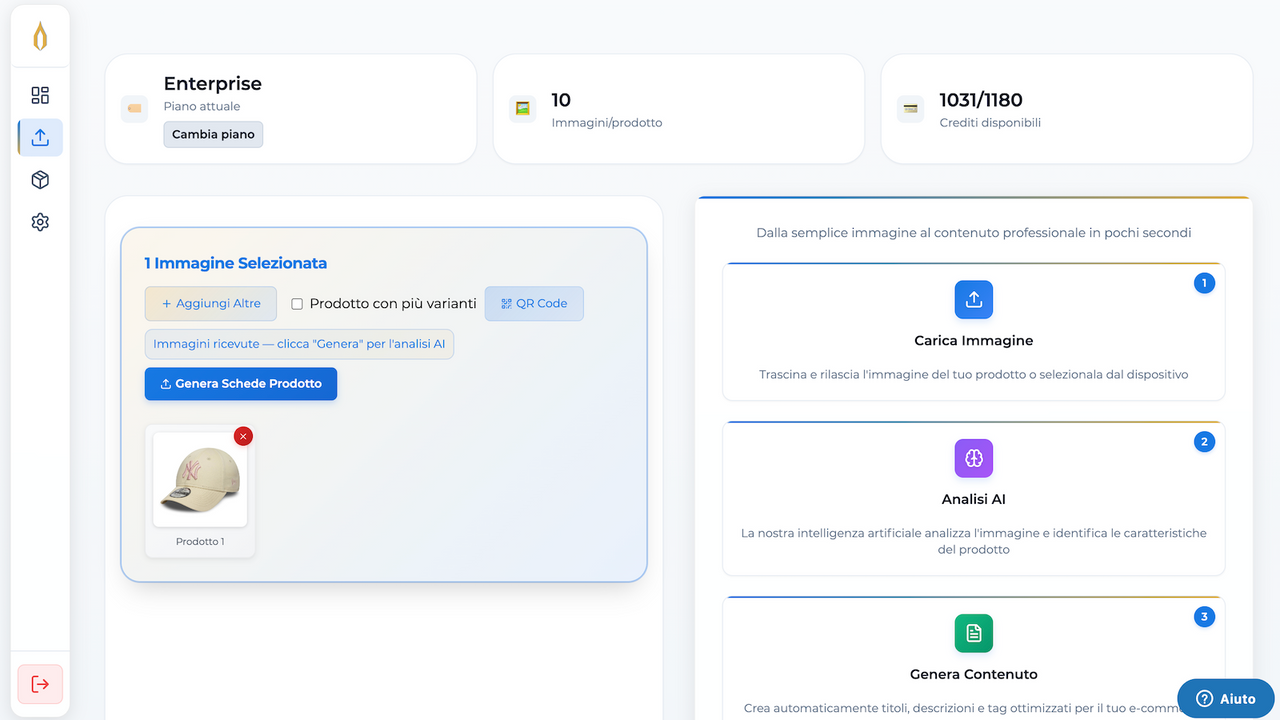
Preparing a product for sale involves more than writing a description. A catalog team has to organize photos, identify the item, explain its use, keep variants consistent and prepare the fields the store needs. Repeating that work across a new collection can become a back-office bottleneck.
uppify.ai focuses on turning product inputs into structured product information. Its Shopify app is built around creating listings and organizing catalog work—not generating a new garment design or verifying the physical properties of an item from its photograph.
This guide is part of a reciprocal content collaboration. It draws on the Shopify listing and official product guides. It does not repeat the vendor's speed claims as an independent test or present generated copy as verified product evidence.
A product photo is a starting point, not the entire brief
The official description-generation guide starts with a photo and allows additional notes about the product and brand voice. It describes structured outputs including titles, descriptions, bullets, tags, categories and search metadata.
This is useful because a blank product page is not one writing task. It is a collection of fields with different purposes. A customer-facing description explains the item; a category helps organize the catalog; search metadata summarizes the page for discovery.
Give the workflow facts that the photo cannot establish. Material composition, dimensions, care instructions and included accessories should come from product records or the supplier. A photograph may show a finish or silhouette, but it does not prove certification, battery life, waterproofing or compatibility.
For a new collection, gather those records before generating copy. This turns review into checking the output against a known brief instead of trying to decide afterward whether each confident sentence is true.
Understand which input route you are using
Swipe horizontally to read the full table.
| Source described on the website | What it contributes | What still needs review |
|---|---|---|
| Photo | Visual reference for generated product copy and options | Nonvisual specifications and package contents must come from records, not the image |
| Product URL | Existing page information and images | Permission to reuse the material and whether the source is current |
| Supplier PDF or CSV | Extracted identifiers, prices and product fields | That the SKU, price basis and variant relationships match the item being sold |
The website specifically describes SKU and price extraction from supplier files and automatic image validation and rehosting. Rehosting is a publishing operation, not evidence that you own the image or that the product claim is correct. Its website plans also distinguish URL access from file imports, with file imports shown in Business and Pro; do not assume the broader website routes are included in every Shopify app tier.
The uppify website describes photos, URLs and file-based inputs, with availability varying by plan. It also marks its Chrome extension as coming soon. Do not build an immediate catalog workflow around that unreleased route.
A photo-based task begins with a visual input and supplied context. A URL-based task begins with information already present on a source page. A file import begins with structured or document-based records. These inputs have different review needs: photos may omit specifications, source pages may be outdated and files may contain inconsistent field names.
Choose the route that preserves the best source information for the item. More inputs do not automatically produce a better listing if they disagree. Resolve a conflict in a material, size or package record before letting it propagate across several products.
Review the product sheet by field purpose
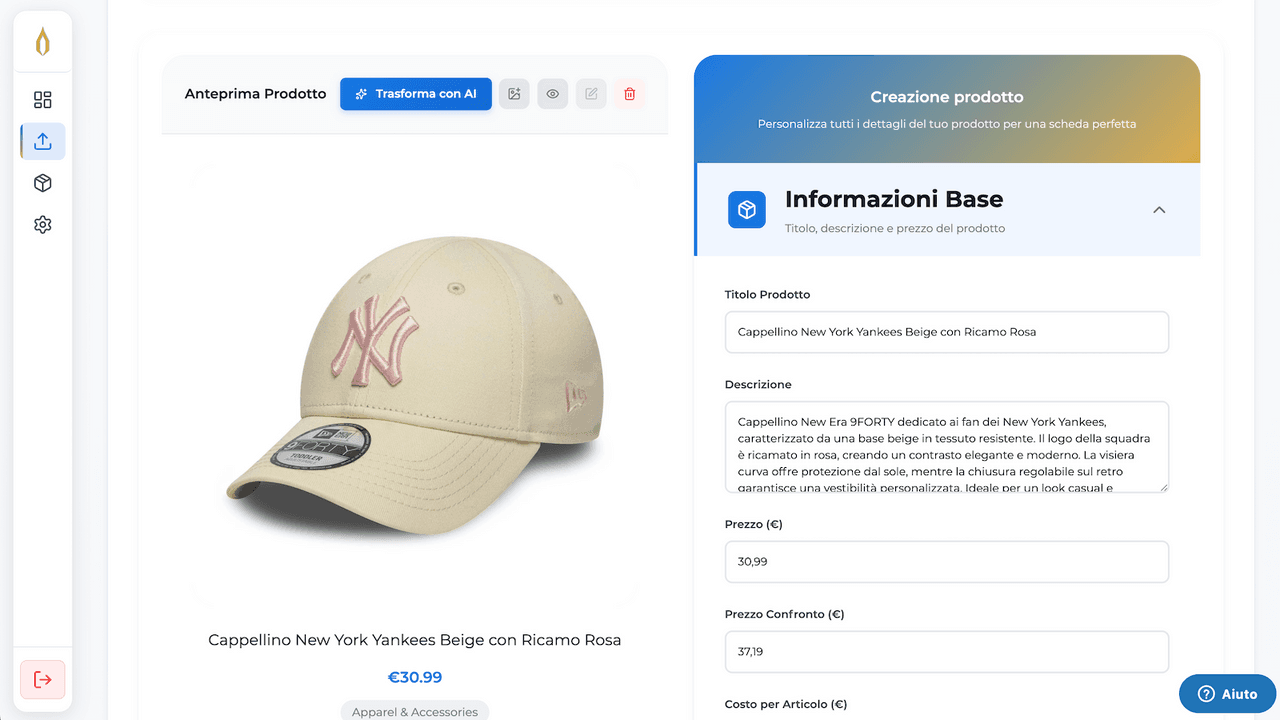
The photo sits beside editable listing fields. Review the product details before publishing.
The output is easier to inspect when the reviewer knows what each field should do. Avoid reviewing it as one undifferentiated block of AI text.
Swipe horizontally to read the full table.
| Field group | What the shopper or team needs | What to check before publishing |
|---|---|---|
| Product identity | A clear title and recognizable item | Product name, color, model and variant match the source records |
| Description and bullets | A useful explanation of benefits, features and use | Every specification is supported; important limitations are not omitted |
| Catalog organization | Consistent categories, tags and variants | The structure fits the store's conventions rather than creating near-duplicate labels |
| Search fields | A concise summary of the actual page | Titles and metadata describe the item naturally, without invented claims or keyword repetition |
This is an editorial review framework, not an example of output generated in our own store. It keeps the useful distinction between producing a field and approving its contents.
The official Shopify description guide also describes optional context and configurable brand language. Use that to make related listings coherent, but keep the details that distinguish one product from another. Reusing the same adjective-heavy introduction across a collection can make every item sound interchangeable.
Variants deserve their own consistency check
The App Store listing places variant management in its paid plans. For a merchant, the important question is whether the resulting options match the products that can actually be purchased.
Review size and color labels, the relationship between photos and options, and the identifiers used by the store. A family of products should use a consistent naming convention, but separate items should not be collapsed simply because their pictures look similar.
Do not let a generated description imply that every variant has the same measurements or features when the source records say otherwise. Shared copy can explain the collection; variant-specific facts still need an accurate place in the listing.
Start with a representative product family before expanding to a large batch. Include an item with options and an item with detailed specifications so the review covers more than the simplest case. This is a rollout recommendation, not a claim that uppify automatically validates every variant.
Search-friendly copy still needs to answer real questions
uppify's SEO product-page guide discusses titles, metadata, headings, descriptive language and image alt text. These are useful content components, but filling them does not guarantee a ranking or an AI recommendation.
A useful title identifies the product clearly. A description explains what it does, who it is for and what the customer should know before buying. Headings help readers find specifications and care details without searching through a long promotional paragraph.
For AI-assisted discovery, make important answers explicit in normal language. If an accessory is excluded, say so. If the item requires a particular power source or fits only specific models, explain that condition where a shopper can find it. Do not add unsupported facts just to make the page sound more complete.
Alt text belongs to the image's accessibility field. It should describe the actual image; it is not a visible caption or a list of search terms. A customer-facing caption, when needed, should explain something useful about the picture in ordinary language.
Publishing and exporting are separate from approval
The website describes publishing to connected stores and exporting content, while the Shopify listing includes CSV/JSON export. Confirm the route and plan used by your account instead of assuming every export format and connection is available everywhere.
Before a batch goes live, review the field mapping and the destination. Creating new products, enriching existing records and exporting a file are different actions. This guide does not claim an undocumented overwrite-protection rule or arbitrary two-way synchronization.
Keep the approved source brief with the product record. That gives the next person updating the listing a reliable reference, rather than making the generated text the only surviving record of the product's facts.
Plans and language: confirm the current offer
As checked October 7, 2026, the Shopify listing advertises a free allowance, paid product-volume tiers and CSV/JSON export. It lists the app language as Italian and explicitly says it is not translated into English.
The website's pricing presents a different set of plan names, currencies and allowances from the App Store. We have not combined those into one price table: that would imply a consistency the sources do not establish. Before choosing a plan, confirm the monthly product allowance, images per product, connected stores, variants, file inputs and any additional packs with the team.
This distinction matters for a catalog project. The cheapest headline price is not enough if the workload needs more images, several stores or file ingestion. Equally, do not pay for an input route the team will not use.
Frequently asked questions
What does uppify generate from a photo?
Its official guide describes structured product content, including a title, descriptions, bullets, tags, categories and search metadata. Supplied product context remains important for accuracy.
Does a generated specification mean the photo proved it?
No. Verify material, measurements, care and compatibility against product records before publishing.
Does it support variants?
The Shopify listing includes variant management in paid plans. Confirm the relevant tier and your product structure before a batch import.
Is the Shopify app available in English?
The listing currently names Italian and says it is not translated into English. Do not assume an English admin interface from this English-language article.
Explore uppify.ai and its Shopify listing. Its practical value is assembling the product sheet; the merchant's role is making that sheet accurate, consistent and ready for the customer.

