Shopify AOV Secrets: How AI Product Cards & Smart Bundles Print Revenue in 2026
How AI recommendations and Buy One, Get One offers can grow Shopify AOV
AI product cards help shoppers find relevant products, while a BOGO (Buy One, Get One) offer rewards a qualifying purchase with the second-item benefit stated in the offer. BOGOS lets merchants build promotions around gifts, bundles, upsells, and quantity discounts. Used together, they can make it easier to discover a complete purchase and understand the offer before checkout.
Shopify merchants are often told to increase AOV with bigger discounts, more upsells, or a new merchandising app. That advice misses the operating problem: shoppers do not want more products; they want a faster path to the right decision. A useful AOV strategy combines intent data, product relationships, offer economics, and a low-friction checkout journey.
This guide explains how to build that system, where each component belongs in the funnel, which bundle model fits which catalog, and how to prove incremental revenue without trading away contribution margin. It also shows where BOGOS promotion types such as Buy One, Get One, Buy X, Get Y, gifts with purchase, and mix-and-match bundles fit into a practical Shopify merchandising plan.
What Shopify AOV means—and what it does not mean
Shopify reports average order value as (gross sales − discounts) ÷ orders, excluding post-order adjustments. Keep the same revenue basis when comparing periods or experiments; the metric becomes useful when segmented by acquisition channel, device, first-time versus returning shopper, product category, discount exposure, and fulfillment cost. AOV growth caused only by a deeper discount can reduce profit, increase returns, or attract low-intent orders. For the exact calculation, see Shopify’s AOV definition in its sales report.
AOV
How much revenue each order carries
Attach rate
How often a second product is added
Contribution margin
What remains after product, shipping, and offer costs
1. Turn product questions into merchandising signals
A shopper asking about compatibility, size, delivery, ingredients, or setup is revealing a job to be done. Treat those questions as merchandising signals. Algoshop can read the conversation together with catalog, variant, and cart context, then present a focused recommendation instead of sending the shopper back to a collection page.
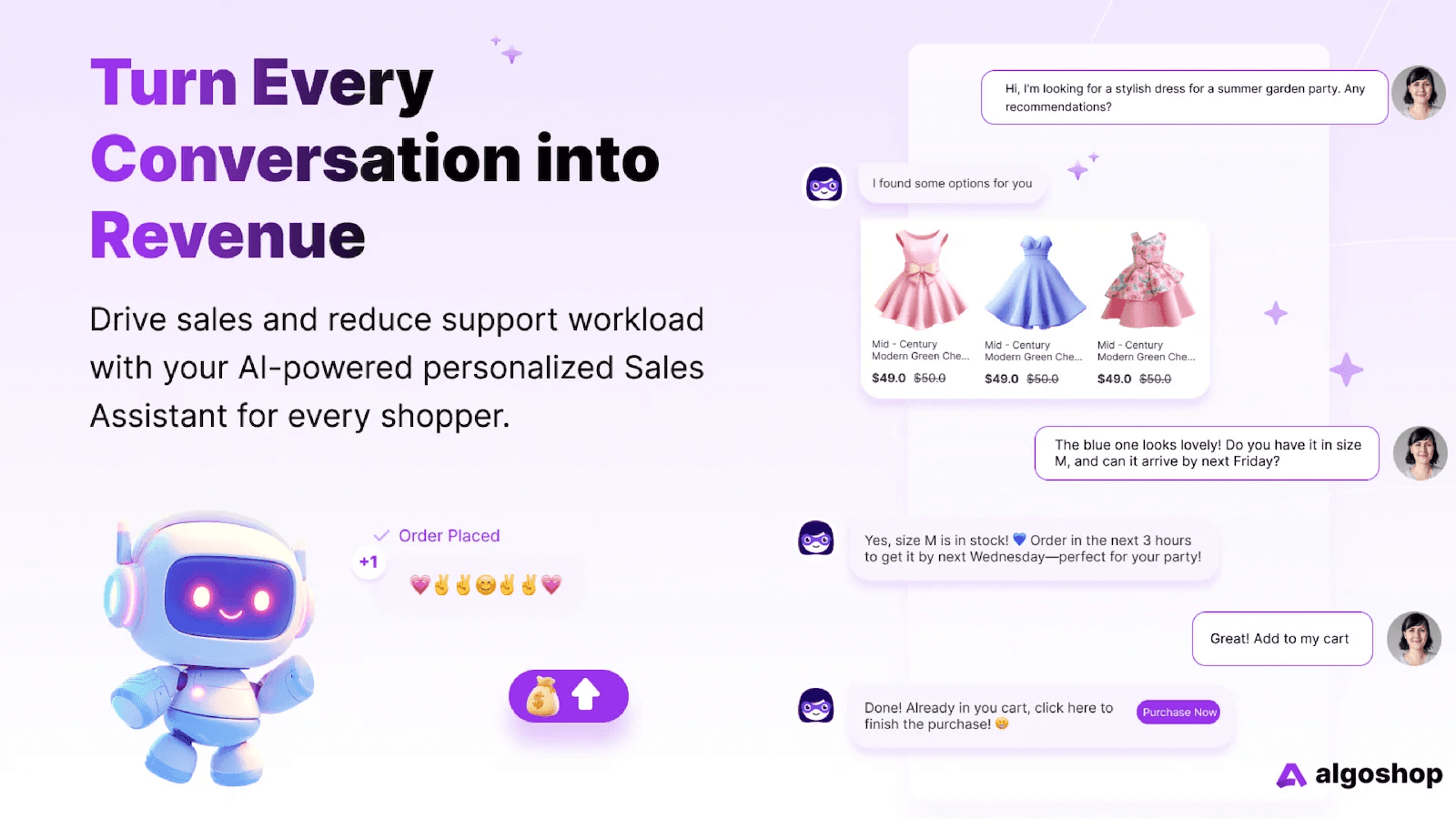
What a helpful recommendation should explain
Start with the customer’s goal, name the product that fits it, explain the relevant feature, acknowledge an important trade-off, and make the next action obvious. The shopper should understand why it fits, what to check, and what to do next without having to search the catalog again.
- Intent: what the shopper is trying to accomplish.
- Evidence: product attributes, compatibility, availability, or reviews.
- Choice: one primary recommendation plus a small number of alternatives.
- Action: select a variant, add to cart, compare, or ask a follow-up.
2. Select the right smart bundle model
Smart bundling is not “put three products together and discount them.” It is a commercial rule that helps a shopper complete a mission while protecting margin. Choose the model based on product complementarity, inventory depth, price architecture, and the threshold that already influences your customers.
| Model | Best fit | Primary job | Watch-out |
|---|---|---|---|
| Gift / BOGO | Anchor + accessory | Create a clear reward | Gift cost and inventory |
| Fixed bundle | Known product routine | Shorten decision time | Low flexibility |
| Mix and match | Curated collection | Give choice with guardrails | Too many options |
| Tiered spend | Threshold-led carts | Move the cart to a target | Discount leakage |
Gift-with-purchase works when the free item reinforces the main purchase. Mix-and-match works when shoppers have genuine preferences. Tiered spend works when the store can make the next threshold visible without pushing irrelevant products. These are the mechanics supported by BOGOS; choose an offer only after checking product fit, gift cost, inventory, and margin.
3. How BOGOS turns promotion ideas into storefront offers
BOGOS is a Shopify promotion app built for merchants who need more than a single coupon. It brings gift offers, bundle offers, upsells, and quantity-based discounts into one promotion layer, so a store can choose the mechanic that matches the shopper’s intent instead of forcing every customer into the same percentage-off deal. Its official overview describes BOGOS as a single app for setting up and managing promotions, from basic offers to more advanced campaigns. BOGOS product overview.
The app supports automatic gifts or gift selection based on cart value, cart quantity, or specific products. It also supports fixed bundles, mix-and-match offers, and build-a-box experiences; upsells on product, checkout, and thank-you pages; and discounts that reward larger quantities.
Match the offer to the customer’s reason to add more
A gift offer is useful when a free sample or complementary item makes the main purchase feel more complete. A bundle is a better fit when products are commonly used together or shoppers benefit from choosing a set. An upsell can introduce a related add-on at a high-intent moment, while a quantity discount rewards customers who already know they need more than one unit. The offer should explain its qualifying condition plainly: what must be in the cart, what the customer receives, and whether a choice is available.
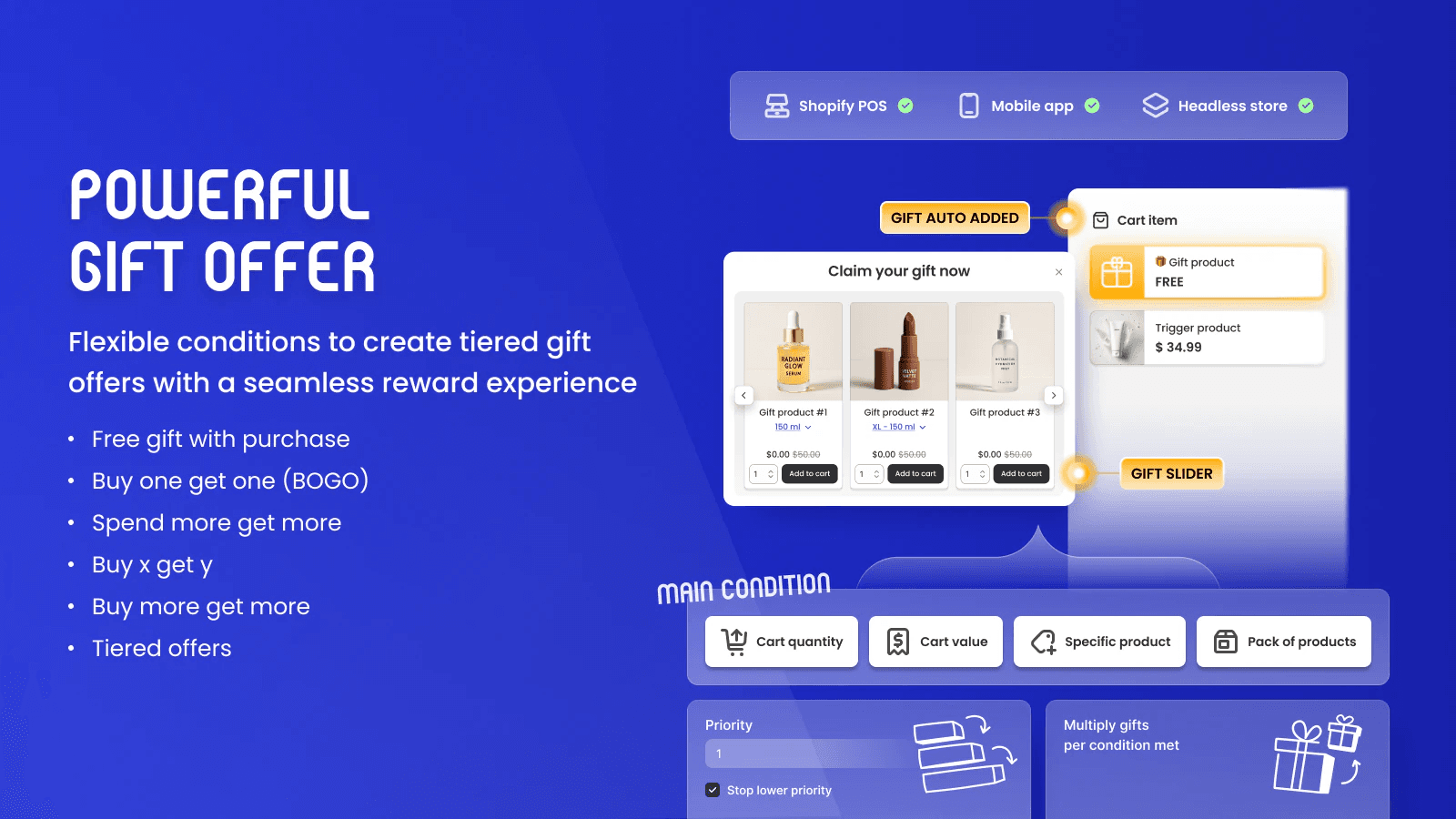
Merchants can also use BOGOS promotional tools to make an offer discoverable: its documentation lists progress bars, Today’s Offer widgets and blocks, offer pages, and customizable offer widgets for gifts, bundles, frequently bought together, checkout upsells, thank-you page upsells, and quantity breaks. These placements can show customers how close they are to a threshold or where to claim an eligible offer. Keep the message consistent with the actual campaign rules so the cart does not surprise the shopper.
Build bundles around the shopping mission
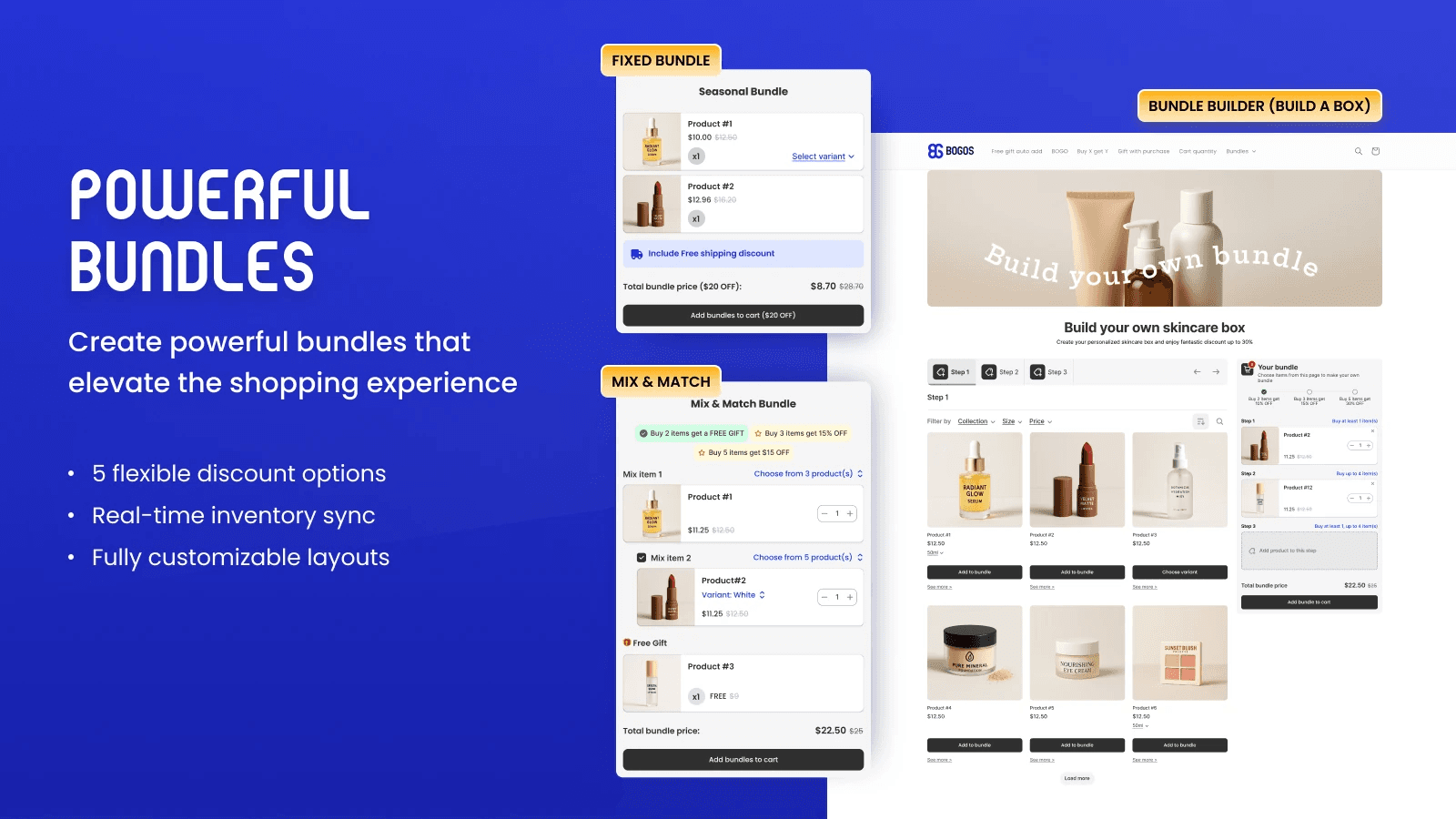
BOGOS describes fixed bundles and flexible customer-built combinations. A fixed bundle is useful when the merchant knows the right combination; mix-and-match works when customers should choose among approved options; and build-a-box is suited to a curated assortment customers assemble themselves. The documented bundle discounts include percentage off, amount off, fixed price, free product, and shipping discount, with tiered discounts supported for eligible bundle types.
Manage overlapping offers and learn from results
When a store runs several campaigns at once, offer priority rules help determine which promotions can appear together. BOGOS also documents combining offers with other discounts, bulk editing campaigns, and importing or exporting offers across stores. Its analytics include real-time trend charts, conversion metrics by offer, and data export. Use those reports alongside store-level conversion, revenue per session, average order value, and margin data to judge whether a promotion is creating incremental value.
A practical BOGOS campaign checklist
- Choose the offer type based on the product relationship and shopper need.
- Set eligibility using cart value, quantity, or selected products where relevant.
- Write the qualification and reward in clear storefront language.
- Check offer priority, discount combinations, stock, and mobile presentation.
- Review offer-level conversion and store-level margin after launch.
For international and multi-channel stores, BOGOS supports Shopify Online Store, Shopify POS, headless or Hydrogen storefronts, and selected mobile app setups. The official feature overview also lists broad Shopify theme and page-builder compatibility, plus integrations with cart drawers, translation, review, and subscription apps. Promotion text can be translated automatically or manually in the app, with third-party translation integrations available. BOGOS feature overview.
4. Design the AI recommendation card
The card is the bridge between conversation and commerce. It should not feel like an ad interrupting a support answer. In Algoshop, the most useful card combines the product image, name, one-line fit explanation, price or savings, variant selector, availability, and one primary action. The shopper should understand both “why this product?” and “what happens if I click?” without opening another page.
For high-consideration products, add comparison language and a secondary option. For replenishment products, show the familiar item first and use the recommendation to suggest a compatible refill or larger pack. For a shipping question, the card can show a relevant add-on that brings the cart closer to the free-shipping threshold.
Contextual
Explain why this item fits the question.
Variant-aware
Do not recommend an unavailable size or color.
Transparent
Show price, discount, and qualification rules.
Dismissible
Let shoppers continue without pressure.
5. Build the revenue loop across the funnel
AOV growth is rarely created by one widget. Coordinate the experience from discovery to post-purchase: capture intent, retrieve the right relationship, present the offer, confirm the choice, and learn from the result.
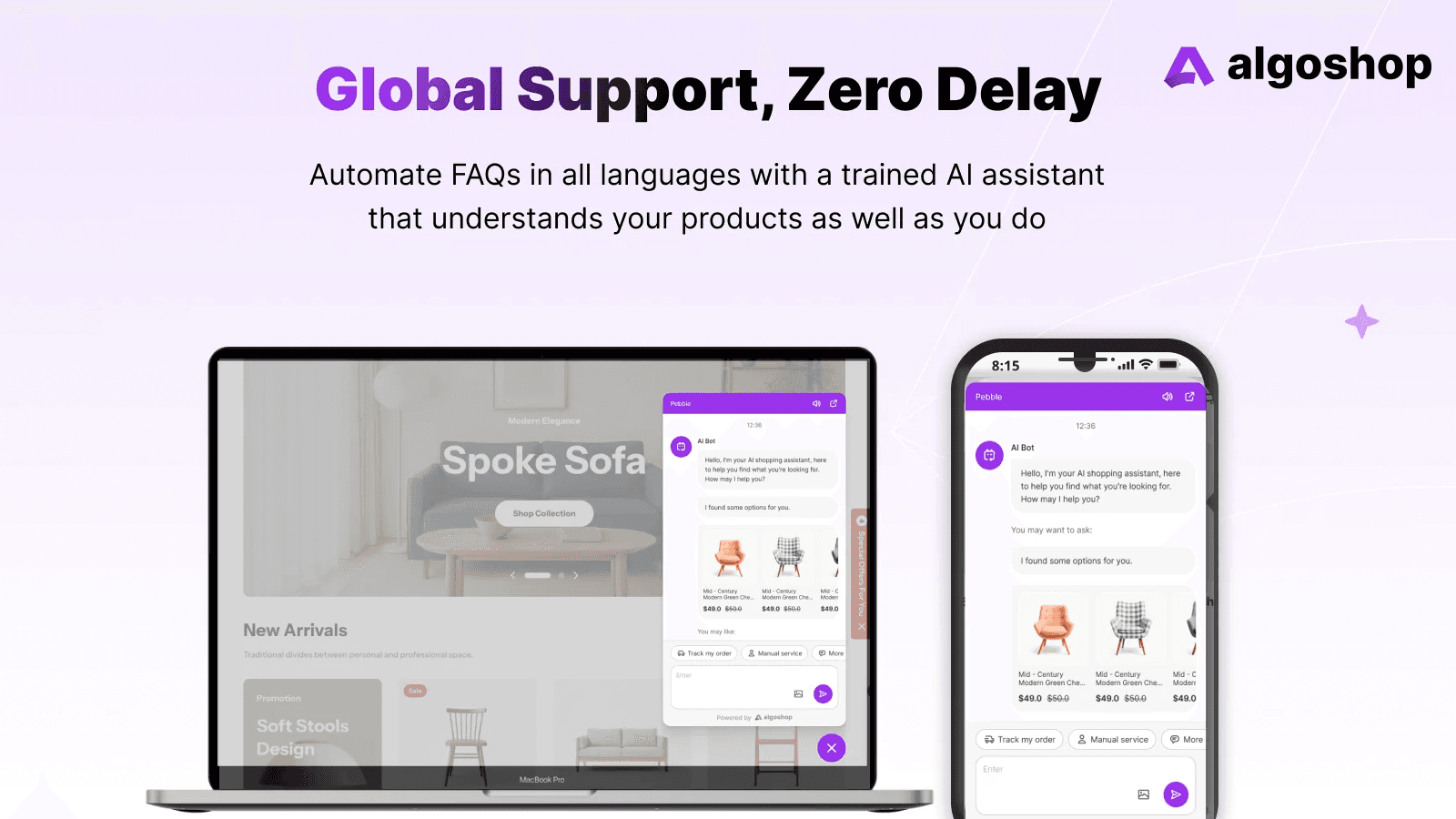
Place recommendations where intent is strongest: product detail pages for compatibility, chat for questions, cart for threshold reminders, checkout for low-risk add-ons, and post-purchase for replenishment. Do not show the same generic offer at every stage.
A merchant can coordinate Algoshop product guidance with a BOGOS promotion in the same shopping journey. For example, Algoshop can help a shopper compare items for a complete routine, while the merchant configures a qualifying gift or bundle in BOGOS. The offer’s configured rules determine eligibility and redemption; this article describes complementary merchandising roles, not an automatic integration between the apps.
6. Use a margin-safe experimentation framework
Before launch, write down the hypothesis, audience, trigger, offer, margin floor, and success metric. Start with one category or one traffic source. Compare an exposed cohort with a holdout, and evaluate revenue per session—not just the AOV of orders that accepted the offer.
Measurement checklist
7. Common Shopify AOV mistakes to avoid
- Discounting before understanding intent. A cheaper random item is not a relevant recommendation.
- Showing too many choices. More products can increase cognitive load and lower conversion.
- Ignoring inventory and variants. A broken recommendation damages trust faster than no recommendation.
- Optimizing only for order value. Include margin, returns, fulfillment, and repeat purchase quality.
- Using one message everywhere. Product, cart, checkout, and post-purchase moments need different jobs.
Frequently asked questions
What does BOGO mean in ecommerce?
BOGO means Buy One, Get One: a shopper buys a qualifying item and receives another item under the promotion’s stated conditions. The offer may specify which products qualify, whether the second item is free or discounted, and how the reward is applied. Always make those terms clear before checkout.
What promotion types does BOGOS support?
BOGOS documents gift offers, fixed and mix-and-match bundles, build-a-box offers, upsells, and quantity-based discounts. Gift eligibility can depend on cart value, quantity, or selected products, with gifts auto-added or selected by the shopper.
What is Shopify AOV?
Shopify reports average order value as gross sales minus discounts, divided by orders, excluding post-order adjustments. Compare AOV using the same calculation basis and read it alongside conversion rate, contribution margin, returns, and discount cost.
How do AI product recommendation cards increase Shopify AOV?
They surface relevant products, variants, and bundle options inside the shopper conversation, reducing the steps between a product question and a larger, more complete cart. The recommendation should remain contextual and easy to dismiss.
Which Shopify bundle model should a merchant start with?
Start with the model that matches your catalog and margin structure: a gift or BOGO offer for a simple anchor-and-accessory pairing, mix-and-match for shopper choice, or tiered spend incentives when shipping thresholds influence cart size.
How should merchants measure a bundle experiment?
Track incremental revenue per session, AOV, contribution margin, attach rate, discount cost, return rate, and checkout completion. Compare the same audience and traffic source against a holdout whenever possible.
Where BOGOS fits in your AOV strategy
BOGOS gives Shopify merchants a single place to create and manage gift, bundle, upsell, and quantity discount offers. A Buy One, Get One or Buy X, Get Y promotion can reward a qualifying purchase; a gift offer can add a gift automatically or let shoppers choose one; and mix-and-match or build-a-box offers can help customers assemble a set. Pair those rules with relevant product guidance, then measure the effect on order value, conversion, and margin.
BOGOS’s product documentation lists these promotion types for Shopify Online Store, POS, and headless or Hydrogen storefronts, alongside offer widgets, campaign management, analytics, and translation options. BOGOS product overview.