
A shopper may leave a store with an unanswered question, an item still in the cart, or no clear next step. Support and merchandising tools can address different parts of that journey, but installing a chatbot does not by itself recover a cart or increase order value.
This article uses Algoshop's listed product-recommendation and Outreach Card capabilities as a starting point for four practical scenarios. The examples are illustrative—not reported customer results. Because campaign controls can change, verify triggers, data inputs, and display options in the current app before building a workflow, then measure outcomes against your own baseline.
Where Support Ends and Product Recommendations Begin
Most Shopify merchants evaluate chatbots through the wrong lens. They ask: 'Can it answer questions faster?' They should ask: 'Can it recover revenue I am already losing?' The distinction is not semantic—it determines whether your chatbot operates as a cost center or a profit center.
Support and sales tools serve different jobs. Check each product's current listing and documentation for supported channels, automation, product context, and handoff rather than assuming all chatbots work the same way. A support workflow may answer an order question; a recommendation campaign may show a relevant companion item if the app supports that placement and trigger.
For example, a shopper may add a dress and still have a fit or delivery question. A support flow should make the answer easy to find or escalate. A recommendation campaign might show a compatible belt, but only if the app supports the placement and the item is relevant. Treat this as a workflow to test—not evidence that a tool detects intent or recovers a particular share of carts.
What Is a True AI Sales Assistant? Reactive vs. Proactive Architecture
Understanding the architectural divide requires examining three generations of e-commerce conversation tools:
Generation 1: Rule-Based FAQ Bots
Static if-then scripts. Answer predictable questions. Cannot understand context, learn from conversations, or initiate contact. Examples: basic Tidio flows, Chatra scripts.
Generation 2: AI-Powered Support Assistants
These assistants can help interpret a customer's question and may connect it to a support workflow. Capabilities vary by product and configuration; verify knowledge sources, escalation, supported channels, and current plan limits rather than assuming a fixed cost reduction or that support tools cannot assist sales.
Generation 3: AI Sales Assistants (Algoshop)
A storefront sales workflow may combine a relevant product recommendation with an Outreach Card. The Algoshop listing describes behavior-triggered cards and product recommendations. Confirm which signals and controls are available in the current app, keep the message optional, and measure its effect in your store.
The Four Sales Scenarios Behind Algoshop's Product Recommendation Engine
Algoshop's Product Recommendation Card is not a single feature—it is a configurable sales system with four distinct operational modes. Each mode targets a different point in the customer journey, using different data signals and recommendation logic.
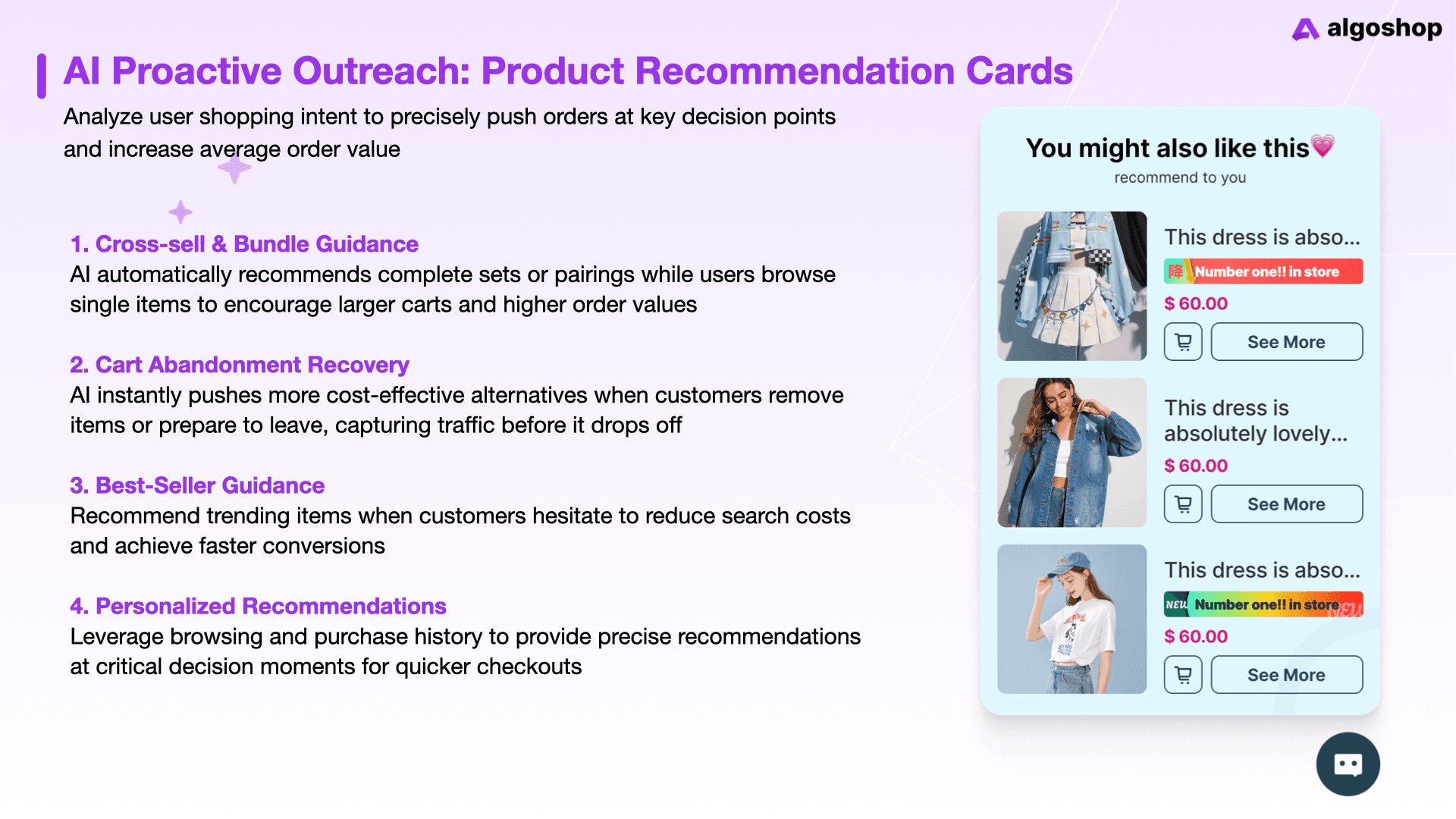
1. Cross-sell & Bundle Guidance
A complementary-item campaign should start with a clear product relationship. For example, a yoga mat might pair with a strap or blocks; check that each item is compatible, in stock, and accurately priced. The Shopify listing describes product recommendations, but it does not establish which visitor-level signals drive each result. Verify the recommendation source in the current app, then compare useful add-on orders and margin with your existing merchandising rule. Any sample prices in a draft should be replaced with the store's actual prices before publication.
2. Cart Abandonment Recovery
An on-site reminder and an abandoned-checkout email are different workflows. The Algoshop listing describes cart-recovery messaging and behavior-triggered Outreach Cards; check the app for the exact trigger, eligible audience, destination link, and whether a shopper can add a recommended item directly. A useful test might compare an eligible reminder with a holdout, while tracking delivered messages, return visits, completed orders, discounts, and margin. Do not assume the app detects exit intent or that a visitor will return.
3. Best-Seller Guidance
A best-seller recommendation can help when a shopper wants a popular starting point, but popularity should be based on real store data and described with a clear time period. The Shopify listing describes product recommendations; verify whether the current app offers a best-seller source or sales badge before promising either. If you use a popularity claim, confirm the underlying count and avoid inventing a badge. Compare whether the recommendation helps shoppers find a suitable product, not just whether it receives clicks.
4. Personalized Recommendations
Personalization should be described only at the level the product documents. The Shopify listing mentions behavior tracking and product recommendations, but a merchant should verify exactly which session, customer, and conversation signals are used, whether they persist between visits, and how unavailable variants are handled. Test with a few realistic shopper journeys—for example, a size question followed by a product recommendation—and inspect the actual response before making claims about individual profiling or optimal suggestions.
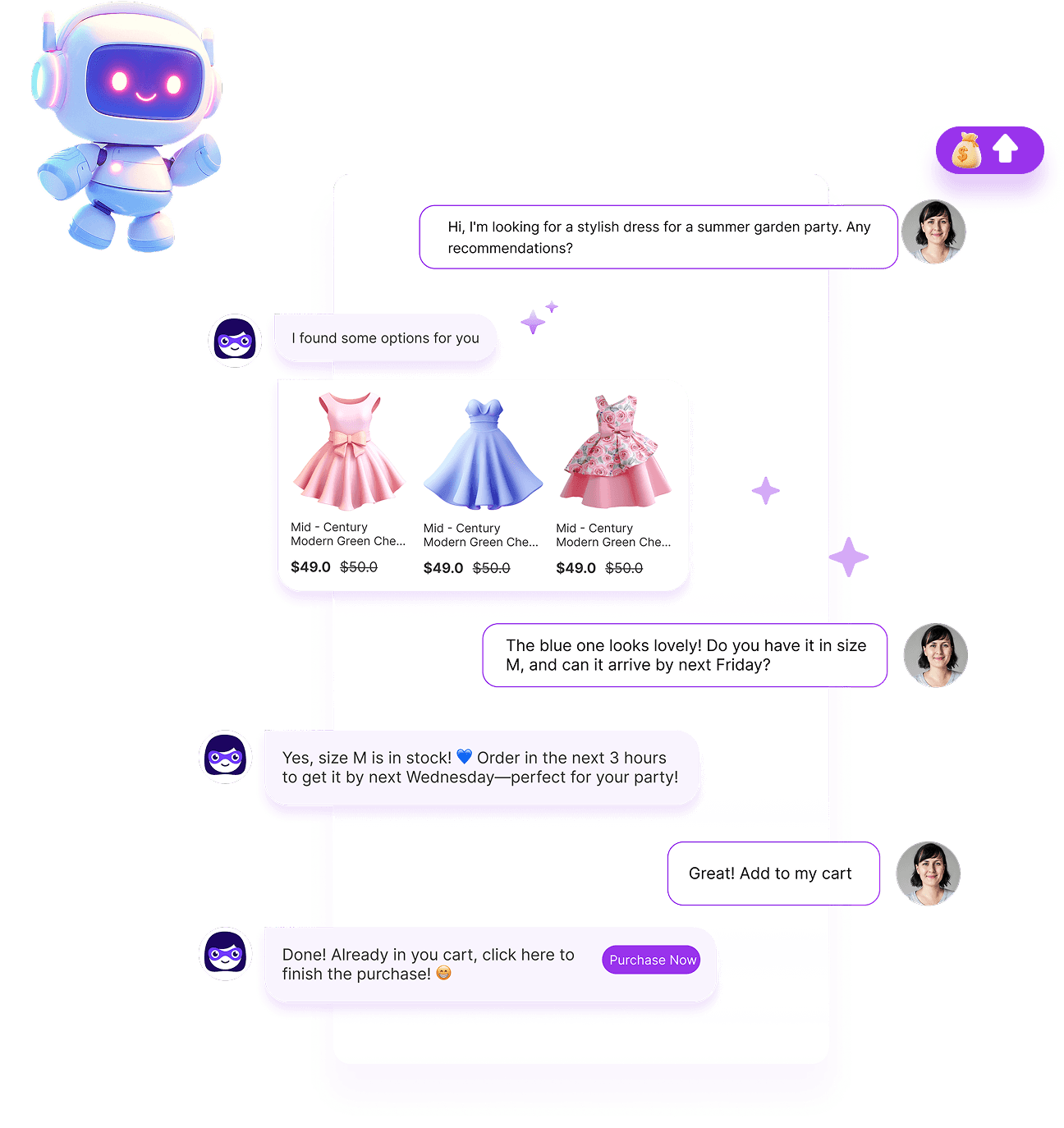
AI chatbot conversation showing personalized product recommendations with images, prices, and add-to-cart buttons
What to Verify About Shopper and Product Signals
Recommendation quality depends on product accuracy and the signals a campaign is permitted and configured to use. The following are useful review categories—not a claim that the app collects every data type:
Layer 1: Session Behavioral Signals
Check the app's current listing and settings for supported behavior events. A page view, cart change, or other signal is evidence of an action—not proof of purchase intent. Confirm any data collection and customer-consent implications before relying on it.
Layer 2: Conversational Context
If a recommendation uses chat context, verify that behavior in the current app and review what conversation information is retained. A question such as 'Do you have this in navy?' can guide a human or configured assistant to check available colors; it does not by itself prove purchase readiness.
Layer 3: Purchase History & Lifetime Value
If customer or order history is used, verify the data source, permissions, and whether it affects recommendations. Avoid inferring discount sensitivity or promising that returning customers will receive a particular offer unless that rule is documented and enabled.
Layer 4: Store Catalog & Inventory Intelligence
Check how product details and availability are refreshed and whether a campaign can exclude unavailable products. Do not assume the app reads margin data or optimizes profitability unless current product documentation explicitly confirms it. Merchants should review compatibility, price, and stock before a recommendation goes live.
A Practical Checklist for Reviewing a Product Recommendation Campaign
The current app determines which campaign controls are available. Use this setup checklist as a review process, and confirm labels and options in the live app rather than assuming an older interface description is current.
Step 1 — Content: Define What the Shopper Sees
Begin by checking the current campaign fields in the installed app. Give the campaign an internal name that records its purpose and placement. Write concise card copy that explains why the recommendation is relevant, choose a clear button label, and verify the product source and item count available to your plan. Review any badge or discount label against the actual offer terms. Preview the completed card on mobile and desktop, and record the settings so the test can be repeated or stopped.
Step 2 — Design: Match Your Brand Identity
Use the design controls available in the current app to match your storefront's typography, spacing, and colors. Check text contrast and button visibility instead of assuming the editor validates accessibility automatically. Preview at desktop and mobile widths, verify that product details remain legible, and test design alternatives with comparable traffic; no color or button style guarantees higher engagement.
Step 3 — Targeting: Control When, Where, and to Whom the Card Appears
Before choosing targeting, inspect which page placements, audience conditions, triggers, frequency rules, and schedule options the current app actually supports. Start with one observable trigger and a relevant message; do not assume exit intent, scroll depth, customer segments, or checkout placement are available. Confirm that the card can be dismissed and does not repeat excessively. Test the purchase path and record the settings so a teammate can reproduce or turn off the campaign. Setup time depends on the store, content, and review steps; a fixed time estimate is not universal.
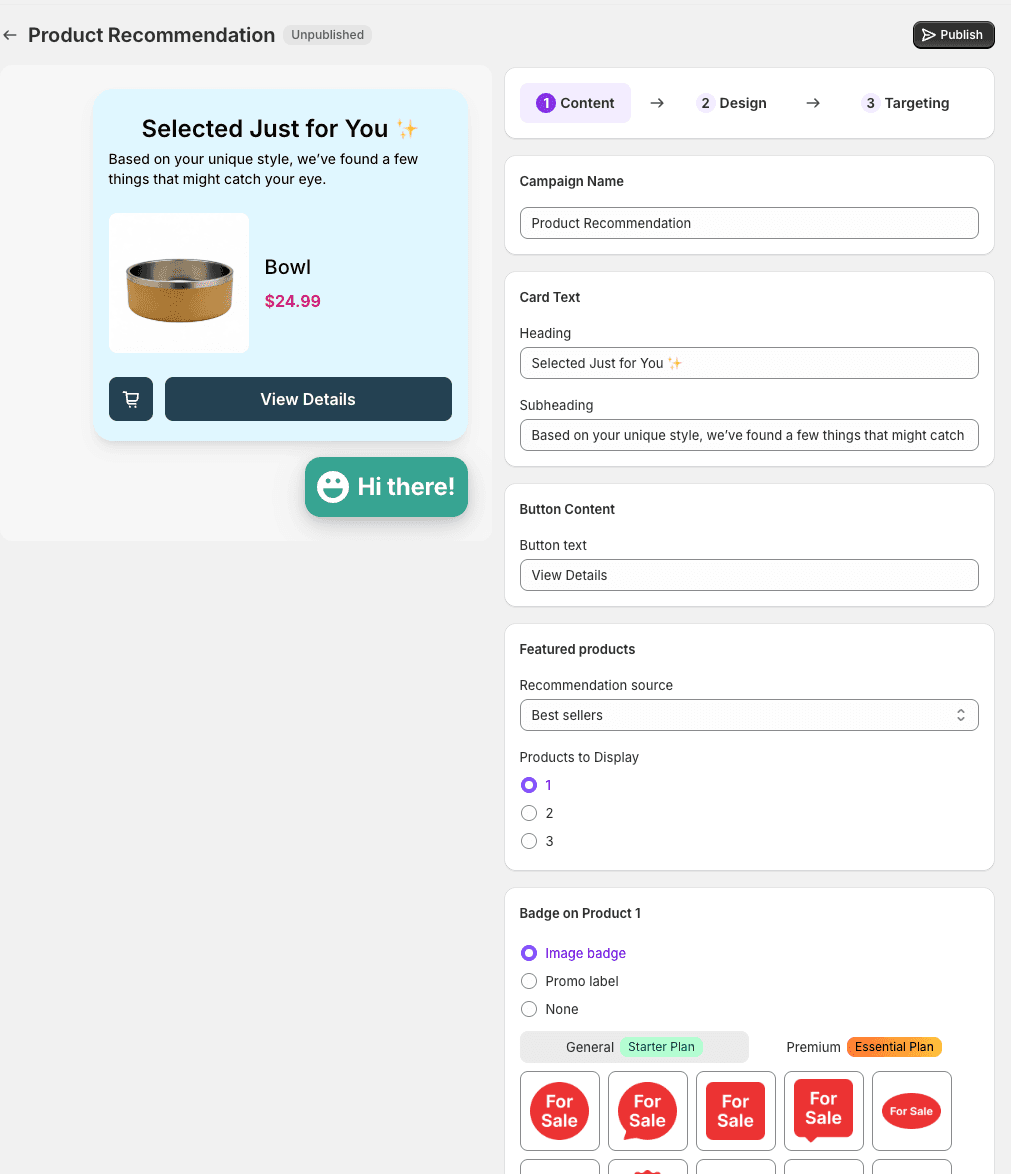
Algoshop Campaign Builder Content tab showing campaign name, card text fields, recommendation source selection, and badge configuration
How to Compare Manual Rules with AI-Assisted Recommendations
To evaluate manual and AI-assisted recommendations, define a store-specific test. Record the products shown, eligible visitors, orders, average order value, margin, returns, discounts, and app cost for a consistent period.
A manual rule is explicit and can be easy to audit, but it may need updating as products and stock change. An AI-assisted recommendation may use additional signals, depending on the documented product behavior and settings. Neither approach should be assumed to win; compare them with the same audience and a suitable control.
If you model a possible outcome, show the assumptions and label the result as a scenario—not revenue observed or caused by the app. Include discounts, fees, returns, and margin, and use a controlled comparison before making an incremental-revenue claim.
Questions to Ask When Comparing Shopify Chat Tools
When comparing Shopify chat products, review their current documentation and test the features relevant to your store. Avoid assuming that every product in a category lacks a capability:
Limitation 1: No Real-Time Behavioral Tracking
Check which shopper events the product documents and whether you can choose a supported trigger. A page view and an exit-intent signal are not interchangeable. Test the configured condition yourself and avoid claiming it identifies intent with certainty.
Limitation 2: No Catalog-Native Understanding
Compare how each product receives product and order context, how often the information is updated, and what happens when a variant is unavailable. Do not infer freshness, margin optimization, or catalog coverage from the phrase 'Shopify integration'; confirm those details in documentation and a store test.
Limitation 3: No Conversation Memory Applied to Sales
If conversation context is important, ask whether the product can use it in later recommendations and what is retained. Test with a question such as 'Do you have waterproof options?' Then check whether a subsequent answer or card reflects that preference, and whether the behavior is documented and configurable. Do not assume every tool treats conversations the same way.
Frequently Asked Questions
How do AI product recommendations increase AOV on Shopify?
A recommendation may help shoppers discover a complementary or higher-tier item, but the underlying signals vary by product. Verify the documented data inputs and compare eligible shoppers, completed orders, order value, margin, and returns with a relevant control. No general recovery or attachment rate is guaranteed.
What is the difference between reactive and proactive chatbots?
A reactive flow responds after a shopper opens chat; a proactive message may be triggered by a configured event. Check whether the app supports the specific trigger, page, and frequency controls you need. Do not infer a shopper's intent from a single behavior or assume one vendor is the only product with a given capability.
Can I control when and where product recommendation cards appear?
The available controls can change by app version and plan. Check the current Campaign Builder and confirm which message, design, product-source, placement, audience, trigger, and frequency options are available to your store. Start with one relevant campaign and test its display and decline path on desktop and mobile.
How does Algoshop's recommendation engine differ from Shopify's native product recommendations?
Compare the current Shopify recommendation surface with the specific third-party app configuration you plan to use. Check how each selects products, where it can display, what data informs results, how often it updates, and whether it can exclude unavailable items. The Shopify listing describes Algoshop product recommendations and behavior-triggered Outreach Cards; confirm exact inputs and placements in the app before making a distinction.
What AOV increase can merchants expect from AI product recommendations?
There is no guaranteed AOV increase or recovery rate. Define eligible visitors, run a suitable comparison, and track recommendation exposure, clicks, add-to-cart events, completed orders, margin, discount cost, and returns. Attribute an incremental result only when the test supports that conclusion.
Do I need coding skills to set up AI product recommendation campaigns?
Check the current app setup and the controls available to your plan. If the campaign can be configured through the interface, preview it on desktop and mobile, test its trigger and purchase path, and verify whether any theme or integration work is required. Setup time depends on the store and campaign.

