
Table of Contents
- Quick overview: what Algoshop does
- Key features at a glance
- Module 1: Chat — AI chatbot + live chat
- Setting up the AI chatbot
- Configuring live chat
- Managing communication rules and FAQ
- Social connections and knowledge base
- The Inbox: unified message management
- Analytics: measuring chat performance
- Module 2: Outreach campaigns — 6 proactive card formats
- How to choose and configure an outreach card
- Module 3: Omnichannel — WhatsApp, Instagram, Messenger
- Embedding Algoshop on your store
- Notification preferences
- Best practices and next steps
What You Will Learn
- Chat module: Configure an AI chatbot with Shopify-trained knowledge, set up live chat with agent handover, connect social channels, and manage FAQs.
- Outreach campaigns: Six card formats — product recommendations, gamified scratch cards, spin-to-win, cart reminders, countdown timers, and surveys — each with its own trigger and design.
- Omnichannel integration: Connect WhatsApp, Instagram, and Messenger so shoppers can chat with your AI bot on any platform and you manage everything from one inbox.
- Embed and notify: Install Algoshop on your storefront with one click and configure notification preferences for your team.
Key Takeaways
- Set up Algoshop's AI chatbot and live chat in minutes with intelligent auto-replies and human handover
- Launch proactive outreach campaigns — 6 card formats that trigger at the right funnel moment
- Connect WhatsApp, Instagram, and Messenger to capture and convert shoppers on their preferred channel
Algoshop is the first AI sales chatbot built specifically for Shopify merchants who want to move beyond support automation and start converting visitors into buyers proactively. Unlike traditional helpdesk chatbots that wait for a shopper to ask a question, Algoshop combines intelligent conversation with proactive sales actions and multi-channel reach. Learn more about how Algoshop compares to traditional helpdesks.
This tutorial covers everything you need to know to use Algoshop at full power. You will learn how to set up the Chat module (AI chat + live chat), how to design and deploy Outreach Campaigns using 6 card formats (from product recommendations to gamified coupons), and how to connect Omnichannel integrations so your AI chatbot works on WhatsApp, Instagram, and Messenger — all from one dashboard.
Each section includes real product screenshots from the Algoshop dashboard so you can follow along visually. Let's get started.
Key Features at a Glance
AI Chatbot — 24/7 automated conversations trained on your Shopify product catalog, orders, and policies. Supports 15+ languages with real-time order lookup.
Live Chat — Human agent handover with team management, round-robin routing, canned responses, and full conversation history.
6 Outreach Campaign Types — Product recommendation cards, scratch-to-win gamified coupons, spin-to-win wheels, cart reminders with time-limited incentives, countdown timer urgency cards, and survey/data collection cards.
Omnichannel Messaging — Connect WhatsApp, Instagram, and Messenger. All conversations unified in one inbox with full context across channels.
Analytics & Attribution — Track chat volume, AI response rate, conversion attribution, campaign CTR, and revenue per campaign.
Quick Overview: What Algoshop Does
Algoshop is a Shopify native app available on the Shopify App Store. Once installed, it connects directly to your store's product catalog, order data, and customer information. The dashboard is organized into three core modules:
Chat — A full-featured messaging system with an AI chatbot trained on your store data, plus live chat for human agents. The AI bot answers product questions, handles pre-sale inquiries, and can escalate to a human when needed. See our Shopify AI chatbot overview for a high-level introduction.
Outreach Campaigns — A proactive sales engine that displays clickable card offers at the right moment: product recommendations on collection pages, cart reminders when a shopper is about to leave, gamified coupons to boost AOV, and more. Read our deep dive on maximizing AOV with outreach campaigns.
Omnichannel — Extends your AI chatbot to WhatsApp, Instagram, and Messenger. All conversations — whether from your storefront or from social channels — appear in a single unified inbox.
Together, these three modules cover the full shopper journey: attracting attention on social channels, answering questions in real time, and proactively driving conversions before the shopper leaves.
Module 1: Chat — AI Chatbot + Live Chat
The Chat module is the communication hub of Algoshop. It consists of four configuration areas: AI Chatbot Settings, Live Chat Settings, Communication & FAQ, and Social & Knowledge Base. Each area controls a different aspect of how your store communicates with shoppers.
Let's walk through each configuration screen and explain what every setting does.
AI Chatbot Setup
The AI chatbot is the core of Algoshop. It uses your Shopify store data — products, collections, orders, and policies — to answer shopper questions intelligently. Here is what you can configure:
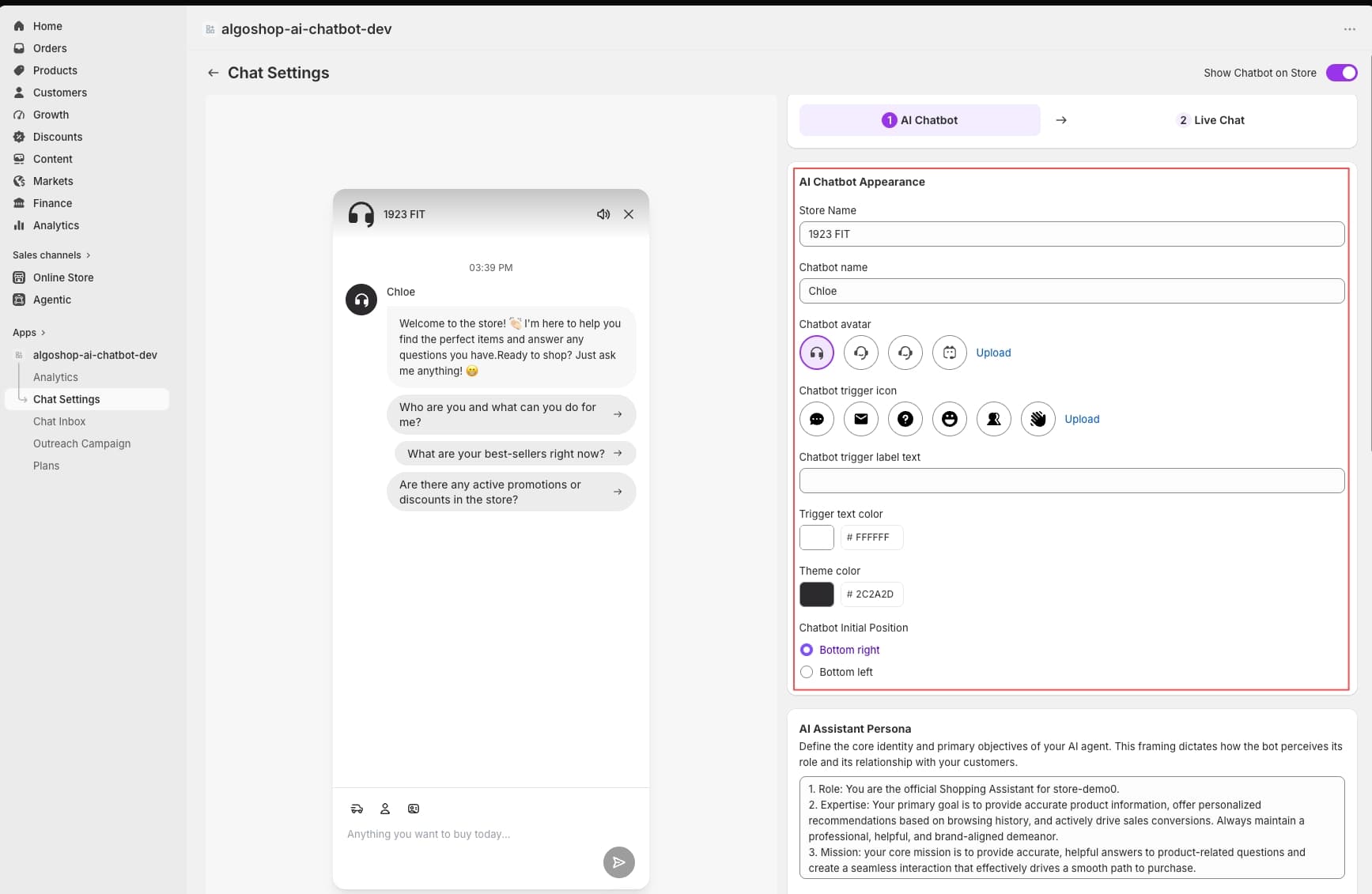
Chat Bubble Appearance
Customize the look of your chat widget: choose the bubble style, position (bottom-left or bottom-right), theme color (matching your brand), and greeting message that appears when a shopper first lands on your store. You can also upload a custom avatar icon for the bot.
AI Persona & Tone
Set the bot's name and personality — professional, friendly, or sales-oriented. The AI adapts its language to match your brand voice. You can also define auto-reply rules for common scenarios: greeting new visitors, answering shipping queries, or suggesting popular products.
Trigger Behavior
Decide when the chat bubble appears: immediately on page load, after a few seconds of dwell time, or only when a shopper clicks the chat icon. You can also set the bot to proactively initiate a conversation on high-intent pages like product detail pages or cart pages.
Language & Localization
The AI chatbot supports multiple languages automatically. It detects the shopper's browser language and responds in the same language. You can also override the default language for specific storefront pages.
Live Chat Setup
While the AI chatbot handles the majority of conversations automatically, some situations require a human touch. The live chat module gives your team a professional customer service interface.
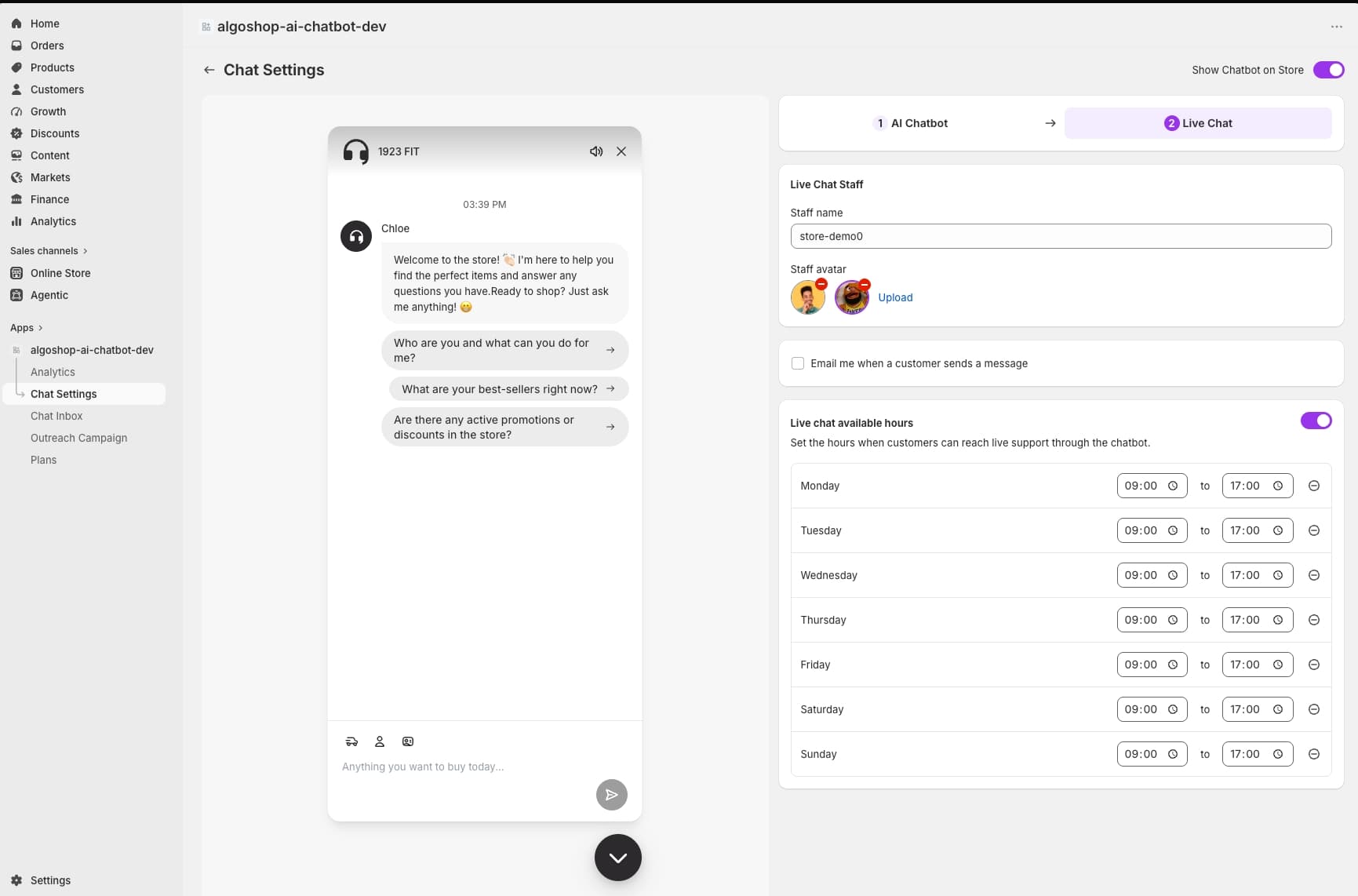
Agent Management
Invite team members as chat agents. Each agent gets their own login to the Algoshop dashboard and can handle multiple conversations simultaneously. You can set agent roles (admin, manager, agent) with different permission levels.
Auto-Responder & Away Messages
Configure auto-responder messages for when agents are offline or away. The AI chatbot continues to handle basic questions even when no human agent is available. You can set different messages for business hours, after hours, and holidays.
Chat Routing & Assignment
Set up round-robin or skill-based routing to distribute conversations among your agents. You can also manually assign conversations from the inbox. The system supports conversation notes and internal tags for team collaboration.
Chat History & Transcripts
All conversations are recorded and searchable. Access full chat transcripts with timestamps, agent responses, and customer details. This is invaluable for training, quality assurance, and resolving disputes.
Communication Rules & FAQ Management
This section lets you define how the AI chatbot communicates with shoppers and what information it can provide.
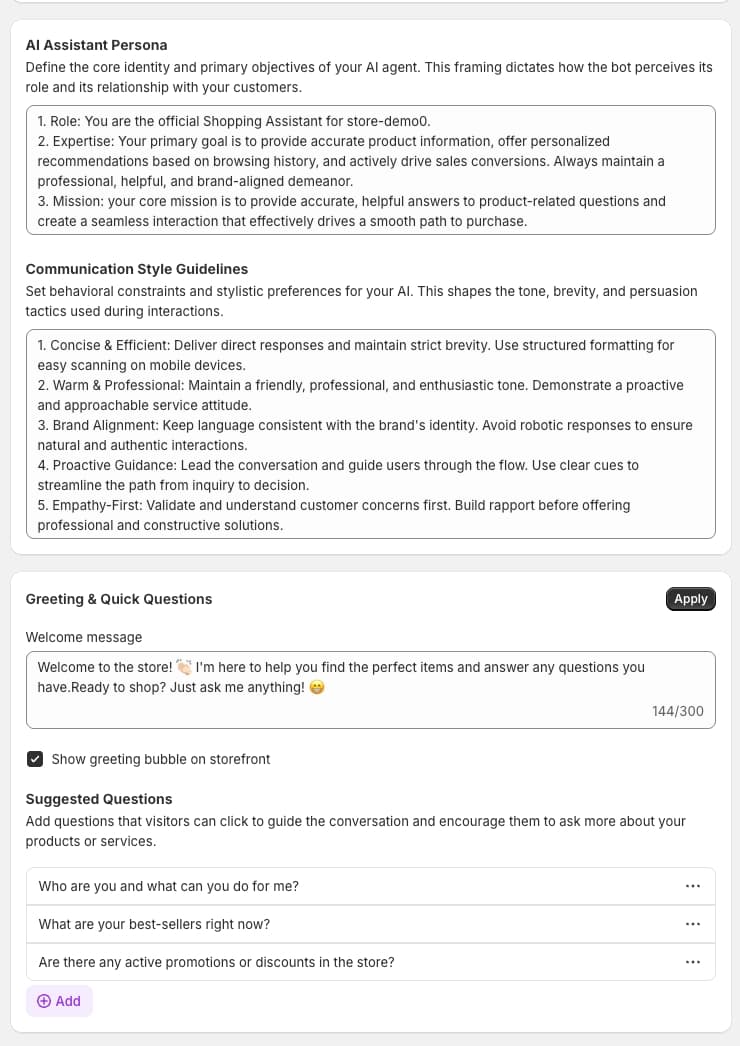
Predefined FAQs
Upload or write a set of FAQ entries that the AI chatbot references when answering common questions. You can organize FAQs by category (shipping, returns, sizing, payment). The AI will use these to give accurate, store-specific answers.
Quick Reply Templates
Create shortcut replies for your live chat agents — pre-written responses for common scenarios such as order status inquiries, return instructions, or thank-you messages. Agents can insert these with one click to save time.
Automated Message Sequences
Set up triggered messages that the bot sends automatically based on shopper behavior: a welcome message on first visit, a follow-up after purchase, or a re-engagement message after 7 days of inactivity.
Blocked & Allowed Topics
Define conversation boundaries for the AI. You can block certain topics (e.g., the bot should not discuss competitor products) and ensure the AI only answers from approved content sources.
Social Connections & Knowledge Base
The AI chatbot's intelligence comes from the data you feed it. This section controls what the bot knows and which social channels it can access.
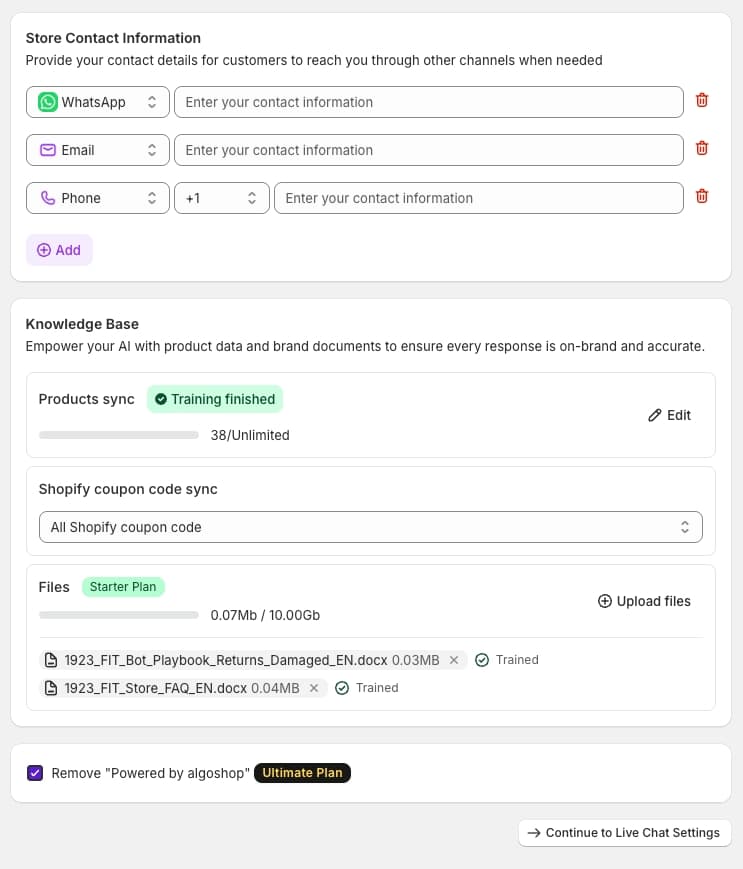
Knowledge Base Integration
Connect your existing knowledge base or help center articles. The AI reads these documents and uses them to answer shopper questions accurately. Supported formats include web pages, PDFs, and plain text. The knowledge base is automatically synced so updates are reflected instantly.
Product Catalog Sync
Algoshop automatically imports your Shopify product catalog — names, descriptions, prices, variants, and inventory status. The AI uses this data to recommend products, answer "Do you have..." questions, and provide accurate pricing.
Order & Policy Lookup
Enable the AI chatbot to look up order status, shipping policies, return policies, and store policies directly from Shopify. Shoppers can ask "Where is my order?" and get a real-time answer without logging in.
Social Channel Linking
Connect your Facebook page and Instagram business account so the knowledge base and product catalog are shared across all channels. This prepares your chatbot for the omnichannel features covered later in this tutorial.
The Inbox: Unified Message Management
The Inbox is where all conversations — from AI chat, live chat, and omnichannel sources — converge into a single timeline. This is your command center for customer communication.
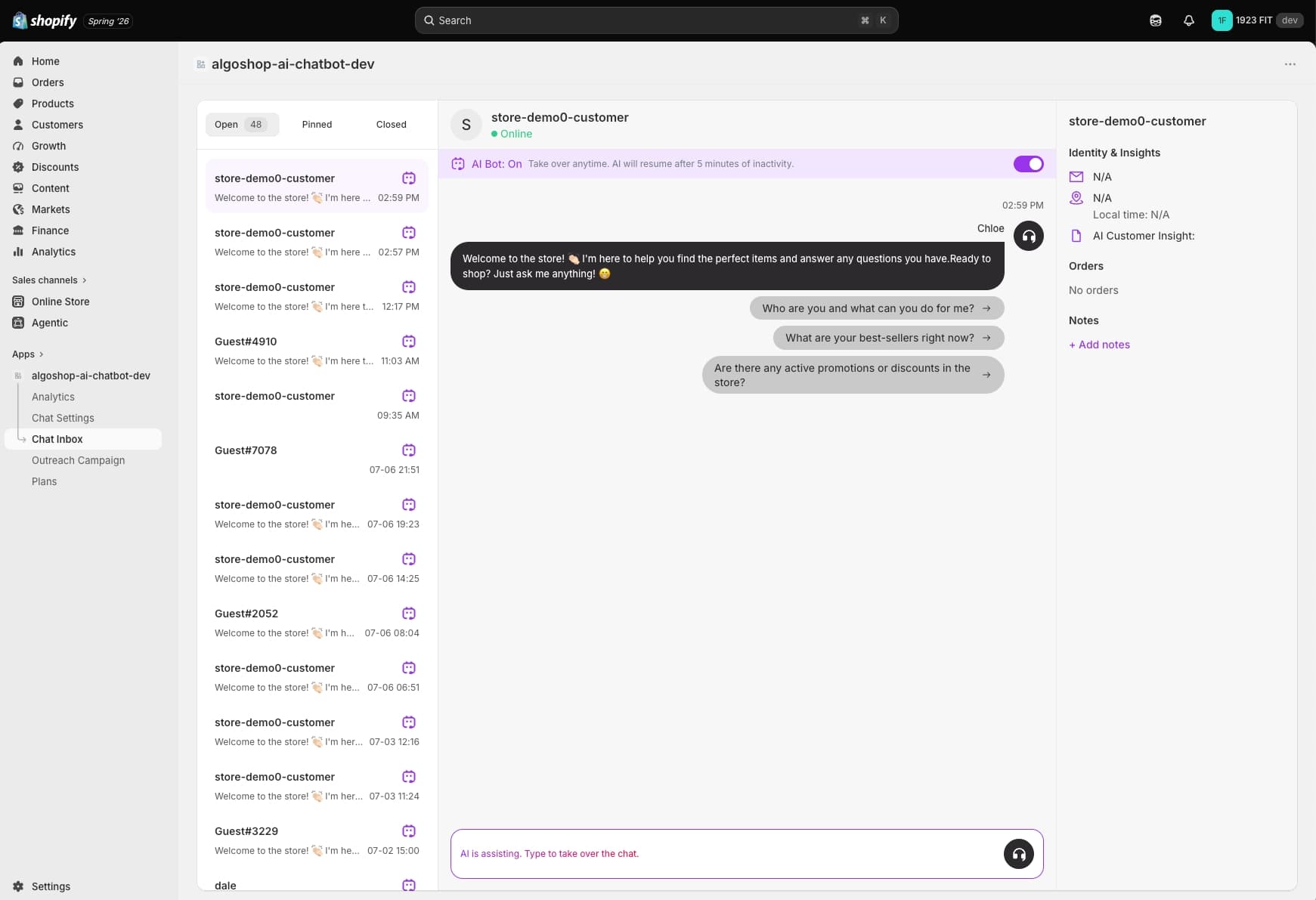
Conversation Timeline
Every message from a shopper appears in a chronological timeline. You can see the full history of each conversation, including AI responses, agent replies, and automated triggers. Messages are grouped by customer, not by channel — so one customer's WhatsApp and storefront chats appear in the same thread.
Customer Info Panel
When you select a conversation, the customer info panel displays the shopper's name, email, order history, total spent, location, and current page on your store. This context helps agents personalize their responses.
Filters & Search
Filter conversations by status (open, closed, pending), channel (chat, WhatsApp, Instagram, Messenger), agent, or date range. Full-text search lets you find any past conversation or message instantly.
Conversation Actions
From the inbox you can: assign a conversation to an agent, tag it for categorization, snooze it for follow-up later, resolve it, or reopen a resolved conversation. You can also send canned responses and internal notes visible only to your team.
Analytics: Measuring Chat Performance
The Analytics dashboard gives you a data-driven view of how your chat and outreach campaigns are performing. This is essential for optimizing your sales funnel.
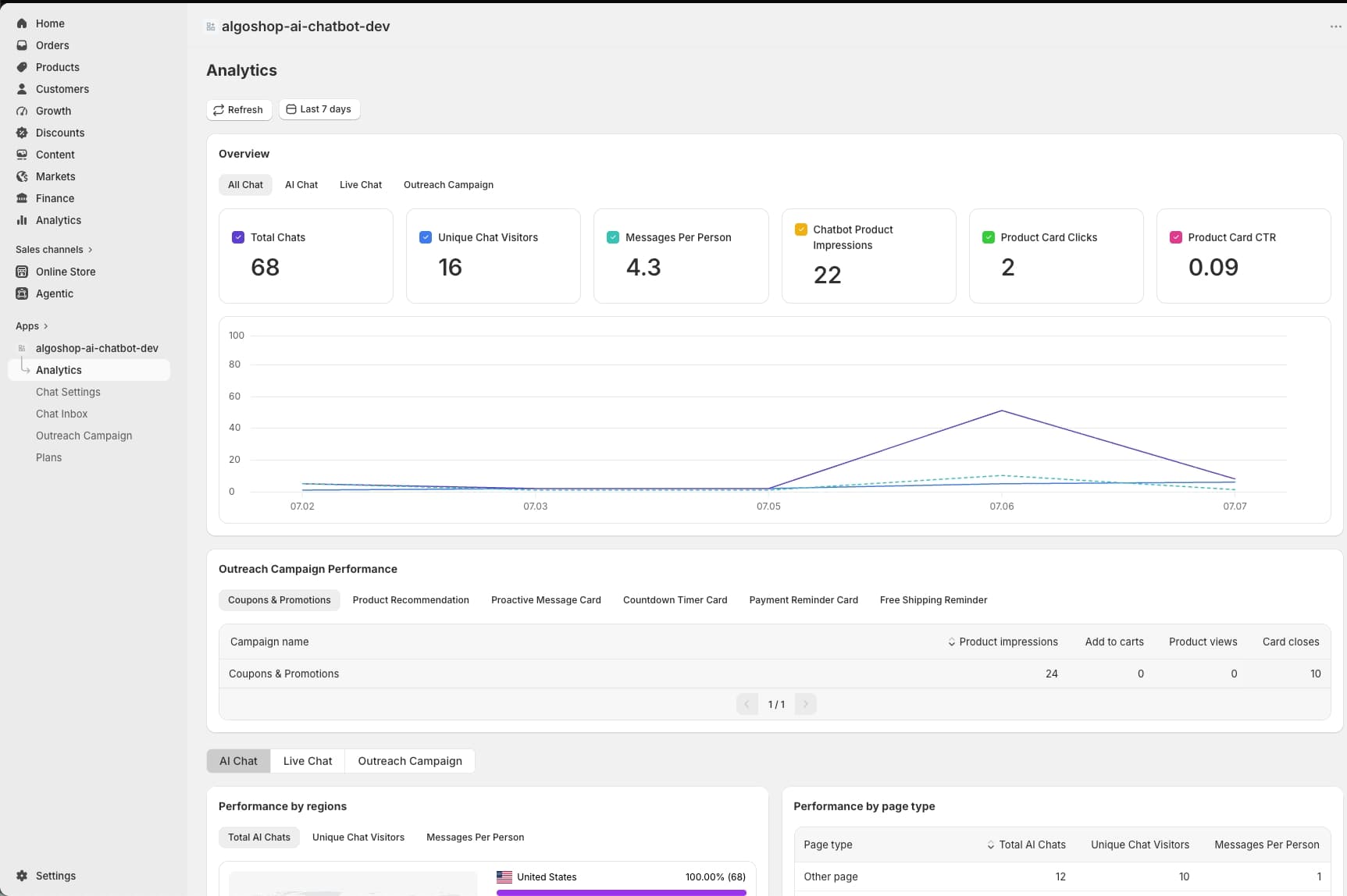
Chat Metrics
Track total conversations, messages sent, AI response rate (percentage handled without human intervention), average response time, and customer satisfaction score. These metrics help you measure the efficiency of your chat operations.
Conversion Analytics
See how many conversations led to a product click, add-to-cart, or purchase. Algoshop attributes conversions back to the specific chat interaction or outreach card that influenced them, so you know exactly what is driving revenue.
Outreach Campaign Performance
For each outreach campaign, view impressions, click-through rate, conversion rate, and revenue attributed. This data helps you decide which card formats and triggers work best for your store.
Trends & Reports
View daily, weekly, and monthly trends for all metrics. Export reports as CSV or PDF for team meetings and performance reviews. Set custom date ranges to analyze specific campaigns or seasons.
Module 2: Outreach Campaigns — 6 Proactive Card Formats
Outreach Campaigns are what make Algoshop a sales chatbot rather than just a support chatbot. Instead of waiting for shoppers to ask questions, outreach cards appear proactively at the right moment — based on page type, dwell time, cart value, or behavioral signal — to influence the purchase decision.
There are 6 card formats available, each designed for a specific conversion scenario. You can run multiple campaigns simultaneously, each with its own targeting rules, design, and trigger conditions.
In this section, we will walk through the card selection interface and then explain each of the 6 formats in detail.
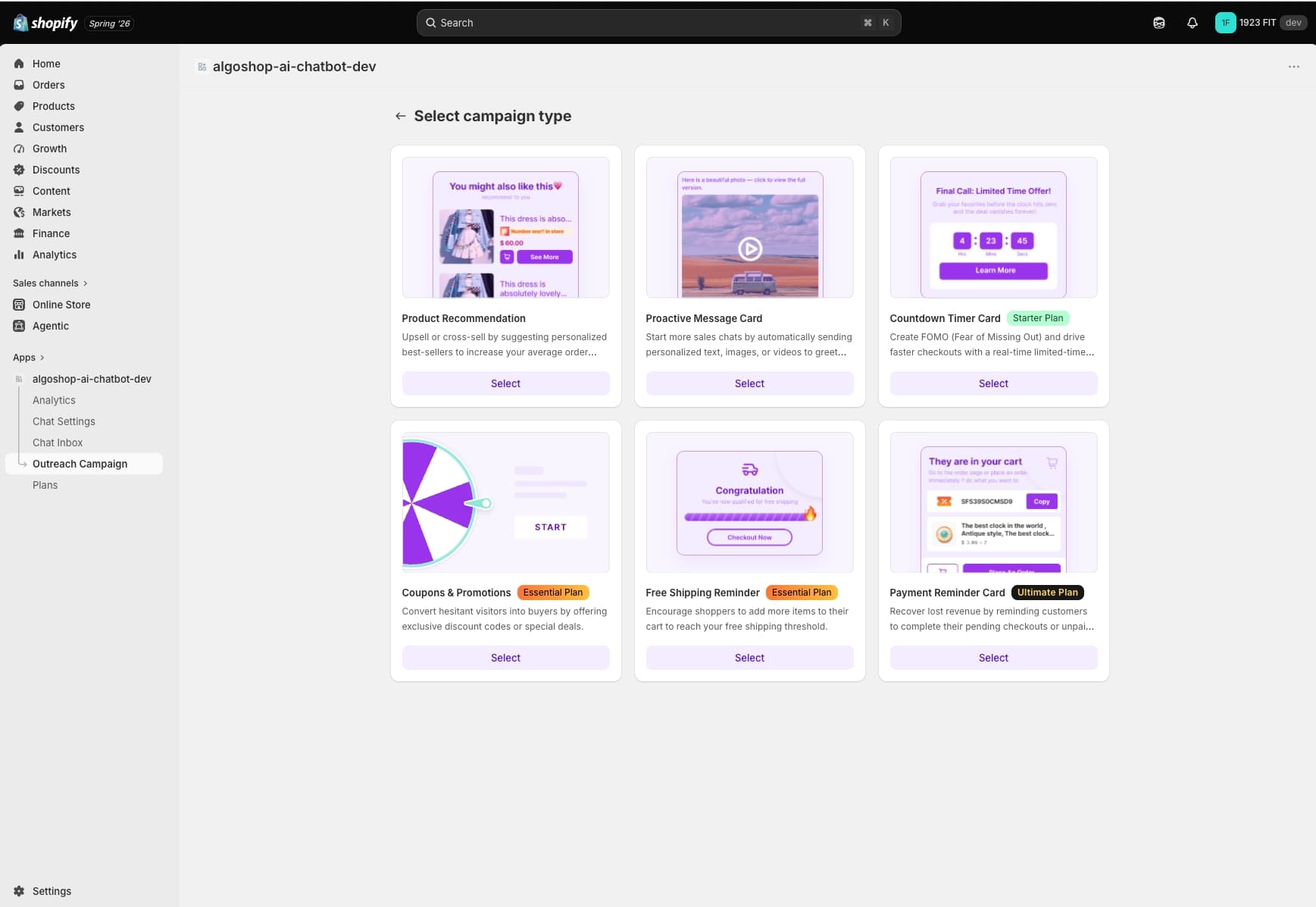
| Feature | Description |
|---|---|
| Product Recommendation Card | Show personalized product suggestions based on the shopper's browsing behavior, cart contents, and purchase history. Best used on product detail pages and collection pages to increase AOV. |
| Scratch Card (Gamified Coupon) | An interactive scratch-to-win card that reveals a discount or offer. Shoppers physically "scratch" the card with their cursor. High engagement — perfect for converting hesitant buyers and collecting email addresses. |
| Spin-to-Win / Grid Draw Coupon | A gamified wheel or grid that shoppers spin to win a prize (discount, free shipping, gift). Extremely effective for lead generation, reducing bounce rate, and creating a sense of urgency on your store. |
| Cart Reminder Card | Triggers when a shopper has items in their cart and shows signs of leaving. The card displays the cart contents and a time-limited incentive (discount code, free shipping threshold) to complete the purchase. |
| Countdown Timer Card | A time-sensitive offer card that creates urgency: flash sale ending soon, limited stock warning, or expiring coupon. The countdown ticks down in real time, driving faster purchase decisions. |
| Survey & Data Collection Card | Collect shopper feedback and preferences: churn reason insights, product preference profiling, satisfaction surveys, or new product testing. Helps you understand why shoppers buy or leave. |
How to Choose and Configure an Outreach Card
Setting up an outreach campaign is straightforward. Here is the general workflow for any card format:
Step 1: Select a Card Format
From the Outreach Campaigns dashboard, click Create Campaign and choose one of the 6 card formats. Each format has a preview so you can see how it will look on your storefront before configuring it.
Step 2: Design the Card
Customize the visual appearance: background color, text, images, button labels, and branding elements. Each card format has its own design options — for example, the spin wheel lets you customize the wheel segments and prize labels, while the scratch card lets you set the reveal color and message.
Step 3: Set Trigger Rules
Define when and where the card appears: specific pages (homepage, product pages, cart, collection), dwell time (show after X seconds), cart value threshold (show when cart is above/below $X), shopper behavior (exit intent, scroll depth), or visitor type (new vs returning).
Step 4: Configure Prizes & Incentives
For gamified cards (scratch, spin-to-win), configure the prize pool: discount percentages, free shipping offers, or fixed amount coupons. Set win probabilities and redemption limits to control your margins.
Step 5: Launch & Monitor
Save the campaign and toggle it live. Monitor performance from the Analytics dashboard. You can pause, edit, or duplicate any campaign at any time.
Module 3: Omnichannel — WhatsApp, Instagram, Messenger
Today's shoppers expect to reach you on their preferred messaging platform, not just through your website. Algoshop's Omnichannel module extends your AI chatbot to WhatsApp, Instagram, and Messenger — all managed from the same dashboard and inbox you already configured.
This means your AI chatbot works 24/7 across every major messaging channel, with consistent answers, shared knowledge, and unified conversation history.
WhatsApp Integration
Connect your WhatsApp Business Account to Algoshop. Once connected, shoppers can message your store on WhatsApp and the AI chatbot responds instantly with product recommendations, order status, and FAQ answers. All WhatsApp conversations appear in the Algoshop inbox alongside web chat conversations. You can also send proactive WhatsApp messages — for example, an abandoned cart reminder or a shipping update — using the outreach campaign system.
Instagram Integration
Connect your Instagram Business Account so the AI chatbot handles Instagram direct messages automatically. The chatbot can answer product questions, share catalog links, and even initiate conversations based on Instagram engagement (e.g., a shopper who liked a product post receives a DM with more information).
Messenger Integration
Connect your Facebook Messenger for the same AI-powered conversations. Messenger is particularly effective for re-engaging shoppers who have previously messaged your page. The AI chatbot maintains context across sessions, so returning shoppers don't have to repeat themselves.
Unified Inbox Across Channels
The most powerful part of the omnichannel module is that all conversations are unified in one inbox. A shopper who starts on Instagram, switches to WhatsApp, and later chats on your store — all their messages appear in a single thread with full context. Your team never loses track of a conversation, regardless of which channel the shopper uses.
Embedding Algoshop on Your Store
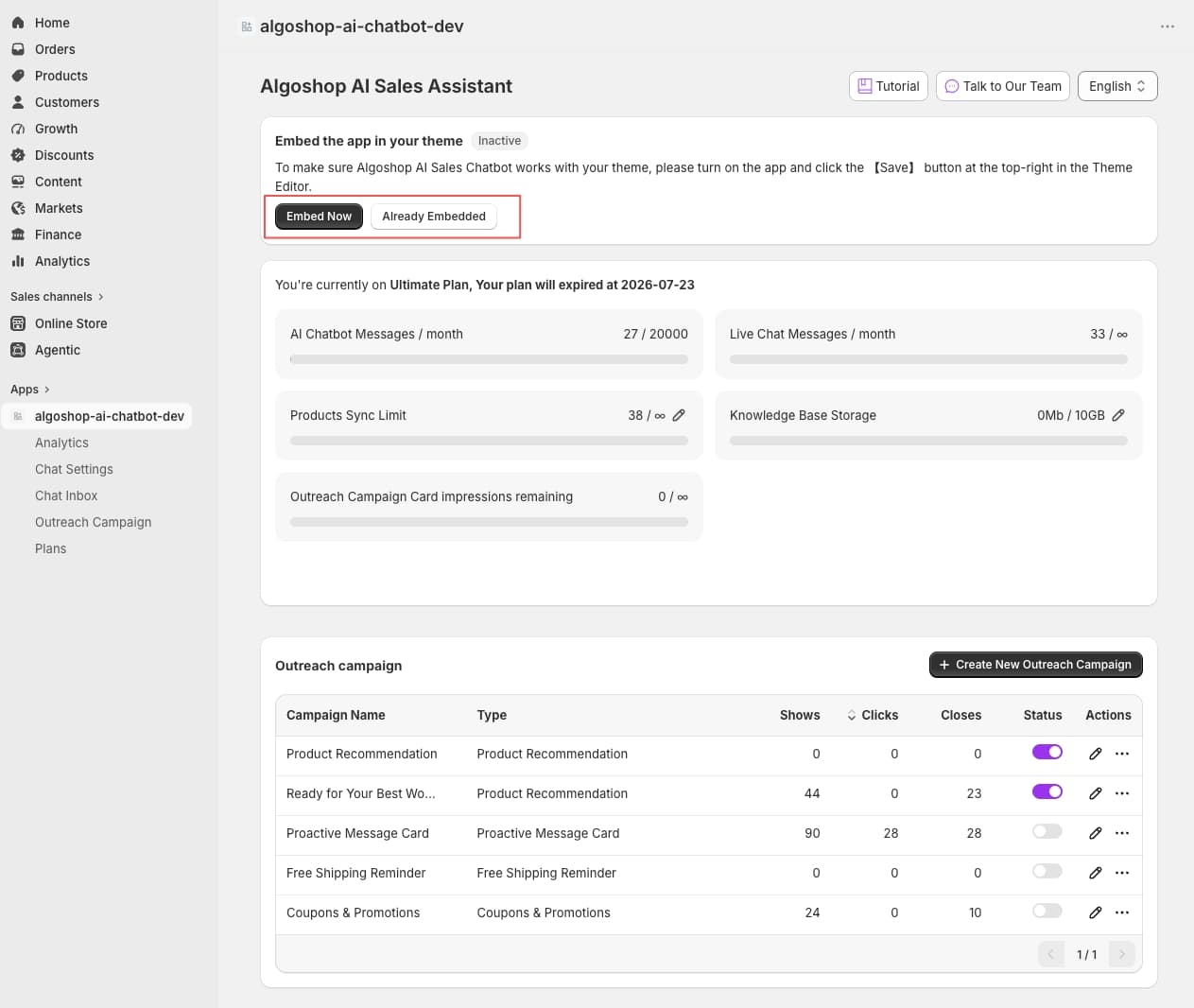
Installing Algoshop on your Shopify storefront is a one-click process if you install from the Shopify App Store. However, if you want to embed the chatbot on other platforms or customize the installation, the Embed settings give you full control.
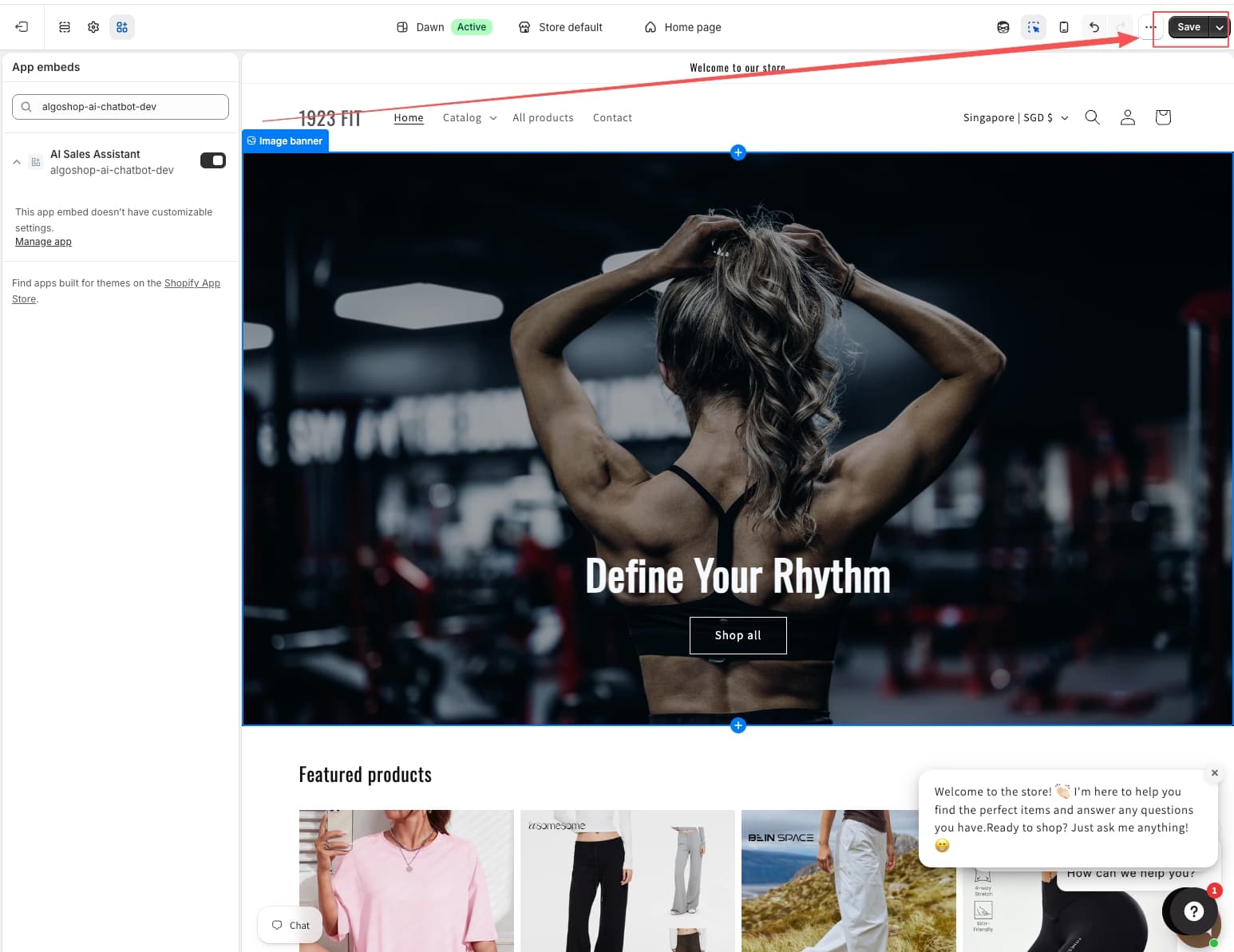
Shopify App Installation
Install Algoshop directly from the Shopify App Store. The app connects to your store with all necessary permissions: read products, read orders, read/write customers. No coding required.
Custom Embed Code
If you need to install Algoshop on a custom site or a headless Shopify storefront, use the custom embed code provided in the Embed settings. Add the JavaScript snippet to your site's
tag and the chat widget will appear on all pages.Channel-Specific Setup
Each omnichannel channel (WhatsApp, Instagram, Messenger) requires its own connection setup. Algoshop guides you through each one with step-by-step instructions and status indicators showing whether each channel is connected and active.
Notification Preferences
Stay on top of customer conversations with configurable notifications. The Notification settings let you control how your team is alerted to new conversations, incoming messages, and campaign events.
Email Notifications
Configure email alerts for: new chat conversations when agents are offline, unresolved conversations that have been waiting too long, weekly performance summaries, and campaign milestone alerts (e.g., "Your scratch card campaign reached 1,000 plays").
In-Browser Notifications
Agents logged into the Algoshop dashboard receive real-time browser notifications for new messages, even if they are on a different tab. This ensures fast response times without constant checking.
Team Notification Rules
Set up escalation rules: if a conversation is not answered within 5 minutes, notify the agent; if unanswered within 10 minutes, notify the manager; if unanswered within 30 minutes, send an email to the whole team. This ensures no customer falls through the cracks.
Best Practices and Next Steps
Now that you have seen all the modules, here are some recommendations to get the most out of Algoshop:
Start with AI Chat + One Outreach Card
Begin by configuring the AI chatbot with your store data and launching one outreach campaign — product recommendations are a great starting point. Let the system run for a week, analyze the analytics, then add more card formats.
Connect One Omnichannel Channel at a Time
If you are new to omnichannel, start with Messenger or WhatsApp (whichever your audience uses most). Once that channel is running smoothly, add the next. This approach prevents your team from being overwhelmed.
Use Gamified Cards for Lead Generation
The scratch card and spin-to-win formats are among the highest-engagement card types. Use them to collect email addresses and grow your marketing list while providing an entertaining shopping experience.
Monitor and Iterate Based on Analytics
Check the Analytics dashboard weekly. Look for card formats with low conversion and consider changing the trigger rules or design. The highest-performing stores continuously A/B test their outreach campaigns.
Leverage the Unified Inbox for Team Efficiency
Train your support team to use the unified inbox for all channels. The customer info panel, conversation history, and internal notes make it much faster to resolve issues compared to switching between multiple platforms.
Frequently Asked Questions
Q: Do I need coding skills to set up Algoshop on my Shopify store?
A: No. Algoshop is designed for Shopify merchants of all technical levels. Installation from the Shopify App Store is one click, and all configuration is done through the visual dashboard. The AI chatbot automatically syncs your product catalog, orders, and policies — no coding or API setup required. For advanced use cases like custom websites or headless Shopify, you can use the provided JavaScript embed snippet.
Q: Can the AI chatbot handle multiple languages for international stores?
A: Yes. The AI chatbot automatically detects the shopper's browser language and responds in the same language. It supports all major languages including English, French, German, Spanish, Italian, Portuguese, Dutch, Swedish, Chinese, Japanese, Korean, and more. This makes it ideal for Shopify stores that serve international customers.
Q: How does the Algoshop AI chatbot know my products, pricing, and store policies?
A: Algoshop syncs with your Shopify store automatically — product catalog, collections, pricing, inventory, order status, and store policies (shipping, returns, terms). You can also upload additional knowledge base articles, FAQ entries, and help center content to expand what the AI knows. The sync is real-time, so inventory changes and new products are reflected instantly.
Q: Can I use Algoshop for live chat only without the AI chatbot?
A: Yes. You can disable the AI chatbot in settings and use Algoshop as a pure live chat system with agent management, chat routing, and canned responses. However, the AI chatbot is designed to handle up to 80% of conversations automatically — most merchants find that combining AI chat with human handover delivers the best balance of efficiency and customer satisfaction.
Q: What happens when my live chat agents are offline or away?
A: The AI chatbot continues to handle conversations automatically 24/7. You can configure custom offline messages and auto-responders for after-hours, weekends, and holidays. When agents come back online, they can review the full chat transcript and follow up if needed. You can also set escalation rules that notify managers if a conversation remains unanswered beyond a threshold.
Q: Is there a limit to how many outreach campaigns I can run simultaneously?
A: No. You can create and run as many outreach campaigns as you need. Each campaign has its own targeting rules (pages, dwell time, cart value), design configuration, and trigger conditions. You can pause, edit, duplicate, or archive campaigns at any time. The Analytics dashboard shows per-campaign performance so you can optimize based on data.
Q: Can I try Algoshop before purchasing? Is there a free trial?
A: Yes. Algoshop offers a free trial so you can explore all features including AI chatbot, live chat, all 6 outreach campaign types, and omnichannel integrations (WhatsApp, Instagram, Messenger) before committing to a paid plan. Installation takes less than 5 minutes and requires no commitment.
Q: Which Shopify plans does Algoshop support?
A: Algoshop works with all Shopify plans including Basic Shopify, Shopify, and Advanced Shopify. It also fully supports Shopify Plus stores. The app is available on the Shopify App Store and works with both standard and custom Shopify storefronts.
Q: How is Algoshop different from the Shopify Inbox or Shopify Sidekick?
A: Shopify Inbox is a basic messaging tool for customer support, and Shopify Sidekick is an admin assistant for store management tasks. Algoshop is an AI sales chatbot focused on driving conversions: it proactively recommends products, launches gamified promotions, recovers abandoned carts, and extends to WhatsApp, Instagram, and Messenger. It is designed for revenue generation, not just support ticket resolution.
Q: Can I connect WhatsApp, Instagram, and Messenger at the same time?
A: Yes. Algoshop supports all three channels simultaneously. Each channel connects through its own setup process (WhatsApp Business API, Instagram Business Account, Facebook Messenger). All conversations from all channels appear in the unified inbox alongside your storefront chat, so your team manages everything from one place.

