

Rosetta's official illustration combines an assistant, recommendations and cart prompts. Its promotional figures are not a result measured for this article.
An extra offer is useful only when it fits the shopper's decision. Someone exploring a category needs help narrowing the choice. Someone comparing a product needs a relevant reason to consider an alternative. Someone reviewing a cart needs to understand the basket, not a new wall of promotions.
Rosetta: AI Upsell Suite brings an AI shopping assistant, personalized recommendations, contextual prompts, bundles and a cart drawer into one storefront toolkit. Its distinctive angle is the relationship between the recommendation, its explanation and the moment it appears.
This article is part of a reciprocal content collaboration with Rosetta. It explains the current Shopify product rather than treating the broader company's advertising and marketing services as included app features. The examples of merchandising decisions are editorial guidance, not a store test or a measured revenue uplift.
Make the recommendation answer a shopping question
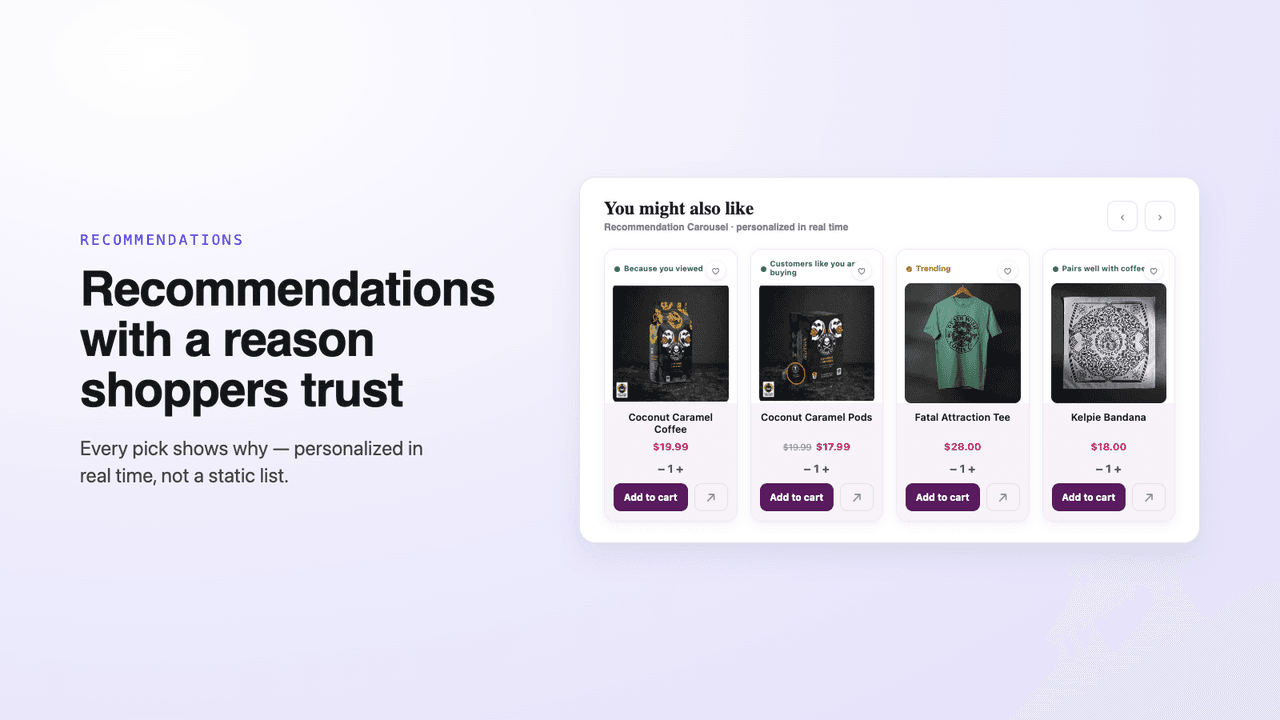
Each suggested product carries a reason instead of appearing as an unexplained list.
The Rosetta website discusses personalized interactions across the shopping journey. For a merchant, the practical starting point is the question the shopper is trying to answer: which product fits, what complements it, or what benefit a larger basket unlocks.
A recommendation without a clear relationship to that question can feel like another advertisement. A recommendation with a useful explanation helps the customer understand why they should look at it. This is particularly important when a catalog contains similar-looking options with different purposes.
Do not reduce personalization to showing more products. Decide where additional choice helps and where it makes the purchase harder. A small, well-explained recommendation can be more coherent than several widgets asking for attention at the same time; that is a design principle, not a promised conversion result.
Rosie and recommendations play different roles
The Shopify listing describes Rosie as a live AI shop assistant that responds to shopper intent. It also describes real-time recommendations that show a reason for the suggestion. Those are related but different interactions: an assistant offers a conversational entry, while a recommendation can sit alongside the browsing experience.
Choose the entry point around your catalog. A shopper who needs help narrowing choices may benefit from the assistant. A shopper already inspecting a product may prefer a concise recommendation without opening a conversation.
The published description does not establish every detail of Rosie's training, memory or access to live operational records. Do not assume an assistant can answer shipping, inventory or policy questions accurately until its available information and configuration are understood. Keep the customer's path to normal product details and support visible.
Different moments need different prompts
Rosetta names low-stock messages, free-shipping goals and cart-saver prompts among its contextual nudges. Each should answer a different customer question, not compete to create urgency.
Match the message to the decision
Browsing
Help the shopper discover relevant products. A recommendation should make its relationship to the shopper's interest understandable.
Considering an item
Use product-related context where it helps the decision. Stock information should correspond to the actual offer rather than act as decorative pressure.
Reviewing the basket
Explain shipping goals, gifts or a bundle in relation to the current basket. Keep quantities, totals and checkout easy to find.
This map is an editorial way to organize the documented features, not a claim that Rosetta assigns every visitor to these exact stages. Review the messages together on the real storefront: a reasonable prompt can still become distracting when another app displays a second one beside it.
Stock prompts deserve particular care. If the store uses preorders, several locations or unusual inventory rules, verify what the displayed message means. A shopper should not be told that a product is scarce merely because urgency is visually effective.
Timed bundles need a clear offer
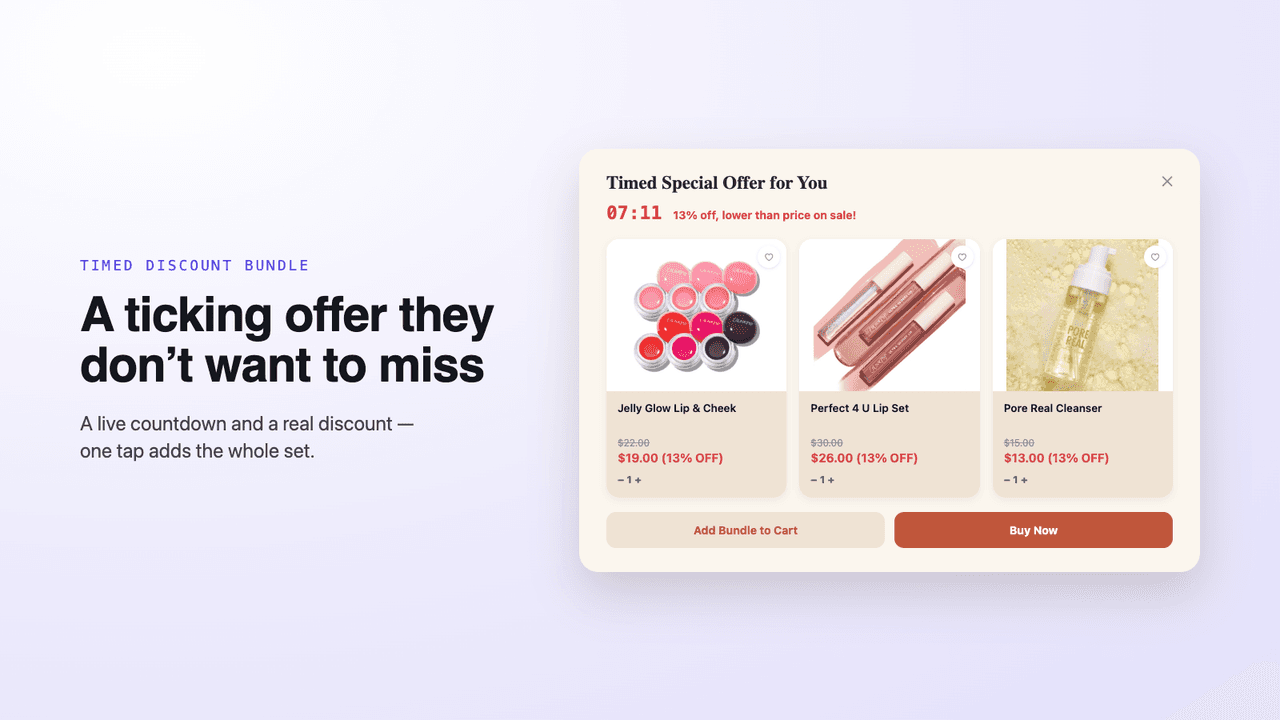
The vendor example presents contents, prices and the timer together.
A bundle asks the customer to consider a set rather than one extra item. Rosetta lists timed-discount bundles as part of its suite. The shopper needs to understand the included products, available options, total and the actual terms of the discount.
Do not use the timer as a substitute for that explanation. A time limit should reflect a genuine offer condition. If another discount is available elsewhere in the store, check the resulting checkout behavior before promoting the bundle as the best price.
Rosetta uses the term “margin-safe” in its listing, but the public description reviewed here does not explain the exact cost inputs or enforcement mechanism. We do not turn that phrase into a guarantee of profit. Product costs, delivery, returns and other expenses still belong in the merchant's pricing decision.
The cart drawer should make the purchase easier to read
Rosetta's listed suite combines several ways to present an offer. Give each a distinct job on the page rather than placing an assistant, recommendation and promotion beside one another without a hierarchy.
Give each storefront element a clear purpose
The assistant
Rosie provides a conversational route into product discovery. Keep ordinary browsing available for shoppers who prefer to explore without chatting.
The explained recommendation
Use the reason attached to a suggested product to clarify relevance. A complementary item should read as a useful option, not an unexplained replacement for the current choice.
The basket goal
Shipping or gift goals belong with the current basket and their conditions. They should not obscure item quantities, the total or the checkout action.
On mobile, inspect the combined footprint rather than each feature in isolation. The suite's breadth is valuable when the elements work together; it is not an instruction to display every interaction at once.
The suite includes a personalized cart drawer with shipping and gift goals. Those benefits are different: one concerns delivery, while the other adds a product. Make the conditions visible instead of compressing both into a generic “reward unlocked” message.
Keep the main basket first. A customer should be able to recognize the selected items, change quantities and understand the total. Place the recommendation or reward where it supports that review rather than obscures it.
Mobile is an important check because several individually small widgets can fill a limited screen. Review the drawer alongside the assistant launcher, promotional banners and any other cart apps. The aim is a coherent purchase path, not enabling every available feature simply because it exists.
Read the dashboard as product reporting, not net profit
Rosetta advertises feature-level revenue reporting in Shopify admin. That can help a merchant compare activity across the suite instead of judging it only by clicks.
Before using a report to justify a rollout, understand its definition. Revenue associated with a feature is not automatically incremental revenue that would never have occurred without it. It is also not net profit after merchandise, shipping, returns and advertising costs.
Use the dashboard to frame a question: which feature was involved, what purchase activity was recorded and what period is being compared? Then review the store's own commercial context. A promotion, stock change or traffic-source shift can affect the same period. This guide does not invent an attribution window or a formula the vendor has not documented.
Branding, language and overlapping tools
The app lists multilingual presentation and brand customization. Review both the surrounding interface and the wording of the offer in each market you serve. A translated prompt still needs accurate product details and understandable promotion terms.
The listing names English, Traditional Chinese, Japanese, Simplified Chinese, German, Spanish, French and Brazilian Portuguese. Use that list to plan the markets you can serve, then check the actual recommendation and promotion wording in each enabled language.
It also lists Automatic Discounts, Judge.me, Loox, Okendo and Yotpo among the supported connections. These names help identify the tools to include in a storefront check; they are not a guarantee that every theme, subscription and discount combination behaves identically.
If another assistant, including Algoshop, is already present, recognize the overlap. Assign the storefront entry points deliberately or choose the tool that fits the intended job. This collaboration does not establish a technical integration or prove that installing both assistants improves results.
Pricing follows app-made revenue
The Shopify pricing section, checked October 7, 2026, shows a free plan and a pay-as-you-grow plan starting at $19.99/month with a 14-day trial. It explicitly says charges increase as app-made revenue increases.
Do not budget the paid plan as a fixed $19.99 at every volume. The free allowance is displayed as a range rather than a single unambiguous threshold; confirm the applicable allowance and the definition of app-made revenue in the current billing flow.
The broader Rosetta website also promotes its platform services. Those offers should not be substituted for the Shopify app's plan terms. Confirm the app-specific cost before enabling the features in a live store.
Frequently asked questions
What is Rosie?
Rosie's published role is an AI shop assistant that responds to shopper intent and suggests products live. Confirm its information sources and configuration for the questions your customers ask.
Does Rosetta only show product recommendations?
No. Its Shopify suite also lists contextual nudges, timed bundles and a personalized cart drawer.
Does “margin-safe” guarantee profit?
The public description does not establish such a guarantee. Review actual costs and discount behavior rather than treating a marketing phrase as a financial result.
Is dashboard revenue the same as additional profit?
No. Feature reporting, incremental sales and net profit are different measures. Understand the report definition before comparing results.
Explore Rosetta: AI Upsell Suite on Shopify. Start with the shopping decision you want to improve, then choose the assistant, recommendation or cart feature that serves it clearly.

