

Supercart's official illustration shows cart offers and optional services. Keeping protection fees is not the same as earning net profit after claims and fulfillment costs.
The cart is where a shopper checks what they are buying and decides whether to continue. It is also where an extra product, a shipping reward or a paid service can either clarify the purchase or make it harder to understand.
Supercart: Slide Cart Drawer combines cart presentation with in-cart upsells, bundles, reward progress and optional services. Its distinguishing angle is bringing those decisions into one configurable drawer rather than treating each as a separate storefront interruption.
This guide is part of a reciprocal content collaboration with the Supercart team. It explains the published features and setup guidance, not an AOV test or a guarantee that every added service improves profit.
Give the cart a clear hierarchy
The cart editor documentation describes a visual editor for arranging and customizing blocks. That flexibility should begin with the shopper's main task: understand the selected items, quantities and total, then find checkout.
An upsell is secondary to that task. Keep its purpose clear and avoid filling the drawer with equally prominent messages. A product recommendation, reward milestone and service fee answer different questions; they do not need identical emphasis.
Branding should support this hierarchy. Match typography and colors to the store, but preserve readability and clear action labels. Review the drawer on a phone, where an oversized promotion can push the purchased items and checkout action out of view.
In-cart upsells and bundles are different offers
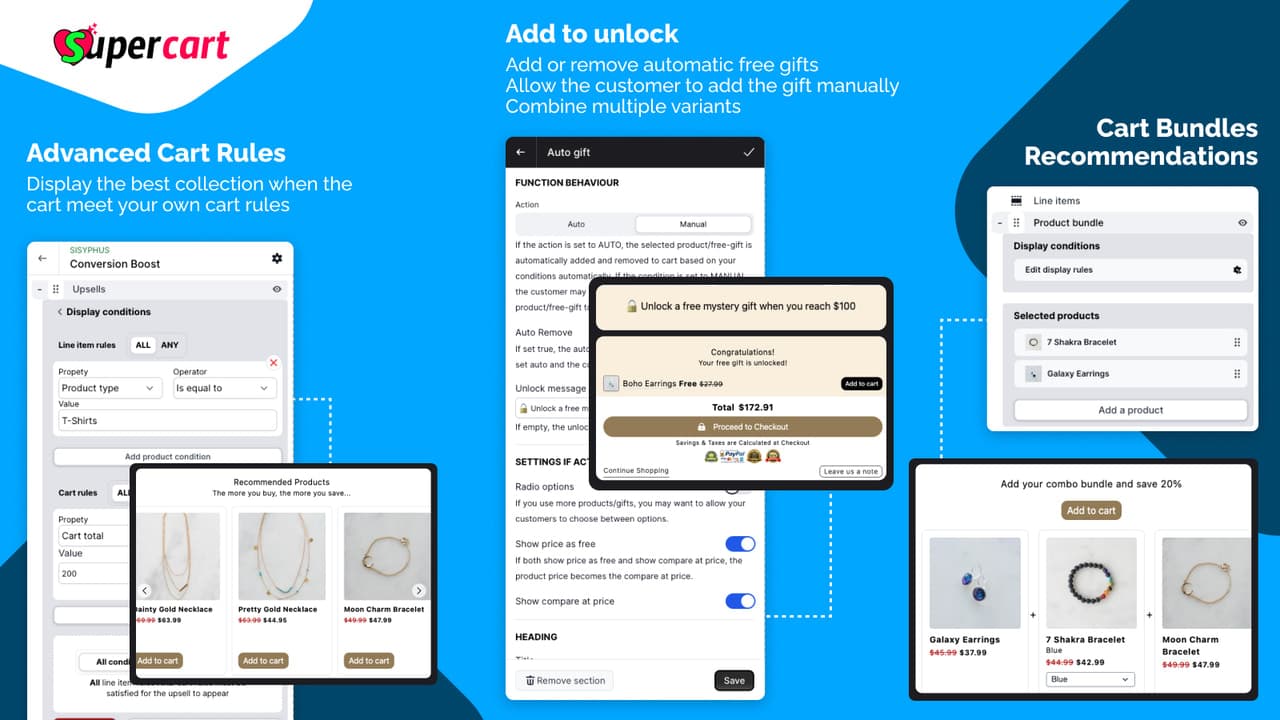
Offer rules, gift behavior and bundles are separate choices inside the drawer.
Supercart describes one-click cart additions and product bundles. An individual add-on lets the customer supplement the chosen purchase. A bundle presents several items as a coordinated offer. Those are different merchandising decisions even if both appear inside the cart.
Choose an add-on when its relationship to the original product is easy to explain. Choose a bundle when the set itself is useful and the shopper can understand what it contains. Do not rely on the word “AI” to replace the explanation of why a recommendation fits.
The documentation portal separates upsells, bundles and conditional rules. Use the current rules and product settings to define the audience for an offer, then check stock and discount behavior in the actual store. This guide does not assert an undocumented stacking or inventory rule.
Reward progress should explain the next benefit
The shipping and gift progress feature presents milestones inside the cart. This helps shoppers see the relationship between the basket and a reward instead of discovering the condition late in the purchase.
Free shipping and a gift are not interchangeable. One changes a delivery charge; the other adds an item. Make the threshold, eligible region and relevant terms understandable for whichever campaign you run.
Three cart messages with different jobs
Product addition
Explain what the item adds to the purchase. Keep the price and product identity visible before the shopper accepts.
Reward progress
Explain the benefit and the requirement. A progress message should correspond to the real campaign terms, not an arbitrary pressure tactic.
Optional service
Explain what the customer is paying for and who provides it. A separate fee should not be disguised as a necessary product addition.
These are editorial design recommendations, not revenue predictions. The best cart presentation lets a customer make an informed choice quickly.
In-house shipping protection remains your responsibility
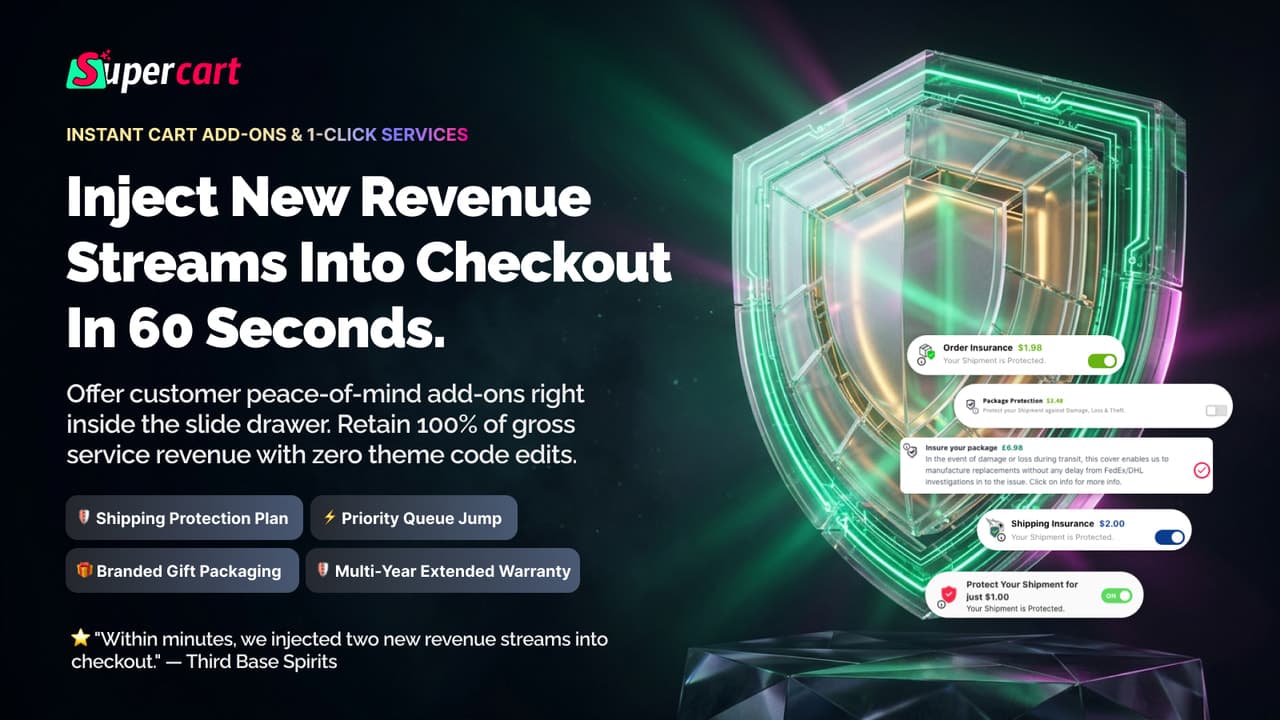
The drawer presents the service; coverage and claim handling remain the merchant's responsibility.
Supercart describes in-house shipping protection as a merchant-managed service. That differs from transferring the risk to a third-party insurer. The app can present and charge for a service; it does not make replacement costs or customer obligations disappear.
Before enabling protection, define coverage, exclusions and the claim process. Customers need to know how to ask for help and what the store will do if a parcel is lost or damaged. Do not call a collected protection fee “100% net profit”: product replacement, reshipping and staff time affect the economics.
For legal or insurance questions, obtain appropriate advice for the market where the store operates. This guide does not determine whether a merchant's particular protection arrangement is legally compliant.
Rush processing and gift packing need operational backing
The listing also describes rush processing, handling fees and gift packing. These are concrete services, not merely extra lines in a cart total.
If you offer rush handling, define what happens sooner and what does not. Faster warehouse processing is not automatically a faster carrier service. If you sell gift packing, make sure the fulfillment team receives the instruction in a form it can act on.
A well-designed optional service links the purchase choice to a real operational action. A cart that collects a fee without a reliable handoff creates a support problem, even if the drawer itself looks polished.
Test the drawer before changing the live store
The editor guide distinguishes rearranging a block, hiding it and deleting it. Hiding keeps the saved content and settings; deleting removes the block from that cart version. That makes a seasonal gift-wrap offer a different editing job from removing an offer permanently.
A drawer with a clear buying hierarchy
What is already in the basket
Keep line items, variant choices, quantities and prices easy to inspect. These establish what the customer is about to buy.
What is optional
Use separate blocks for add-ons, services or reward progress. The customer should understand both the choice and any price attached to it.
How to finish
Keep the subtotal and checkout action recognizable. Decorative changes should not make the primary task harder to find.
The documentation says edits are saved to the cart template automatically, while Re-Publish pushes the changed version to shoppers. A saved draft is therefore not confirmation of a live update. Preview the intended version, approve it, then use the documented publication step; check the storefront afterward instead of assuming that saving changed what customers see.
Supercart's publishing guide describes working with duplicate themes and previewing before launch. This is the right place to check branding, cart contents, offer rules and checkout entry together.
Use the store's actual purchasing paths. Review ordinary cart additions, changed quantities, discounts and any subscription or fulfillment connections you depend on. Only advertise a supported integration once its particular configuration is understood.
If several tools manage cart behavior, choose which one owns each interaction. A new drawer should not create two competing free-gift rules or two unrelated checkout buttons. Consolidating presentation is useful only if the underlying rules remain coherent.
Plans and commission: understand the usage thresholds
The Shopify listing, checked October 7, 2026, starts with a free-to-install tier and paid Growth tiers. The free tier describes up to 15 orders per month or $1,000 in monthly Supercart revenue. The published paid bands are:
Swipe horizontally to read the full table.
| Plan | Monthly price | Monthly order band | Supercart revenue threshold |
|---|---|---|---|
| Growth 2 | $9.99 | 16–99 | Up to $2,000 |
| Growth 3 | $18.99 | 100–299 | Up to $3,000 |
| Growth 4 | $27.99 | 300–499 | Up to $4,000 |
The listing joins the order and revenue thresholds with “or”; confirm how those criteria interact if your store falls into different bands. All three paid tiers show a 14-day trial.
The app advertises 0% GMV commission. That describes its commission model—not the margin of the merchant's products or services. Subscription charges and operational costs remain separate.
Because the listing uses order and Supercart-revenue thresholds, confirm which rule determines your tier before budgeting. Do not assume a monthly price is fixed at every store volume or that the revenue threshold refers to all Shopify sales.
Frequently asked questions
Is Supercart only a cart-design app?
It combines the drawer with merchandising and optional-service features, including upsells, bundles, gifts and shipping progress. The visual editor organizes how those features appear.
Is its in-house protection third-party insurance?
The product describes a merchant-managed protection engine. Do not present it as third-party underwriting or assume the app absorbs replacement costs.
Do free gifts and free shipping do the same thing?
No. A gift adds a product; a shipping reward changes a delivery benefit. Their campaign conditions should be explained separately.
Does no GMV commission mean all fees are profit?
No. It means the app's advertised commission is not a percentage of GMV. Product, shipping, claims and other costs still affect profit.
Explore Supercart's setup documentation and its Shopify listing. Build the drawer around the choices your customers genuinely need, and enable only the services your team can reliably deliver.

