
Algoshop AI Sales Chatbot is now available in the WordPress Plugin Directory. WordPress website owners and WooCommerce merchants can install the plugin, connect an Algoshop account, and bring AI shopping assistance, human support, and proactive outreach into the same customer conversation channel.
The launch extends access beyond Shopify. This guide explains what the WordPress plugin enables, how the three product modules work together, and how to install and test the experience before making it available to visitors.
WordPress
Basic chat works without WooCommerce.
WooCommerce
Connect product discovery, variants, and cart actions.
Three modules
AI Chatbot, Human Support, and Outreach Cards.
Flexible placement
Sitewide display, shortcode, or Gutenberg block.
An Algoshop account is required. Service limits depend on the plan and connected services.
What the WordPress launch means
Algoshop AI Sales Chatbot is a customer communication product that combines AI assistance, live human support, and proactive outreach cards. The WordPress plugin connects a website to the Algoshop SaaS service that provides the chatbot and supported commerce functions.
For a WordPress website, the starting point is answering visitor questions using the business information and reference material supplied to the chatbot. For a WooCommerce store, the connection adds product and shopping context: customers can discover relevant items, choose available variants, and add products to their cart from chat.
These are different setup paths within the same product. A website without WooCommerce can use basic chat, but it does not gain a WooCommerce catalog or cart simply by installing the plugin. Store-specific features require the appropriate connection, available data, and enabled services.
Swipe horizontally to read the full table.
| Website setup | Starting use | What to prepare |
|---|---|---|
| WordPress without WooCommerce | Visitor questions and basic chatbot assistance | Business information, policies, reference files, and contact details |
| WordPress with WooCommerce | Product discovery and supported cart or order assistance | Store authorization, accurate product information, and shopping policies |
| Existing Shopify store | Continue using the Shopify integration | Use the existing Shopify setup; the WordPress plugin is for WordPress websites |
The plugin handles the website connection and display options. The Algoshop Dashboard is where merchants customize the chatbot and manage conversations and campaigns. See the WordPress AI chatbot overview and WooCommerce AI chatbot overview for the platform-specific product context.
AI Chatbot: from questions to purchase decisions
The AI Chatbot module helps visitors express what they need and receive useful answers without waiting for a team member to be online. Its answers depend on the information available from the connected store and the knowledge supplied by the merchant.
Answer product and policy questions
Product questions often combine several requirements: size, material, intended use, shipping destination, or return eligibility. Prepare information that supports a concrete answer. A product description that only says “premium quality” gives the assistant less useful context than a description with dimensions, materials, care instructions, and relevant limitations.
Store knowledge can include shipping and return policies, everyday questions, and reference files. Keep these sources current when delivery terms or product details change. If a shopper asks for an exception that is not documented, human support should resolve it rather than relying on an inferred promise.
Recommend products based on stated needs
Product discovery uses what shoppers ask for and the product information available from the connected store. A request such as “a lightweight gift for someone who travels” becomes more useful when the conversation also establishes the budget, preferred style, and intended use.
Illustrative example: a shopper needs a travel gift under a stated budget. The assistant can help narrow the requirements and suggest relevant catalog products. The merchant should check that the recommendations match the catalog descriptions and available variants. This example illustrates a workflow, not a measured conversion result.
Continue toward the WooCommerce cart
The plugin supports choosing available product variants and adding items to a WooCommerce cart from chat, with a path to checkout. This keeps product selection connected to the conversation. It does not replace the store's checkout, payment, coupon, or shipping rules.
Test a product with multiple variants before launch. Confirm that the chosen option reaches the cart correctly, that the cart reflects the current price, and that checkout remains usable on mobile. A good answer is only one part of the journey; the next action must also work.
Help with orders and multilingual conversations
Customers can request order information using their order details, and tracking information can be looked up where supported by connected services. Avoid presenting delivery tracking as universal: the result depends on the store connection and the available tracking service.
Multilingual conversations let customers ask questions in their preferred language. Merchants should still test key product terms, shipping questions, and policy explanations in the languages their customers actually use. Brand-specific vocabulary and incomplete source information deserve particular attention.
Human Support: keep the team in the conversation
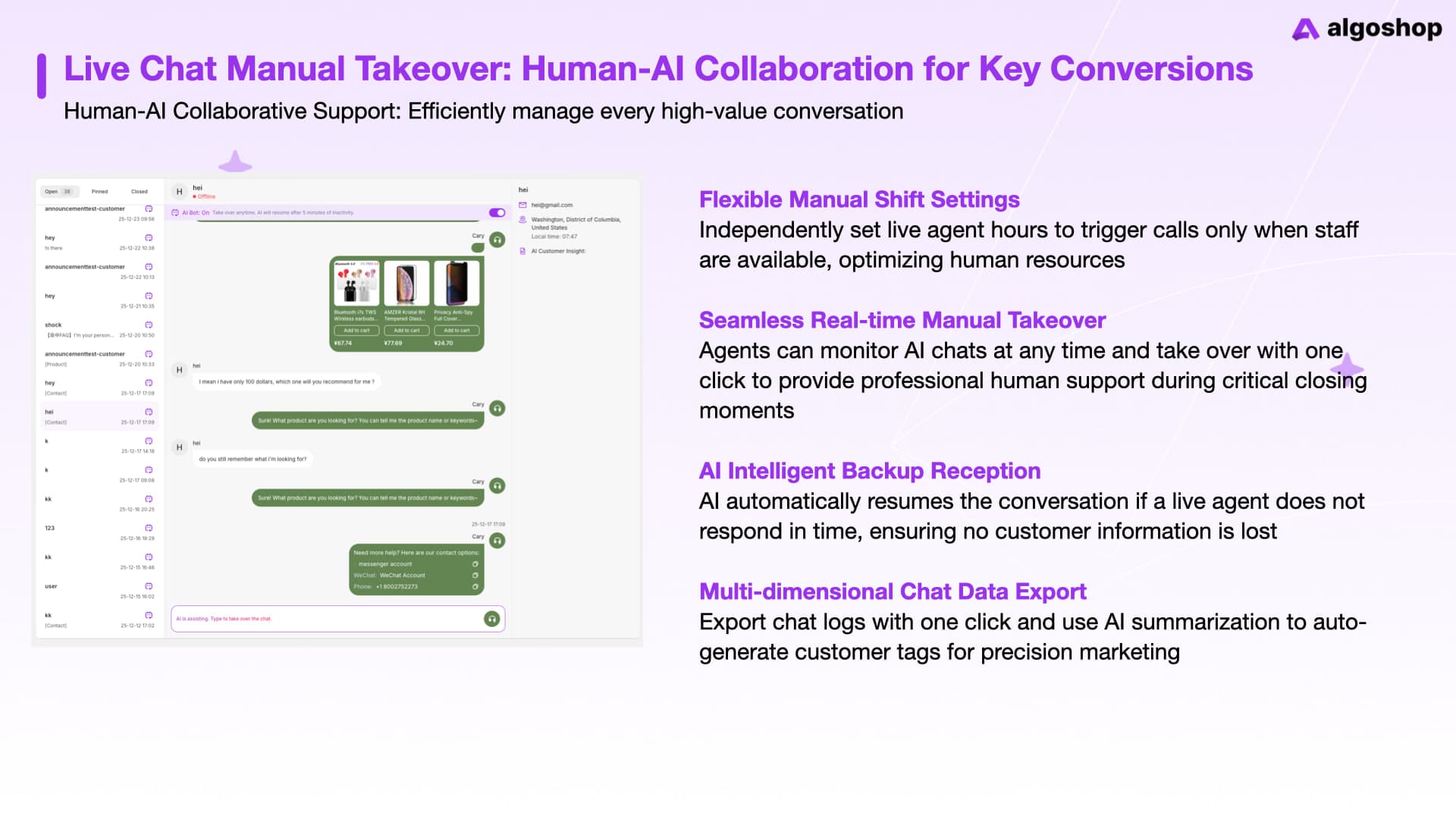
Human Support lets staff take over an AI-assisted conversation when a shopper needs a personal response. The shared conversation inbox provides the context before a team member replies, helping avoid repeated questions and disconnected exchanges.
Use human takeover for decisions requiring merchant judgment: unusual delivery requests, exceptions to return policies, a disputed order, or a product question that the available information cannot resolve. The assistant can handle routine information while staff manage the unresolved part.
Swipe horizontally to read the full table.
| Situation | Useful AI role | Useful human role |
|---|---|---|
| Standard shipping question | Explain the documented policy | Confirm an exceptional delivery arrangement |
| Product selection | Explain known attributes and suggest options | Resolve an undocumented suitability question |
| Order question | Retrieve supported order information | Investigate an issue that needs store action |
Merchants can set live chat hours so visitors understand when human support is available. AI can also be configured to resume assistance after a period of agent inactivity. Set this behavior deliberately: the customer should understand whether they are receiving an AI response or speaking with staff.
Configured email, phone, and social contact links provide other ways to reach the business. Keep those destinations current, and assign someone to monitor the channels being advertised. A visible contact option is useful only when the business can follow through.
Outreach Cards: offer help while shoppers browse
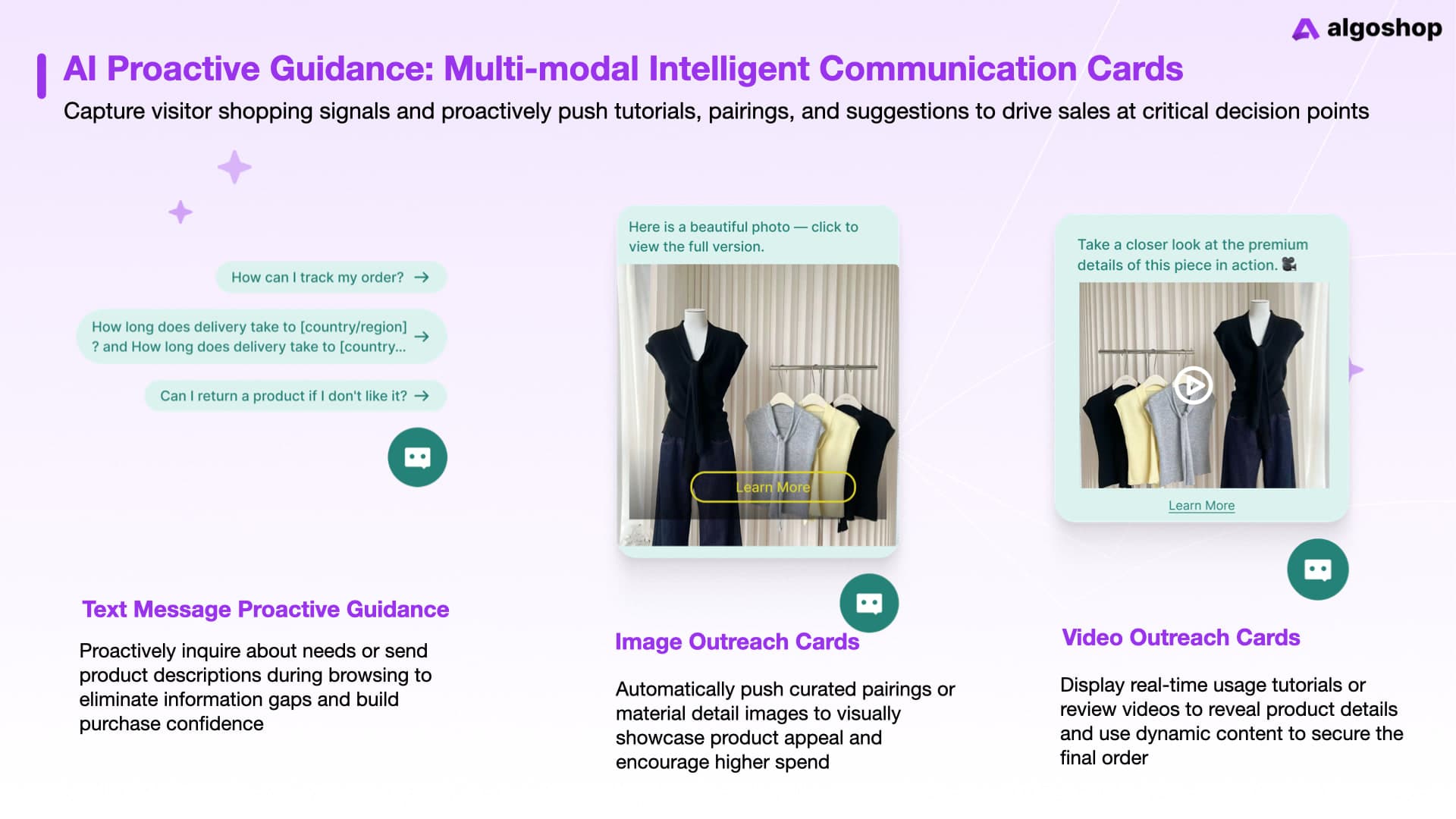
Outreach cards are proactive messages and interactive cards configured by the merchant to engage visitors during browsing. They work alongside the chatbot as part of the store's communication channel, with page targeting, behavioral conditions, timing, and display settings.
A visitor does not have to open a chat first. A card can introduce useful information or an offer at a relevant moment, and the shopper can continue the interaction through the chatbot. The merchant chooses the content and conditions that fit the shopping journey.
The product includes the following ten card forms. They serve different needs, so a store can begin with one relevant format instead of displaying every possible experience.
Swipe horizontally to read the full table.
| Card form | Example use | Merchant preparation |
|---|---|---|
| Proactive text | Offer help on a product page | A concise question or useful answer |
| Image | Explain a detail or show a pairing | An accurate image and relevant link |
| Video | Demonstrate how a product is used | A useful demonstration and clear destination |
| Product recommendation | Highlight related items or bestsellers | Relevant catalog products |
| Scratch card | Invite participation in an offer | Reward content and campaign settings |
| Spin-to-win wheel | Present an interactive promotion | Prize options and offer conditions |
| Prize grid | Provide a different draw experience | Reward choices and campaign appearance |
| Cart reminder | Help shoppers return to checkout | Relevant cart context and checkout link |
| Free shipping progress | Explain the gap to a threshold | A threshold consistent with store rules |
| Promotion countdown | Show when a scheduled offer ends | A genuine deadline and matching offer |
Use information cards for purchase uncertainty
A shopper may hesitate because the product page has not answered a specific question. A text card can invite a question; an image can show a detail; a video can demonstrate use. Match the format to the information needed. An unrelated promotion adds another decision without resolving the original uncertainty.
For example, a product that needs assembly may benefit from a short demonstration linked through a video card. Place it where the shopper is evaluating that product, and make the next action understandable. The content should answer something the visitor is likely to need.
Use shopping reminders for a concrete next step
A cart reminder can guide a shopper back to checkout. A free shipping card can show the amount remaining to reach the configured threshold. These formats work best when the message agrees with the store's actual cart and shipping rules.
Illustrative example: a store offers free shipping at $60 and a shopper's eligible cart is $49. A progress card could show that $11 remains. Those values are example settings, not Algoshop defaults. Check how the store treats discounts, taxes, destinations, and excluded products before using the same message.
Configure interactive offers and real deadlines
Scratch cards, wheels, and prize grids provide interactive coupon experiences. Prepare the reward and its conditions before styling the card. Supported campaign forms can invite contact details for follow-up with appropriate consent.
Promotion countdowns should correspond to genuine scheduled offers. Keep the displayed deadline, discount validity, and checkout behavior consistent. The plugin's current changelog states that WooCommerce coupon entry remains unchanged; a card should not imply that a coupon is automatically applied when that has not been configured and tested.
For more product context, see the Algoshop complete tutorial and the campaign image library.
How the three modules work together
The three modules support different moments in one customer journey. Outreach starts a relevant interaction, AI handles product or policy questions, and human support resolves issues that need a person.
The following is an illustrative WooCommerce workflow:
Swipe horizontally to read the full table.
| Shopper action | Product response | Merchant configuration |
|---|---|---|
| Browses a product with unanswered questions | A text or video card offers help | Page targeting and helpful content |
| Asks whether the product suits a need | AI uses available product knowledge | Accurate catalog and reference information |
| Chooses a variant | Supported chat action adds the item to the cart | WooCommerce connection and variant testing |
| Requests a special delivery exception | Staff take over the conversation | Live chat availability and support ownership |
| Returns to the cart | A relevant reminder offers a checkout path | Timing, cart conditions, and destination |
This is a useful design pattern for merchants: connect each intervention to a shopper question or next step. The workflow does not promise a particular revenue result. Its practical value is making assistance available without forcing customers to restart the conversation at every stage.
Install and connect the WordPress plugin
The official plugin readme currently lists WordPress 6.4 or later and PHP 8.1 or later as minimum requirements. Check the current plugin listing before installing, because requirements can change. An Algoshop account is required; WooCommerce is optional for basic chat and necessary for WooCommerce-powered features.
install and activate
In the WordPress Plugins screen, search for Algoshop AI Sales Chatbot, install the plugin, and activate it. Alternatively, download its ZIP from the plugin directory and use Plugins → Add New Plugin → Upload Plugin, then activate it.
connect the account
Open Settings → Algoshop Chatbot and connect the Algoshop account. Plugin settings and connection changes require an administrator with the WordPress manage_options capability. Use the business account responsible for the store so staff can manage its configuration consistently.
authorize WooCommerce when applicable
If the website uses WooCommerce, approve the requested store access. The plugin documents read_write authorization for supported product and commerce features. Review the connection during setup, then test catalog and cart actions rather than assuming every feature is ready because installation succeeded.
choose the display method
Turn on the chatbot and choose sitewide display, or place it using the shortcode or Gutenberg block:
- Shortcode:
[algoshop_chatbot] - Block: Algoshop Chatbot
- Optional shortcode attribute:
[algoshop_chatbot store_id="..."]; when specified, the value must match the connected Store ID.
Choose the placement based on where visitors need assistance. A store can begin on the pages most relevant to its first use case, then expand after testing the experience.
configure and test
In the Algoshop Dashboard, customize the chatbot name, avatar, colors, welcome message, and suggested questions. Add the store information and reference material needed for accurate answers. Configure live support and the first outreach campaign.
Before enabling the experience broadly, test desktop and mobile display, a policy question, a product recommendation, a variant selection, a cart action, and human takeover. For any active offer, check the destination and redemption conditions at checkout.
Build a practical first configuration
A focused first setup makes it easier to see whether the chatbot is useful. Start with the questions the business already receives, then add a proactive interaction that addresses a specific problem.
- Prepare store knowledge. Review delivery, returns, product specifications, and common questions. Remove outdated information and resolve contradictory policies.
- Make the channel recognizable. Set the chatbot identity and greeting. Suggested questions should describe tasks visitors can actually complete.
- Define support ownership. Set human support hours, identify who monitors the inbox, and decide when staff should take over.
- Launch one relevant card. Choose a product explanation, cart reminder, or another clearly justified format. Align its targeting and content with the intended audience.
- Validate the complete interaction. Follow the journey from the card or greeting to the answer, cart, or staff response. Fix the first broken step before adding more campaigns.
For a WordPress site without WooCommerce, begin with visitor questions and configured contact options. For a WooCommerce store, include the catalog and shopping actions in the test. This distinction keeps the setup relevant to the website's actual capabilities.
Understand the service and data connection
The plugin connects to Algoshop SaaS for chatbot delivery, AI replies, and supported commerce features. Its official documentation describes sharing shopper messages and relevant page, product, cart, and browser context, as well as store data needed for enabled WooCommerce features.
The widget also uses ipapi.co for approximate visitor location derived from a public IP address. Review the plugin's External services section and the Algoshop privacy policy when preparing the website's disclosures. This information belongs in the installation decision, especially when enabling contact collection or location-based experiences.
Review conversations and improve the experience
The Dashboard provides chatbot activity and outreach performance insights, conversation history, and available region and device information. Use these to identify the questions customers ask, where answers are incomplete, and whether campaign content fits the audience.
A practical review begins with the interaction itself: did the answer address the question, did the recommendation match the need, and did the next action work? Then review the available activity and campaign data. More card clicks do not automatically mean more completed orders.
When investigating a change, keep its context: the page, device, product, active offer, and campaign timing. Change one relevant setting at a time where practical. If comparing sales outcomes, use consistent periods and the store's actual order data; do not treat a conversation count as attributable revenue.
Frequently asked questions
Is Algoshop available as a WordPress plugin?
Yes. Algoshop AI Sales Chatbot is available in the WordPress Plugin Directory. Install and activate the plugin, then connect an Algoshop account through Settings → Algoshop Chatbot.
Can it be used with WooCommerce?
Yes. Connect WooCommerce to enable the supported product and commerce features, including product discovery, available variant selection, and adding items to the cart from chat. Availability depends on the plan, connection, and enabled services.
Is WooCommerce required for basic chat?
No. Basic chatbot use can run on WordPress without WooCommerce. WooCommerce is required for the features that rely on its product, cart, and commerce data.
Does the plugin require an Algoshop account?
Yes. The plugin connects the website to the Algoshop SaaS service. Chatbot customization, conversations, and campaigns are managed through the Dashboard.
Does installing the plugin make the SaaS service unlimited or free?
No. Plugin installation and SaaS service usage are separate. Features and usage limits depend on the Algoshop plan. Review current pricing and the account's subscription before choosing a plan; this article does not assume a particular free allowance.
Can a human agent take over a conversation?
Yes. Human Support includes a conversation inbox and live takeover. Set support hours and configure the behavior for agent inactivity to fit the team's availability.
Can merchants customize the chatbot and outreach cards?
Yes. Chatbot settings include its name, avatar, colors, greeting, and suggested questions. Outreach formats have appearance, content, targeting, timing, and offer settings appropriate to the campaign.
Can the chatbot help in multiple languages?
Yes. Multilingual assistance is part of the documented feature set. Test the languages and terminology relevant to the business, especially product details and policy answers.
Does deactivating the plugin cancel a subscription?
No. The plugin documentation states that deactivation pauses the connection without disconnecting the store or canceling billing. Uninstall requests service shutdown and cancellation at the end of the current billing period, with no refund. Confirm subscription status in the Dashboard when changing service usage.
Where can installation questions be sent?
Contact support@algoshop.ai. Include the website setup, the connection step involved, and the behavior observed. Do not send passwords or private connection credentials.
Get started with Algoshop for WordPress
WordPress and WooCommerce merchants can now use Algoshop AI Sales Chatbot to combine AI assistance, human conversations, and proactive outreach. Start with accurate store knowledge, a clear support process, and one useful campaign; test the customer journey before expanding it.
Install from the WordPress Plugin Directory, open the Dashboard, or contact support for setup help.
Product reference: feature descriptions and installation details are based on the official plugin readme, reviewed October 3, 2026. Check the current listing for version requirements and changes.

