
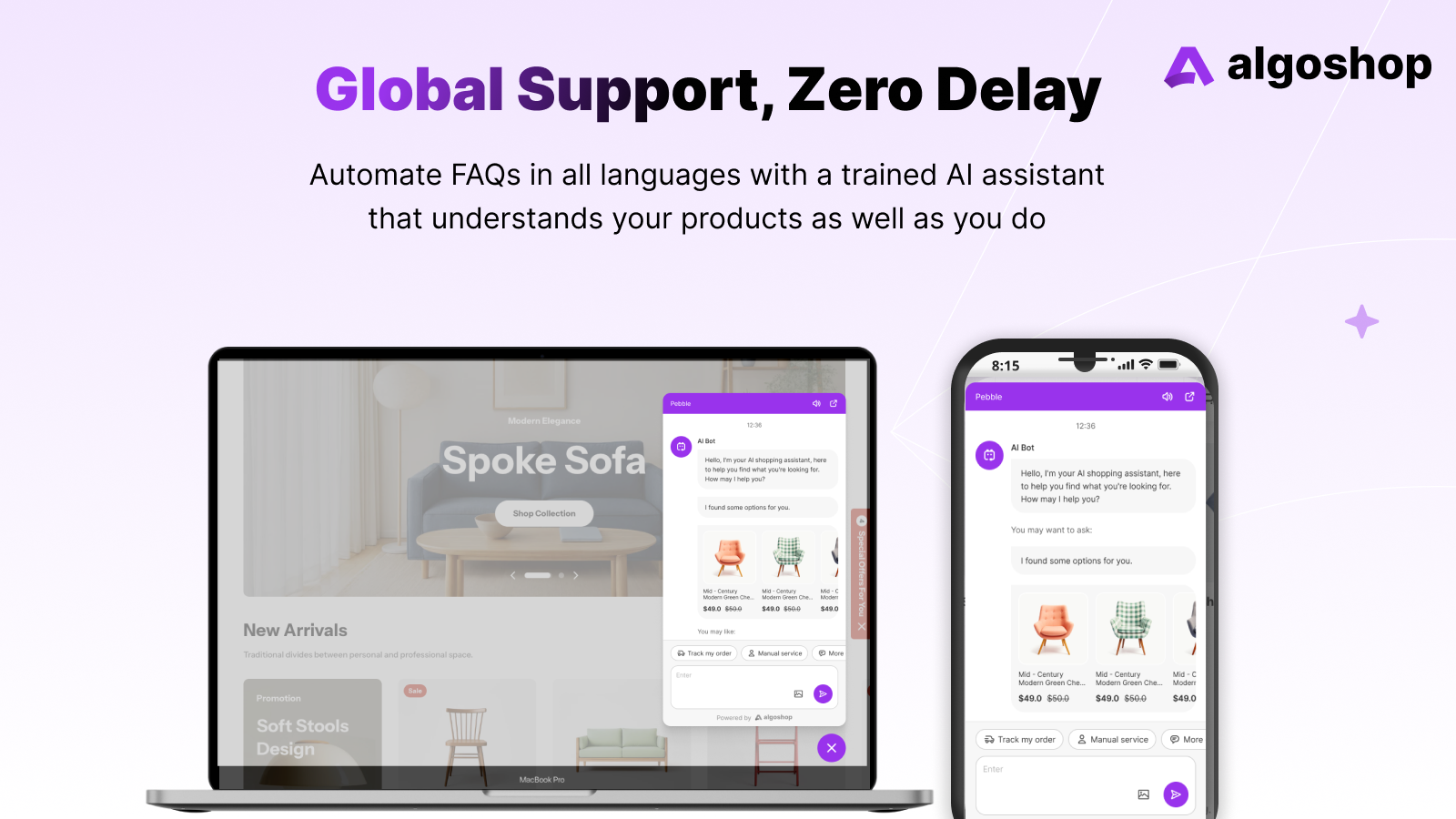
Algoshop product conversations on desktop and mobile. Official product imagery; interface examples are demonstration data.
“We installed a chat widget” is not an answer to “Do shoppers use it?” The icon may load on every page while most visitors never need it. Or it may receive a small number of questions at the exact moment a product page fails to answer something important. A useful review looks at what shoppers were trying to do when chat became relevant, not only the total number of widget opens.
For a Shopify merchant, the question is practical: Is the widget visible without covering the page? Do shoppers open it to resolve buying uncertainty? Do they get an answer they can act on? What happens when the question is outside the bot's knowledge? This guide offers a behavior-first way to investigate those moments, from the page a shopper sees to the answer they receive.
The first distinction: an open is not a useful conversation
A widget-open count can be a starting point, but it groups together several experiences. Someone may open chat by accident, read the welcome message and close it. Another shopper may ask whether a size fits, receive a helpful explanation and then choose a product. A third may ask about a late parcel and need a human handoff. Treating all three as the same “engagement” obscures what to improve.
Swipe horizontally to read the full table.
| Observation | What it may suggest | What to inspect next |
|---|---|---|
| Widget visible, rarely opened | Shoppers may not need it—or may not notice it | Page location, icon label, product-page questions and mobile layout |
| Many opens, few substantive questions | An invitation may be too broad or intrusive | Welcome text, automatic triggers and accidental openings |
| Product questions recur | Key buying facts may be missing or hard to find | Product copy, variant information and answer quality |
| Repeated escalation | The system may lack an approved answer or need human judgment | Knowledge gaps, routing and support ownership |
These are hypotheses, not diagnoses. The next step is to compare the chat record with what happened on the relevant page, using only data the merchant has permission to collect.
Start with one shopper journey
Pick one high-intent journey, such as a customer moving from a product page to the cart. List the questions a person might reasonably ask: Is this available in another size? Will it fit the item they already own? When will it ship? Can they return it? Then compare those questions with what the page already says and how the widget is presented.
An observation plan might include the page visited, the interaction with the widget, the question category and whether the customer received a usable answer. If the merchant also reviews broader page behavior through a tool such as Click Context, page clicks, scroll depth and form interactions can add context. That does not mean Click Context and a chat provider are automatically integrated. It means their separately collected observations can inform the same merchant decision when handled appropriately.
A small, defensible review
Choose a page and question. Select one product family or support flow. Decide what a useful answer would allow the shopper to do.
Observe the page. Check whether key information is visible, whether the widget obscures a control, and where the shopper appears to hesitate.
Read the conversation. Classify the actual question and the reply. Did it resolve the need, ask for more information, or require a person?
Change one thing. Improve the missing product fact, the widget placement, the first reply or the handoff—not all of them simultaneously.
Use an aggregate, consent-aware view. The purpose is to improve the shopping experience, not to identify an individual visitor from a series of clicks. Follow the store's privacy and consent setup when joining behavioral and conversation information.
Turn one concern into a useful investigation
Start with a plain question: “On mobile product pages, can shoppers reach help without losing the product controls?” In Click Context, the tool reference gives a concrete route: page performance for the device context, section visibility for what appeared on screen, and element-click analysis for a recorded control. Session journeys add the surrounding page path. A merchant can ask the question naturally; tool names are useful for understanding the evidence, not a requirement to write code.
Keep that investigation separate from the chat transcript. A click on a launcher does not reveal the customer's question, and an unanswered question does not explain where the widget sat on screen. If the launcher is not captured or a chat runs inside a separate frame, use the provider's own records and a manual mobile check rather than assuming complete coverage.
Swipe horizontally to read the full table.
| Investigative question | Evidence to look for | Practical decision |
|---|---|---|
| Was help reachable at the point of uncertainty? | Page layout, visible sections and any captured launcher interactions | Move a conflicting sticky control or clarify the help label |
| What did the buyer need? | Actual conversation text and the relevant product detail | Improve the missing sizing, contents or policy answer |
| Did the next step become clearer? | A reply with a usable link or a completed handoff, read alongside the visit path | Improve the answer or route, not just the opening prompt |
For a follow-up comparison, Click Context documents a before-and-after tool using equal-length windows around a change. Keep the audience and page scope comparable. The result helps assess the broader page change; it does not establish that every subsequent purchase was caused by the chat.
Where the widget sits matters
On a desktop product page, a small chat control may be unobtrusive. On a phone, the same placement can cover the add-to-cart button, a variant selector or a consent banner. A behavior review should therefore include a real mobile check, not only an image of a desktop screen.
Ask three questions while testing: Can the shopper see the item and price before the invitation appears? Can they dismiss the widget and continue? Can they reach help after the point where a question naturally arises? A chat invitation that interrupts product reading may increase opens while reducing useful conversations. Conversely, a widget hidden below another sticky element may be available in code but not in practice.
What AI chat changes—and what it does not
Once a shopper asks a meaningful question, answer availability matters. Algoshop AI Sales Chatbot is listed for multilingual AI responses, product recommendations, order tracking and live-chat support. These capabilities can help a merchant respond beyond staffed hours or guide a shopper to relevant products, provided the store's product and policy information is accurate.
AI does not make an incomplete product brief correct. A bot that confidently repeats a wrong delivery promise can create more friction than a slower, honest handoff. The merchant should define which facts the assistant may use, which recommendations should be checked against actual catalog availability, and when a person should take over. Chat can change the quality and speed of an answer; it does not turn a widget-open statistic into proof of a sale.
Consider a customer comparing two jackets. If the page has fabric and sizing information but the customer asks, “Which one is better for light rain?”, a helpful reply should explain the relevant specification and point to the product. If the available facts do not settle the question, a human can help with the missing detail. This is a suggested review scenario, not a measured customer case.

Algoshop's storefront demonstration places product suggestions and support controls in the conversation. Review how that panel shares space with the product page, especially on mobile.
Follow the jacket question through to a decision
In the suggested scenario, first inspect whether the material description is visible near the product options. Then read the chat answer: does it distinguish light-rain use from an unsupported waterproof promise, and does the linked item match the customer's question? Finally, check whether the shopper has a clear next step—compare the other jacket, read the care information or ask staff.
There are three different possible improvements. If the answer was already on the page but hard to find, fix the page hierarchy. If the assistant could not find an existing specification, fix its source information. If neither source contains the detail, ask the product team rather than making the widget more insistent. That is a more useful outcome than simply increasing the count of opens.
Measure the outcome that matches the question
Investigate “opened, then stopped” before redesigning the widget
An opened widget followed by silence has several possible explanations. The shopper might have found the answer elsewhere, opened it accidentally, disliked the request to identify themselves, or been unable to use the input on a phone. A single open count does not distinguish those cases. Review the surrounding page behavior and, where legitimately available, the conversation state before treating abandonment as proof of poor answers.
Three findings, three different next actions
The shopping control is obstructed
If the launcher or open panel covers a size selector, basket control or mobile navigation, fix placement before rewriting the welcome message. Recheck the same task with the keyboard and other overlays present. The buying task is the reference point for the layout.
The first step is unclear
If the panel opens but a shopper cannot tell whether to type, choose a suggestion or wait for a person, make the starting action explicit. Test a greeting tied to a useful task such as sizing or product comparison, not a long introduction to the store.
A question arrives, but the answer does not resolve it
Read the actual question against the relevant product or policy information. A sizing question may need a chart; an arrival question may need a destination and shipping rule. Improve the source or the handoff rather than making an uncertain answer more confident.
These are possible explanations to investigate, not outcomes reported by Click Context. Its documented tools provide page and interaction perspectives; they should be used for the evidence they actually expose. Do not label page behavior as a transcript of an unobserved conversation.
Make a change you can interpret afterward
Imagine the concern is that the launcher competes with the mobile size control on a jacket page. Keep the product, offer and answer content unchanged while trying a placement that leaves the control usable. Examine comparable pages and periods, and separate mobile from desktop. Note other material changes, such as a sale or a newly added size chart, because they can explain a different shopper journey.
For a different concern—visitors asking the same question after receiving an answer—leave placement unchanged and improve the specific response source. Add the missing care instruction or clarify the return exception, then review that question again. This avoids a common failure: changing the widget, welcome copy and product page together and attributing every subsequent difference to AI chat.
An investigation should end with a concrete editorial or interface decision. “More engagement” is too broad; “the size selector remains usable with chat open” or “the buyer can reach the relevant size chart from the answer” is something the team can actually check. Commercial outcomes can then be examined through the store's available measurement, without assigning causation to every interaction.
Different questions call for different signals. For discoverability, check whether the shopper could reach the help control when needed. For usefulness, review a sample of substantive questions and the accuracy of answers. For workload, count which questions can be resolved from approved facts and which repeatedly need a human. For commercial impact, look at the broader shopping path and avoid crediting every later purchase entirely to the chat interaction.
Two misleading shortcuts
“More opens means better chat.” An aggressive prompt can increase opens without resolving anything. Read the questions and outcomes before calling the change successful.
“Few opens means chat has no value.” A small group of high-intent questions can reveal important gaps in product information. Inspect the context before removing the widget.
An ordinary weekly review can be enough: select a small, representative conversation sample, identify the top unanswered questions, check the corresponding pages and make one improvement. The next review tests whether the same uncertainty remains. If the sample is too small to support a trend, say so rather than drawing a confident conclusion.
Frequently asked questions
Should a Shopify chat widget appear on every page?
The technical ability to show it everywhere does not mean every page needs the same invitation. Check whether the message and placement fit product, cart and post-purchase contexts separately.
Is a chat open a conversion?
No. It is an interaction with the widget. A conversion or completed purchase requires a separate event and careful interpretation; chat may be one touchpoint among several.
Can behavior analytics and AI chat work together?
They can inform the same review, but do not assume a native integration. Behavioral observations can reveal where shoppers struggle; chat transcripts can reveal the questions they ask. Use each according to its actual capabilities and privacy controls.
The most useful answer to “Do shoppers use your chat widget?” is not a single percentage. It is a short account of where help was needed, whether the answer was accurate, and what the merchant improved as a result. That is the kind of review that can make a chat experience worth keeping.

